Developer technologies | .NET | Xamarin
A Microsoft framework for building cross-platform mobile apps using .NET and C# with native performance and user interfaces.
This browser is no longer supported.
Upgrade to Microsoft Edge to take advantage of the latest features, security updates, and technical support.
' cx='32' cy='32' r='32' /%3E%3Ctext x='50%25' y='55%25' dominant-baseline='middle' text-anchor='middle' fill='%23FFF' %3ENL%3C/text%3E%3C/svg%3E)
Hi
I'm using VS 16.10.0. I created a new Xamarin Forms project (Xamarin Forms 5.0.0.2012), made no changes whatsoever and ran it on an emulator iPad (8th gen) iOS14.5. The icon displayed on the emulator doesn't correspond to those shown in the Assets.xcassets folder. If I right click on the Assets.xcassets file tab in VS I get "Unable to open the folder..." however I am able to navigate within File Explorer to view the files. Screenshot below refers
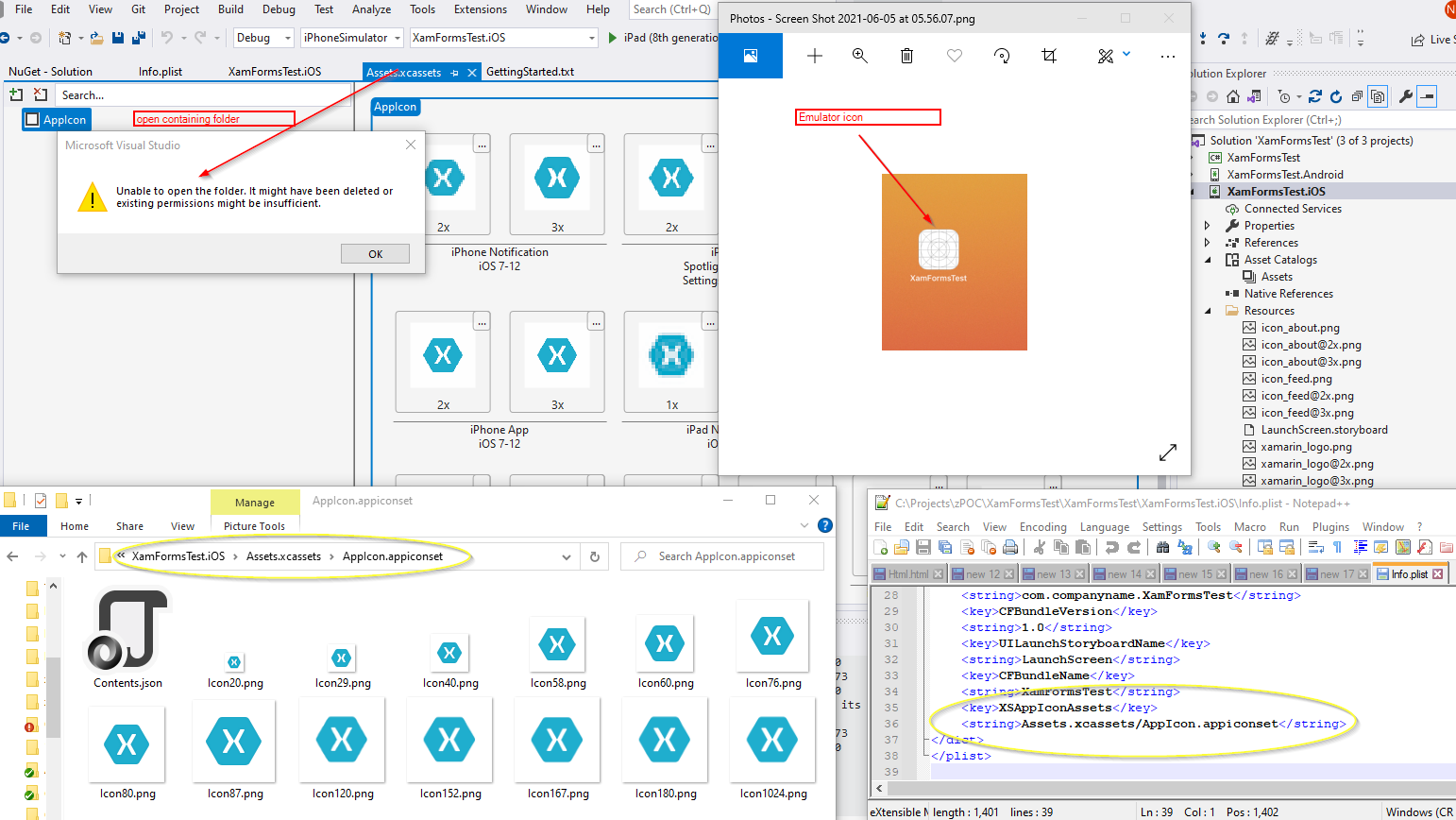
Any advice would be appreciated
' cx='32' cy='32' r='32' /%3E%3Ctext x='50%25' y='55%25' dominant-baseline='middle' text-anchor='middle' fill='%23FFF' %3EJ%3C/text%3E%3C/svg%3E)
Hi, NormL. I created a basic demo to test the function on ios simulator and faced the similar issue. This may be a potential issue with the lastest release, it's recommended to report the issue via the 'Report a Problem' menu and follow it on the Developer Community site. Please see How to report a problem with Visual Studio - Visual Studio | Microsoft Learn.
And you could downgrade the VS to previous version like 16.96 as DimChris suggested.
Thanks - have reported it

It's a visual studio's issue, in version 16.10, i have downgrade in version 16.9.6 and everything is working fine again
Thanks for the feedback. Downgrading resolved the issue
' cx='32' cy='32' r='32' /%3E%3Ctext x='50%25' y='55%25' dominant-baseline='middle' text-anchor='middle' fill='%23FFF' %3ERP%3C/text%3E%3C/svg%3E)
Some fix to this error? I use VS2019 16.11