Share via

Windows 10 Error code 0x81000036 - help required

Anonymous
2021-07-21T18:05:47+00:00

Over the weekend when my automated Windows 10 backup was to occur - the execution of the system backup failed with a 0x81000036 error. I have read a lot of internet information and it seems to all point to a number of repair technics that none of are applicable to my desktop and need other considerations.

My system is as follows:

Edition:           Windows 10 Home,

Version:          21H1,

Installed on:    9/6/2020,

OS Build:        19043.1110

Experience:     Windows Feature Experience Pack 120.2212.3530.0

My take on internet solutions so far for the 0x81000036 error

  • I do not create a system image of the Win 10 system,
  • I do not have a Windows Sandbox either as an option nor something I can turn off,
  • I do not have the Hyper-V feature as an option nor can I turn it off,
  • And I have checked and rechecked to ensure I have the latest updates; I am completely up to date.
  • My backup drive has 1.20TB free to handle the backup. My current backup drive has 629.73GB space used for approximately 4 months of weekly backups.

What I have tried so far to check system;

  • Ran - chkdsk /r
  • Ran - sfc /scannow
    • Windows Resource Protection found corrupt files but was unable to fix some of them. For online repairs, details are included in the CBS log file located at windir\Logs\CBS\CBS.log. For example C:\Windows\Logs\CBS\CBS.log. For offline repairs, details are included in the log file provided by the /OFFLOGFILE flag.
  • Here is the CBS log which shows the errors.
  • I noted in the log that 4 days before the backup failure that the CBS log reflects an KB3025096 update error. The update is: Windows Technical Preview December Update for x64-based systems (KB3025096) Last Modified: 12/15/2014. Not sure if this is the place to start?????
  • So far, I have not noted any other issues within the Win 10 OS or any other applications operation.
  • Any help you can provide would be appreciated….
  • Thanks
Windows for home | Windows 10 | Windows update

Locked Question. This question was migrated from the Microsoft Support Community. You can vote on whether it's helpful, but you can't add comments or replies or follow the question.

0 comments No comments

5 answers

Sort by: Most helpful
  1. Anonymous
    2021-07-22T21:16:39+00:00

    Once the procedure has repaired the corrupt files, but the backup still failed. You can try the in-place upgrade using the Media Creation tool to repair the Windows installation.

    1-Download the media creation tool.

    https://go.microsoft.com/fwlink/?LinkId=691209

    2-Run the tool and select 'Upgrade this pc now'

    3-Select the option 'Keep all my files and apps'

    4-Then click to update.

    Was this answer helpful?

    0 comments No comments
  2. Anonymous
    2021-07-22T04:51:37+00:00

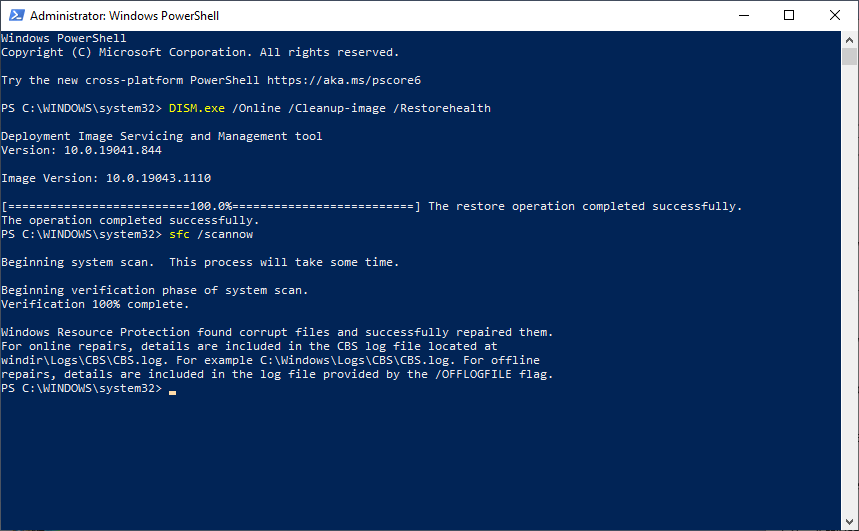
    I implemented the 2 suggestions you made and got what looks like a successful result on both commands. Below is the screenshot.

    I have also 'cut and pasted' the final section of the cbs.log which looks like a single corruption was found and fixed. So, I do not understand why the "Backup" attempt failed yet again.

    CBS Log: (last section only)

    2021-07-21 22:31:34, Info CSI 0000023c [SR] Verify and Repair Transaction completed. All files and registry keys listed in this transaction have been successfully repaired

    2021-07-21 22:33:36, Info CBS Trusted Installer is shutting down because: SHUTDOWN_REASON_AUTOSTOP

    2021-07-21 22:33:36, Info CBS TiWorker signaled for shutdown, going to exit.

    2021-07-21 22:33:36, Info CBS CbsCoreFinalize: ExecutionEngineFinalize

    2021-07-21 22:33:36, Info CBS Execution Engine Finalize

    2021-07-21 22:33:36, Info CBS Execution Engine Finalize

    2021-07-21 22:33:36, Info CBS Deleting the contents of directory: \?\C:\WINDOWS\CbsTemp

    2021-07-21 22:33:36, Info CBS Deletion of: \?\C:\WINDOWS\CbsTemp successful

    2021-07-21 22:33:36, Info CBS Lock: Lock removed: TiWorkerClassFactory, level: 30, total lock:3

    2021-07-21 22:33:36, Info CBS Lock: Lock removed: CCbsWorker, level: 5, total lock:2

    2021-07-21 22:33:36, Info CBS Ending the TiWorker main loop.

    2021-07-21 22:33:36, Info CBS Starting TiWorker finalization.

    2021-07-21 22:33:36, Info CBS CbsCoreFinalize: ExecutionEngineFinalize

    2021-07-21 22:33:36, Info CBS CBS Engine already deactivated

    2021-07-21 22:33:36, Info CBS CBS Engine already deactivated

    2021-07-21 22:33:36, Info CBS CbsCoreFinalize: ComponentAnalyzerFinalize

    2021-07-21 22:33:36, Info CBS CbsCoreFinalize: PackageTrackerFinalize

    2021-07-21 22:33:36, Info CBS CbsCoreFinalize: CoreResourcesUnload

    2021-07-21 22:33:36, Info CBS CbsCoreFinalize: SessionManagerFinalize

    2021-07-21 22:33:36, Info CBS Lock: Lock removed: CSIInventoryCriticalSection, level: 64, total lock:10

    2021-07-21 22:33:36, Info CBS Lock: Lock removed: CCbsSessionManager, level: 11, total lock:9

    2021-07-21 22:33:36, Info CBS CbsCoreFinalize: CapabilityManagerFinalize

    2021-07-21 22:33:36, Info CBS CbsCoreFinalize: PublicObjectMonitorFinalize

    2021-07-21 22:33:36, Info CBS CbsCoreFinalize: Enter vCoreInitializeLock

    2021-07-21 22:33:36, Info CBS CbsCoreFinalize: WcpUnload

    2021-07-21 22:33:36, Info CSI 0000023d Direct SIL provider: Number of files opened: 4.

    2021-07-21 22:33:36, Info CSI 0000023e Direct SIL provider: Number of files opened: 2.

    2021-07-21 22:33:36, Info CSI 0000023f Direct SIL provider: Number of files opened: 249089.

    2021-07-21 22:33:36, Info CBS CbsCoreFinalize: DrupUnload

    2021-07-21 22:33:36, Info CBS CbsCoreFinalize: CfgMgr32Unload

    2021-07-21 22:33:36, Info CBS CbsCoreFinalize: DpxUnload

    2021-07-21 22:33:36, Info CBS CbsCoreFinalize: SrUnload

    2021-07-21 22:33:36, Info CBS CbsCoreFinalize: CbsEsdUnload

    2021-07-21 22:33:36, Info CBS CbsCoreFinalize: CbsTraceInfoUninitialize

    2021-07-21 22:33:36, Info CBS CbsCoreFinalize: CbsEventUnregister

    2021-07-21 22:33:36, Info CBS CbsCoreFinalize: AppContainerUnload

    2021-07-21 22:33:36, Info CBS CbsCoreFinalize: WdsUnload, logging from cbscore will end.

    2021-07-21 22:33:36, Info CBS Ending TiWorker finalization.

    2021-07-21 22:33:36, Info CBS Ending the TrustedInstaller main loop.

    2021-07-21 22:33:36, Info CBS Starting TrustedInstaller finalization.

    2021-07-21 22:33:36, Info CBS Winlogon: Stopping notify server

    2021-07-21 22:33:36, Info CBS Winlogon: Unloading SysNotify DLL

    2021-07-21 22:33:36, Info CBS Lock: Lock removed: WinlogonNotifyLock, level: 8, total lock:6

    2021-07-21 22:33:36, Info CBS Ending TrustedInstaller finalization.
    Was this answer helpful?

    0 comments No comments
  3. Anonymous
    2021-07-22T03:43:48+00:00

    This is good news, the image is repairable. Run this command to repair the image then run the SFC command again.

    1-Right-Click on Start then click on Windows PowerShell(admin)

    2-Type:

    DISM.exe /Online /Cleanup-image /Restorehealth (and press Enter)

    sfc /scannow (and press Enter)

    3-When finish check if the SFC command could repair all corrupted files.

    Was this answer helpful?

    0 comments No comments
  4. Anonymous
    2021-07-22T03:38:10+00:00

    Please see below;

    Was this answer helpful?

    0 comments No comments
  5. Anonymous
    2021-07-21T20:52:09+00:00

    Hi, I'm Robinson, an Independent Advisor and a Windows user like you.

    These files that the SFC command cannot repair could be the source of the problem. Scan the Windows image to check for corruption and if the image is repairable. This operation will take several minutes.

    1-Right-click on Start then click on Windows PowerShell(admin)

    2-Type:

    Dism /Online /Cleanup-Image /ScanHealth (and press Enter)

    Dism /Online /Cleanup-Image /CheckHealth (and press Enter)

    3-When finish, please attach a screenshot of the result

    Was this answer helpful?

    0 comments No comments
