Share via

Copy and paste problem

Anonymous
2021-06-29T22:46:05+00:00

I am having problems with my copy/paste function.

I have 2777 photos (JPEG) on a dvd and am trying to copy/paste to a portable 2GB SSD hard drive.

When I open F: where the dvd is, when I click Select All then copy then paste to iDriveWiFi(D): (SSD), it will start pasting. When it gets to a

certain photo, it stops
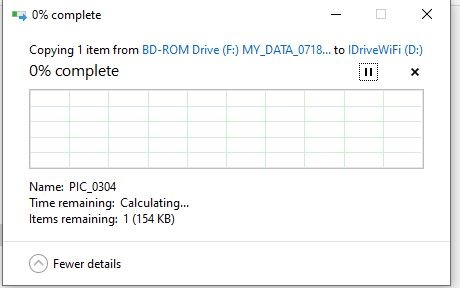
Then everything stops and if I try to close that window, all I get is the rotating donut and at the top is say "not responding". The only way I can

close my F: drive is to remove the dvd.

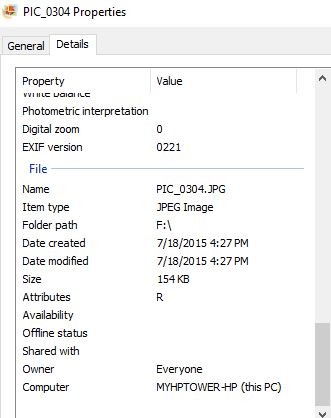
This happens on many other photos and I haven't found anything wrong with them. If I left click on those that I have problems with, they open

just like all the others. Here's the properties on the example above:
I don't have any ideas what's going on. Never had this problem before.

Thinking it might have something to do with a memory problem, I ran the Memory Diagnostic tool. No problems found.

Any ideas why I'm having a problem with the copy/paste?

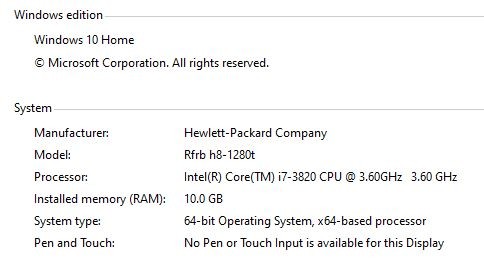
Here's the info on my computer. I have a 1TB hdd.
Windows for home | Windows 10 | Performance and system failures

Locked Question. This question was migrated from the Microsoft Support Community. You can vote on whether it's helpful, but you can't add comments or replies or follow the question.

0 comments No comments

24 answers

Sort by: Most helpful
  1. Anonymous
    2021-06-30T14:01:20+00:00

    The one thing I'd like to know is: when I click on a certain photo it opens and is a good photo. If I close it out and right click, copy, then paste to a new location (SSD), nothing happens. If I try to close that process, all I get is a rotating donut.

    Don't understand why I keep getting the rotating donut.

    Was this answer helpful?

    0 comments No comments
  2. Anonymous
    2021-06-30T12:40:06+00:00

    Again, thank you for your reply

    It is a factory made TDK DVD+R, and has no scratches or other abnormalities. There are no shuffling sounds.

    I did try another DVD drive, portable via USB. Same problems.

    This morning, there is about 100 clips that I want to copy/paste to the SSD. If I click on one to open it to view, all I get is the "rotating donut".

    The problem has to be something in my computer that is preventing the photos to open. If I right click on them, the window to look at the properties opens.

    I'm totally mystified what's happening.

    Was this answer helpful?

    0 comments No comments
  3. Igor Leyko 111K Reputation points Independent Advisor
    2021-06-29T23:58:07+00:00

    Please look at DVD surface, are there some scratches? Is this factory made DVD, DVD-R, or DVD-RW disk? Are there any shuffling sounds from drive when problem occurs?

    Can you try another DVD drive?

    Was this answer helpful?

    0 comments No comments
  4. Anonymous
    2021-06-29T23:48:51+00:00

    Thank you Igor for your speedy response.

    I did the clean boot. No difference.

    If I left click on the 304 link, it takes about 10-15 seconds to open but it doesn't open all the way. The "rotating donut" is there and on the bottom it says loading. See this snip

    Then, when I close it, this is what comes up

    So, I still don't know what the problem is.

    Was this answer helpful?

    0 comments No comments
  5. Igor Leyko 111K Reputation points Independent Advisor
    2021-06-29T23:24:21+00:00

    Hi,

    My name is Igor, I'm Independent Advisor. I have 12 Microsoft MVP awards. It's a pleasure for me to help others and I'll do all my best to help you.

    Please try if the problem exists during clean boot.

    https://support.microsoft.com/en-us/topic/how-t...

    Was this answer helpful?

    0 comments No comments
