Binding Navigator

Bek 21 Reputation points
2021-06-06T17:09:48.693+00:00

Hi Guys,
Hope you are all fine.
I am not a guru in Visual Studio and I need your help.
In fact I designed a form on which I have a binding navigator class. I would like to replace the built-in method codes behind the buttons (e.g. the add new item button method) with my custom code. How can achieve that?
Thanks for any advice you have for me.
Bek

Windows for business | Windows Client for IT Pros | User experience | Other
Developer technologies | Visual Studio | Other
A family of Microsoft suites of integrated development tools for building applications for Windows, the web, mobile devices and many other platforms. Miscellaneous topics that do not fit into specific categories.
{count} votes

Answer accepted by question author
  1. Karen Payne MVP 35,596 Reputation points Volunteer Moderator
    2021-06-09T21:46:26.643+00:00

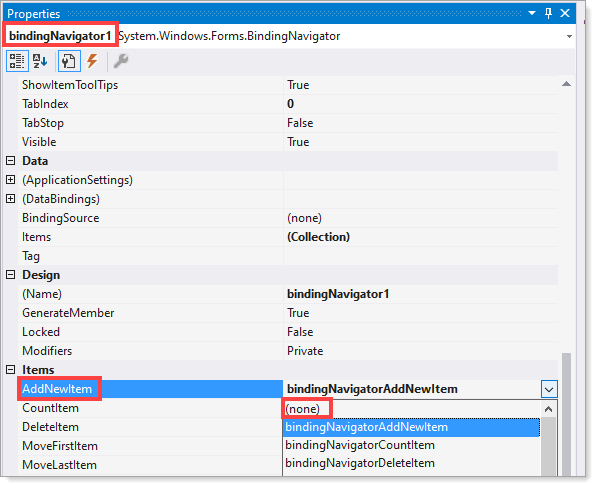
    It's easy, select the BindingNavigator on the form followed by selecting the Property Window.

    Now to change for example the Add button, select AddNewItem, change the value to None. Now double click on the Add button in the BindingNavigator and add code which will now execute rather than the default behavior. This also means there is no default behavior so you need to write code if that is needed.

    Also you can see in one of my code sample I've done this.
    104003-figure1.png


0 additional answers

Sort by: Most helpful

Your answer

Answers can be marked as 'Accepted' by the question author and 'Recommended' by moderators, which helps users know the answer solved the author's problem.