Client can't join primary domain controller but secondary domain controller is working normal?

kimseng vit 21 Reputation points
2021-06-07T01:52:53.84+00:00

Hi team,

I have two domain controller primary and secondary domain controller on windows server 2016 Standard. Now i have some issue with my client any new client PC with windows 10 can't join primary domain controller but my secondary domain controller is working fine. I notice that yesterday i have try to install WSUS server ( But this server is other Host ) then a new PC can't join and also client configure DNS primary domain controller also can't access to website but ping to IP is working fine. I'm not sure 100% with WSUS server.

Any idea?
102805-f2e1ba9a-612c-4671-8f45-d2c3d7c47ba4.png

Windows for business | Windows Server | User experience | Other
0 comments No comments
{count} votes

Answer accepted by question author
  1. Anonymous
    2021-06-07T12:38:16.22+00:00

    Please run;

    Dcdiag /v /c /d /e /s:%computername% >c:\dcdiag.log
    repadmin /showrepl >C:\repl.txt
    ipconfig /all > C:\dc1.txt
    ipconfig /all > C:\dc2.txt
    ipconfig /all > C:\problemworkstation.txt

    then put unzipped text files up on OneDrive and share a link.


4 additional answers

Sort by: Most helpful
  1. Anonymous
    2021-06-07T02:18:48.317+00:00

    I'd check the domain controller and problem member both have the static ip address of DC listed for DNS and no others such as router or public DNS

    --please don't forget to upvote and Accept as answer if the reply is helpful--


  2. Anonymous
    2021-06-07T02:54:43.12+00:00

    Hello @kimseng vit ,

    Thank you for posting here.

    Based on the description, I understand you want to join a WSUS server to the existing domain with two DCs (a primary domain controller and a secondary domain controller).

    Please troubleshoot as below:

    1. Before we do any change in existing AD domain environment, we had better do:
      1-1Check if AD environment is healthy. Check all DCs in this domain is working fine by running command Dcdiag /von each DC.
      1-2Check if AD replication works properly by running repadmin /showrepl and repadmin /replsum on primary DC.
      1-3Check if both SYSVOL folder and Netlogon folder are shared by running net share on each DC.
      1-4Check if we can update GPO by running command gpupdate /force on each DC successfully.

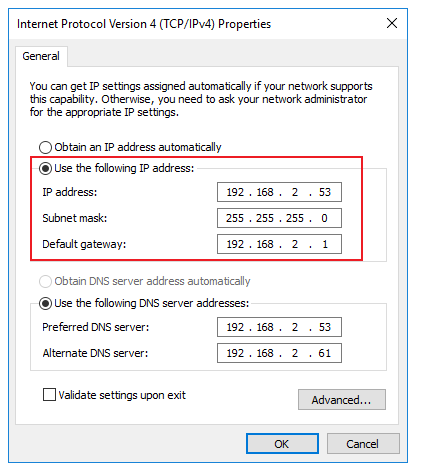
    2.Check if you set static IP addresses for both DCs.

    For example:
    102789-ns2.png

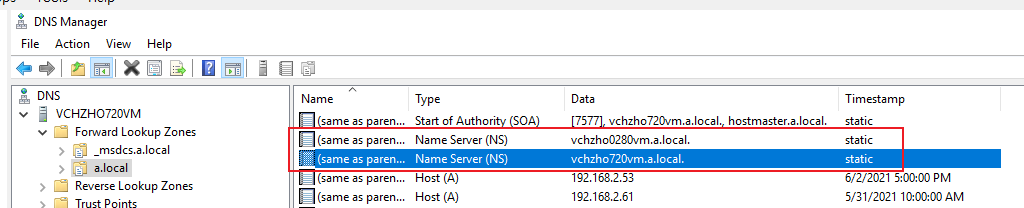
    3.Check if primary domain controller and secondary domain controller are all DNS server (I mean check if you install and configure DNS role on both DCs).

    Or check if there is NS record for both DCs in the DNS manager.

    For example:
    102842-ns1.png

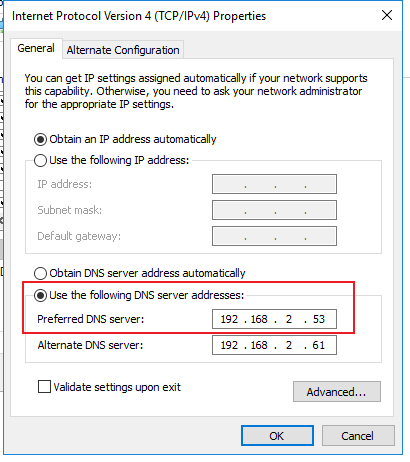
    4.Check if you set the correct preferred DNS server on WSUS server (Please double check here, no one number can be wrong ).

    For example:
    102851-ns3.png

    5.Check if you type the correct domain name when joining the server into domain.

    If it does not work, please confirm:

    1.Based on "Now i have some issue with my client any new client PC with windows 10 can't join primary domain controller but my secondary domain controller is working fine. ", did you mean when you set the Preferred DNS server using the IP address of primary domain controller on WSUS server, you cannot join the WSUS server to domain, but when you set referred DNS server using the IP address of secondary domain controller on WSUS server, you can join the WSUS server to domain, is it right?

    2.What did you mean "also can't access to website"?

    Hope the information above is helpful.

    Should you have any question or concern, please feel free to let us know.

    Best Regards,
    Daisy Zhou

    ============================================

    If the Answer is helpful, please click "Accept Answer" and upvote it.


  3. Anonymous
    2021-06-08T02:59:41.84+00:00

    On TT-DC01-2k16 I'd add domain controller's own static ip address (10.10.101.101) listed for DNS, then do ipconfig /flushdns, ipconfig /registerdns, restart the netlogon service

    There may be some replication problems between domain controllers. You'll need to examine the event logs on both for more details

    I'd check the the required ports are flowing between the networks 172.21.11.1 and 10.10.101.1
    https://learn.microsoft.com/en-us/troubleshoot/windows-server/identity/config-firewall-for-ad-domains-and-trusts
    https://www.microsoft.com/en-us/download/details.aspx?id=24009

    --please don't forget to upvote and Accept as answer if the reply is helpful--


  4. Anonymous
    2021-06-08T11:48:57.17+00:00

    Glad to hear it helps. There appears to be some replication problems between domain controllers. You'll need to examine the event logs on both for more details. This is the reason the policy is not replicated. Depending on the errors found you may need to perform a non-authoritative synchronization
    https://support.microsoft.com/en-us/help/2218556/how-to-force-an-authoritative-and-non-authoritative-synchronization-fo

    --please don't forget to upvote and Accept as answer if the reply is helpful--


Your answer

Answers can be marked as 'Accepted' by the question author and 'Recommended' by moderators, which helps users know the answer solved the author's problem.
