Developer technologies | Transact-SQL
A Microsoft extension to the ANSI SQL language that includes procedural programming, local variables, and various support functions.
This browser is no longer supported.
Upgrade to Microsoft Edge to take advantage of the latest features, security updates, and technical support.
' cx='32' cy='32' r='32' /%3E%3Ctext x='50%25' y='55%25' dominant-baseline='middle' text-anchor='middle' fill='%23FFF' %3ESU%3C/text%3E%3C/svg%3E)
Hi All,
I have a table "TestCaseMaster" which consists of column "RunInTA" which is of datatype bit. I have added new column "DisableDate" which is of datatype datetime.
Whenever the value of RunInTA is updated, the timestamp has to be captured and updated in the column DisableDate.
For example: For TestCaseID 1, if RunInTA is updated from 1 to 0 on 7thJune2021 at 10.00.00 then the value of the column DisableDate for TestCaseID 1 should be "210607 10:00:00"
Please let me know what is the best way to this functionality in SQL.
Kindly waiting for your response.
Thanks,
Santosh
' cx='32' cy='32' r='32' /%3E%3Ctext x='50%25' y='55%25' dominant-baseline='middle' text-anchor='middle' fill='%23FFF' %3EEM%3C/text%3E%3C/svg%3E)
CREATE TABLE TestCaseMaster(TestCaseID int,RunInTA bit,DisableDate char(15))
INSERT INTO TestCaseMaster VALUES(1,1,NULL)
INSERT INTO TestCaseMaster VALUES(1,0,NULL)
INSERT INTO TestCaseMaster VALUES(1,1,NULL)
INSERT INTO TestCaseMaster VALUES(2,1,NULL)

SELECT * FROM TestCaseMaster

 --Create an Update trigger
Create Trigger truTest
 On TestCaseMaster
 for Update
 As
 if Update(RunInTA)
 begin
 Update TestCaseMaster
 Set DisableDate=FORMAT(GETDATE(),'yyMMdd hh:mm:ss')
 From TestCaseMaster br, Deleted d, Inserted i
 Where br.TestCaseID=d.TestCaseID

end


--Test: Check the changes of DisableDate after updating RunInTA
UPDATE TestCaseMaster
SET RunInTA=0
FROM TestCaseMaster
WHERE TestCaseID=1

SELECT * FROM TestCaseMaster

DROP Trigger truTest
DROP TABLE TestCaseMaster
Output:
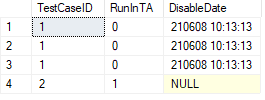
Regards
Echo
If the answer is helpful, please click "Accept Answer" and upvote it.
Thank you so much Echo. Its working.

For this you can use an UPDATE trigger with UPDATE function to test, which column was effected on the update.
See CREATE TRIGGER (Transact-SQL) and UPDATE - Trigger Functions (Transact-SQL) => Example
Hi @Santosh Umarani ,
Using triggers is a good choice, please refer to:
CREATE TABLE TestCaseMaster(TestCaseID int,RunInTA bit,DisableDate char(15))
INSERT INTO TestCaseMaster VALUES(1,1,NULL)

SELECT * FROM TestCaseMaster

--Create an Update trigger
Create Trigger truTest
On TestCaseMaster
for Update
As
if Update(RunInTA)
begin
Update TestCaseMaster
Set DisableDate=FORMAT(GETDATE(),'yyMMdd hh:mm:ss')
From TestCaseMaster br , Deleted d ,Inserted i
end

--Test: Check the changes of DisableDate after updating RunInTA
UPDATE TestCaseMaster
SET RunInTA=1
FROM TestCaseMaster
WHERE TestCaseID=1

SELECT * FROM TestCaseMaster

DROP TABLE TestCaseMaster
Your expected output is in a format similar to "210607 10:00:00", so DisableDate needs to be set to char or varchar. If it is set to datetime, the final output format will be: 2021-06-07 05:26: 03.000.
If you have any question, please feel free to let me know.
Regards
Echo
If the answer is helpful, please click "Accept Answer" and upvote it.
begin
Update TestCaseMaster
Set DisableDate=FORMAT(GETDATE(),'yyMMdd hh:mm:ss')
From TestCaseMaster br , Deleted d ,Inserted i
Echo, you forgot the JOIN condition, that query creates a cartesian product. You didn't got it, because your test table contains only one record.
Thank you Echo for the response. I have following two questions:
Kindly waiting for your response.
Thanks,
Santosh

Sorry to interfere in your dialog, but if you want to update the date when the bit is set to 0, but not when it was already 0, and want to support statements that update more rows, then try this trigger too:
create or alter trigger MyTrigger
on TestCaseMaster
for update
as
    if update(RunInTA)
    begin
        update TestCaseMaster
        set DisableDate = getdate()
        from TestCaseMaster t
        inner join deleted d on d.TestCaseID = t.TestCaseID
        inner join inserted i on i.TestCaseID = t.TestCaseID
        where d.RunInTA = 1
        and i.RunInTA = 0
    end
Sorry, I overlooked that TestCaseID will have multiple different values.I have posted the latest answer, please refer to it.

Creating a trigger on a column does not affect your update statement. So as long as you execute the update statement, your value will be updated. Please check again if the update statement is correct.
Regards
Echo