Developer technologies | Universal Windows Platform (UWP)
A Microsoft platform for building and publishing apps for Windows devices.
This browser is no longer supported.
Upgrade to Microsoft Edge to take advantage of the latest features, security updates, and technical support.
' cx='32' cy='32' r='32' /%3E%3Ctext x='50%25' y='55%25' dominant-baseline='middle' text-anchor='middle' fill='%23FFF' %3EMP%3C/text%3E%3C/svg%3E)
Hi guys,
I have created a packaging application that contains a UWP app(Main app) and a WPF app. In that, I had explored the app service connection between UWP and WPF for passing arguments from those ones.
So I had followed the steps which are mentioned on the below page.
uwp-with-desktop-extension-part-3
I had established a connection, but it returns the status as a failure or sometimes the connection was closed(Null Exception). I didn't know what mistakes I had done. Anyone can help me with this?
TIA
Github URL : WorksManager
' cx='32' cy='32' r='32' /%3E%3Ctext x='50%25' y='55%25' dominant-baseline='middle' text-anchor='middle' fill='%23FFF' %3EAM%3C/text%3E%3C/svg%3E)
@muthu pandi We noticed that you seemed to comment and then deleted something, do you have any other concerns?
Hi,
Welcome to Microsoft Q&A!
If you use uwp api in wpf app, please add Microsoft.Windows.SDK.Contracts NuGet package instead of Windows.Foundation.FoundationContract and Windows.Foundation.UniversalApiContract .
Besides, you need to add await keyboard for all async methods, such as await args.Request.SendResponseAsync(response). At the same time, please change AppServiceConnectionStatus status = connection.OpenAsync().GetResults() to AppServiceConnectionStatus status = await connection.OpenAsync(). After I modify these as the above, your sample runs well.
If the response is helpful, please click "Accept Answer" and upvote it.
Note: Please follow the steps in our documentation to enable e-mail notifications if you want to receive the related email notification for this thread.
Hi @AryaDing-MSFT ,
I had tried your answer as remove the Windows.Foundation.FoundationContract and Windows.Foundation.UniversalApiContract.
Added mentioned NuGet packages. But some of the references are shows, to add the removed package.
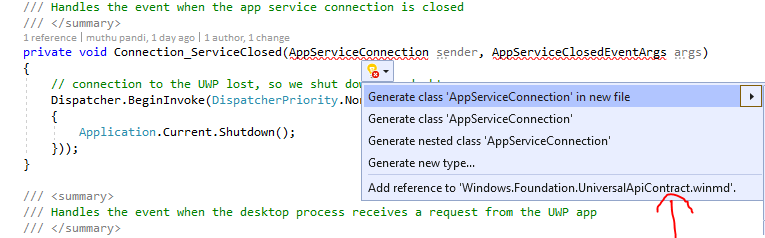
May I know How to rectify that?
@muthu pandi
After we remove the reference of Windows.Foundation.FoundationContract and Windows.Foundation.UniversalApiContract, your sample still works well on my PC.
Your error message seems to be that the AppServiceConnection class doesn’t identify SDK.Contracts package. Maybe you could check whether you install the correct version of Microsoft.Windows.SDK.Contracts NuGet package, this link mentions you need to install the corresponding version of SDK.Contracts according to the operation system version. Besides, please make sure the target version of your Packaging project(WorksManagerPackage) matches SDK.Contracts version.
Finally, I suggest you could clean and rebuild the solution. If you still have questions, please share the reference screenshot of wpf app with us.