add a diagnostic to monitor

NP 471 Reputation points
2021-06-07T22:33:07.457+00:00

Is there a basic guide on adding a diagnostic to a monitor in scom? We have a scenario when ever a disk space reaches a certain threshold and the monitor gets triggered to also produce a report of the top 5 large files on the drive.

Is there anyway to view an inbuilt diagnostic or re-use one like the top memory list that is attached to the memory percentage monitor?

System Center Operations Manager
A family of System Center products that provide infrastructure monitoring, help ensure the predictable performance and availability of vital applications, and offer comprehensive monitoring for datacenters and cloud, both private and public.
0 comments No comments
{count} votes

7 answers

Sort by: Most helpful
  1. System Center guy 691 Reputation points
    2021-06-08T03:42:17.137+00:00

    >Is there a basic guide on adding a diagnostic to a monitor in scom?

    A task is similar to diagnostic.
    A task is a script or other executable code that runs either on the computer running the Operations console or on the server, client, or device that is being managed. Tasks can potentially perform any kind of activity, including restarting a failed application and deleting files.
    Monitors can have two kinds of tasks associated with them: diagnostic tasks that try to discover the cause of a problem or provide you with additional information to assist with that diagnosis, and recovery tasks that try to fix the problem.

    Diagnostic and recovery tasks can only be created for a specific monitor. A diagnostic or recovery task that you create for one monitor cannot be shared with or associated with a different monitor; you must recreate the task for each monitor.

    Roger

    0 comments No comments

  2. NP 471 Reputation points
    2021-06-08T03:58:28.233+00:00

    ok, thanks for that. I guess i probably should have been a bit more specific. I have a script to email a report i wanted attached to a monitor. Is it simply just adding the script as a diagnostic on the monitor properties and whenever the monitor is triggered the diagnostic will work?

    0 comments No comments

  3. System Center guy 691 Reputation points
    2021-06-08T06:53:30.84+00:00

    at first, you may generate the script to generate your required report and then add it to diagnostic task

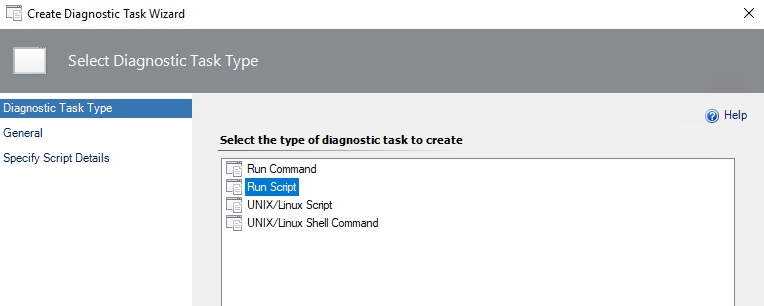
    1. Select the diagnostic task. In this case, we select "Run Script"
      103189-pict001.jpg
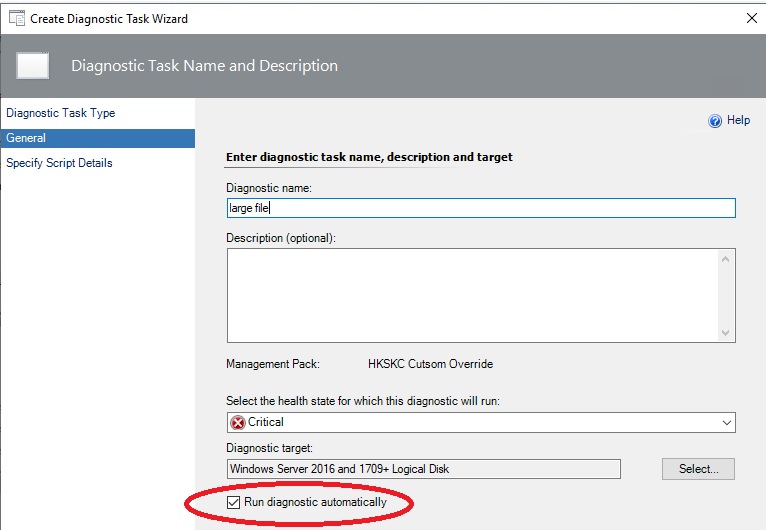
    2. make sure that run diagnostic automatic is selected in order to the script will run when monitor change its state from health to critical/warning

    103306-pict002.jpg

    Roger

    0 comments No comments

  4. NP 471 Reputation points
    2021-06-09T01:18:41.24+00:00

    ok thanks. One last question, is it still the case that only vbs scripts will work? We are running scom 2019, i was hoping to use a powershell script. Thanks

    0 comments No comments

  5. System Center guy 691 Reputation points
    2021-06-09T05:55:55.527+00:00

    Yes you can

    Roger

    0 comments No comments

Your answer

Answers can be marked as 'Accepted' by the question author and 'Recommended' by moderators, which helps users know the answer solved the author's problem.