Microsoft 365 and Office | Word | For business | Windows
A family of Microsoft word processing software products for creating web, email, and print documents.

This browser is no longer supported.
Upgrade to Microsoft Edge to take advantage of the latest features, security updates, and technical support.
' cx='32' cy='32' r='32' /%3E%3Ctext x='50%25' y='55%25' dominant-baseline='middle' text-anchor='middle' fill='%23FFF' %3ES%3C/text%3E%3C/svg%3E)
I'm running windows 10 with MS word installed.
When i create a document TOC the level 1 headings with correct page numbers appear. But the level 2 headings appear as one instance all clustered together and without page numbers. I have to manually select H2 text then hit return to get it to drop down a line, but that still doesn't give me any page numbers for the H2's which i then have to manually type in, but when you convert to PDF, it reverts to the incomplete TOC.
Eg;
H1............................. Pg1
H1............................. Pg2
H2,H2,H2...............
I've had a look at the formats for the headings but don't see anything that should cause this. H1's and H2's are all created the same way, so don't know why this is. Can anyone help?
Thanks
SK
A family of Microsoft word processing software products for creating web, email, and print documents.
Answer accepted by question author

A sample problem document would help. You can use the paperclip symbol to attach one or save in a cloud location and post a link here (that way you can later delete the file). Here is my article on that.
The appearance in the TOC is governed primarily by the TOC 1, 2, 3, etc., styles but also by switches in the TOC field. See Word MVP Suzanne Barnhill's article on TOC Tips and Tricks.
Thanks for the reply.
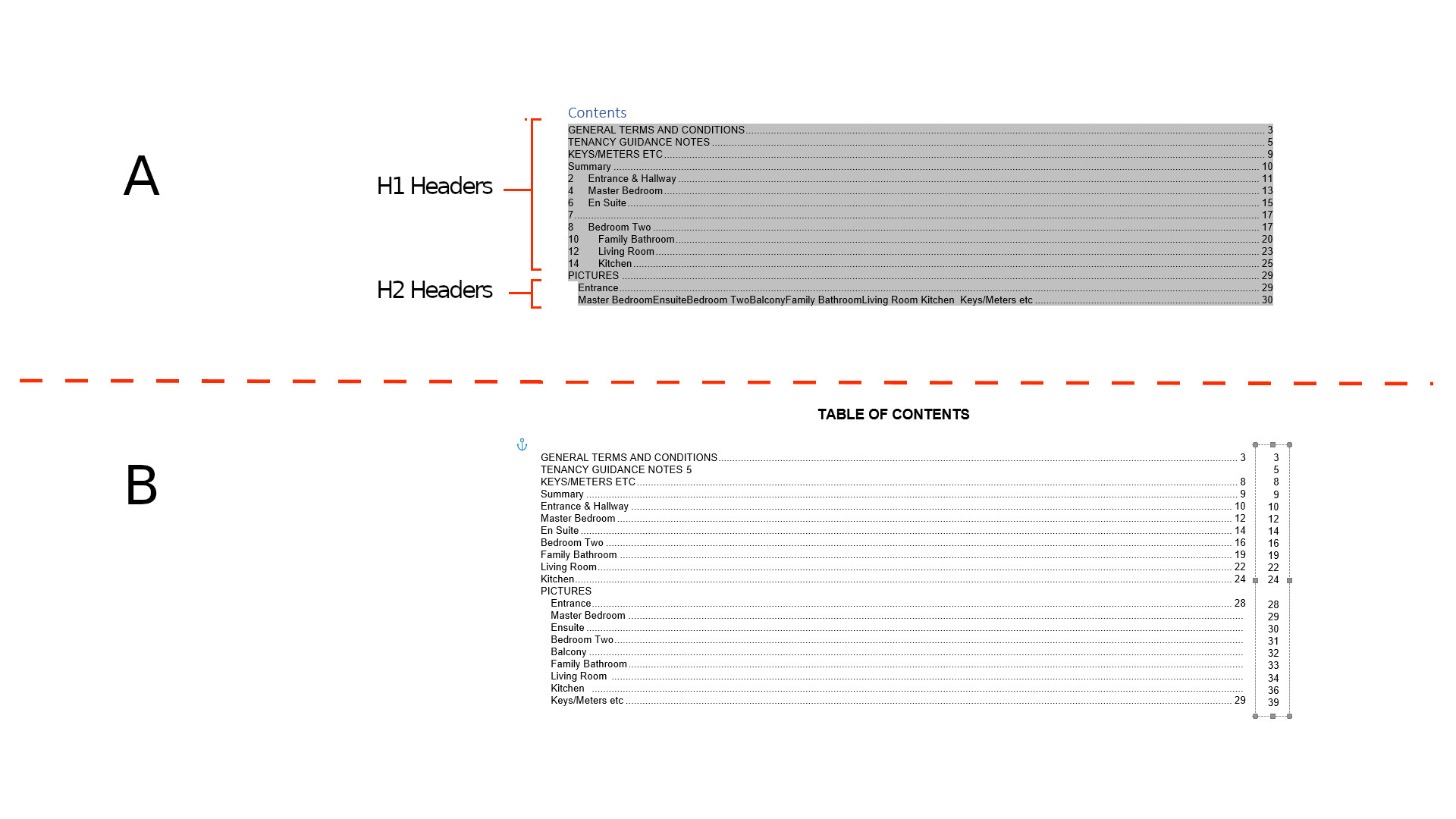
Ive attached a screen shot of what im referring to:
A is how the TOC is coming out. My document has the heading tagged as Hi & H2 respectively but only the H1 are being displayed correctly with page numbers. The H2's are all one instance and they dont have any or correct corresponding page numbers.
B is just a sample of what i have to do manually to correct the format. Additionally i have to create a borderless text box with all the page numbers and transpose over the TOC page numbers. A real pain in the ass but i've never found time to sort out correctly.
Help appreciated.
TIA