The touchpad is not responding, and the settings for the touchpad are missing in the Windows Settings application. I realized that Windows was probably not detecting my device and checked my drivers. My Synaptics Pointing Device is malfunctioning with an error code (10) i.e., the device cannot start.
My device is a Lenovo Legion y530 on Windows 11 Home 22H2.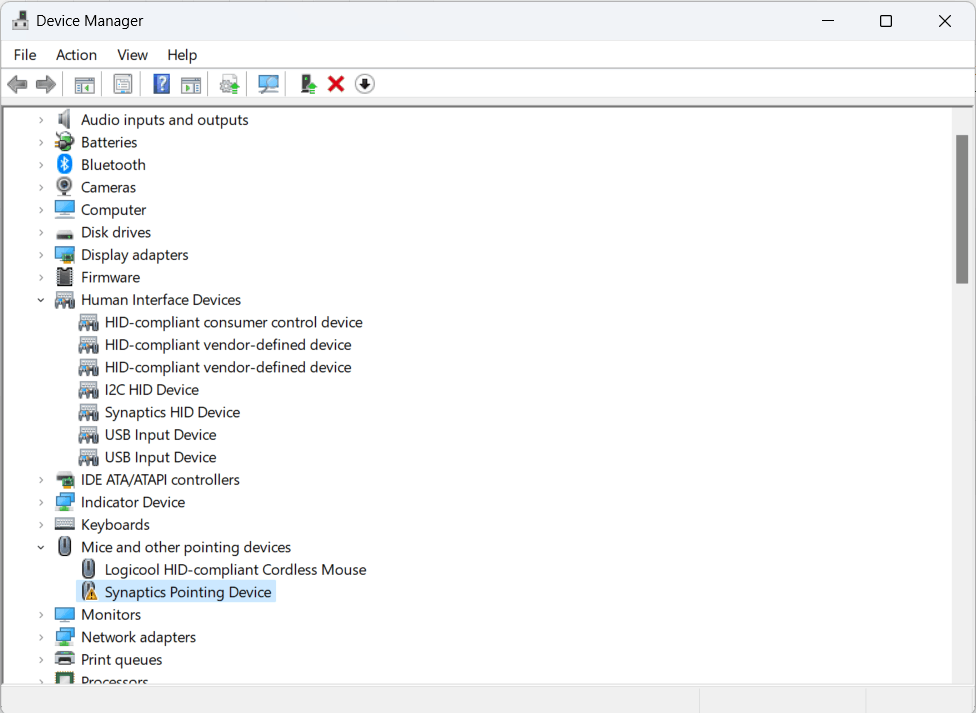
Things I tried/things that didn't work:
System restart didn't fix it
Not related to enabling/disabling my touchpad
Nothings corrupted - sfc, dism are not the solution
Tried updating/uninstalling/reinstalling my touchpad drivers
Also tried uninstalling/reinstalling all HID drivers
Manually installed drivers through my manufacturer Lenovo's website
Not hardware damage - It did work just fine a day ago
I did a Windows reset too... removing all files
I can't figure out what's causing this. Any help would be appreciated.
' cx='32' cy='32' r='32' /%3E%3Ctext x='50%25' y='55%25' dominant-baseline='middle' text-anchor='middle' fill='%23FFF' %3EA%3C/text%3E%3C/svg%3E)
