Azure Data Factory
An Azure service for ingesting, preparing, and transforming data at scale.
This browser is no longer supported.
Upgrade to Microsoft Edge to take advantage of the latest features, security updates, and technical support.
' cx='32' cy='32' r='32' /%3E%3Ctext x='50%25' y='55%25' dominant-baseline='middle' text-anchor='middle' fill='%23FFF' %3EA%3C/text%3E%3C/svg%3E)
Hello, ADLS has a parquet file, using copy activity to move files from one location to another. When copying I want to add an additional column in the sink. Actual data from Source Plus one column like a header at the top. ![11423-images.png][1] [1]: /api/attachments/11423-images.png?platform=QnA Please recommend me on the best approach.
An Azure service for ingesting, preparing, and transforming data at scale.
You would use mapping dataflow whenever you are not mirroring the data. This would require to union data to achieve your result.
Answer accepted by question author
' cx='32' cy='32' r='32' /%3E%3Ctext x='50%25' y='55%25' dominant-baseline='middle' text-anchor='middle' fill='%23FFF' %3EKM%3C/text%3E%3C/svg%3E)
Hi anonymous user,
Sorry for the delay in response. Unfortunately there is no out of box feature to add a row while copying files. I would recommend you to please provide a feedback in ADF user voice forum : https://feedback.azure.com/forums/270578-azure-data-factory . All the feedback shared in this forum are actively monitored and reviewed by ADF engineering team. Also please do share the feedback link here once it is created, as it would help others with similar idea to up-vote and/or comment on the suggestion/feedback.
One possible alternate could be to use Custom activity or a Function activity and write your own logic to achieve this.
----------
Thank you
Please do consider to click on "Accept Answer" and "Upvote" on the post that helps you, as it can be beneficial to other community members.
Hi *anonymous user*, Thanks you for providing the feedback and sharing the link here. :)
@ChiragMishraMSFT-1092 - Sorry for the confusion, I have to add additional row in the sink.
' cx='32' cy='32' r='32' /%3E%3Ctext x='50%25' y='55%25' dominant-baseline='middle' text-anchor='middle' fill='%23FFF' %3EAB%3C/text%3E%3C/svg%3E)
Hi @ChiragMishraMSFT-1092, This can be done using data flow.
' cx='32' cy='32' r='32' /%3E%3Ctext x='50%25' y='55%25' dominant-baseline='middle' text-anchor='middle' fill='%23FFF' %3ECM%3C/text%3E%3C/svg%3E)
Hi @Maaran-7752,
In addition to copying data from source data store to sink, you can also configure to add additional data columns to copy along to sink. For example:
You can find the following configuration on copy activity source tab:
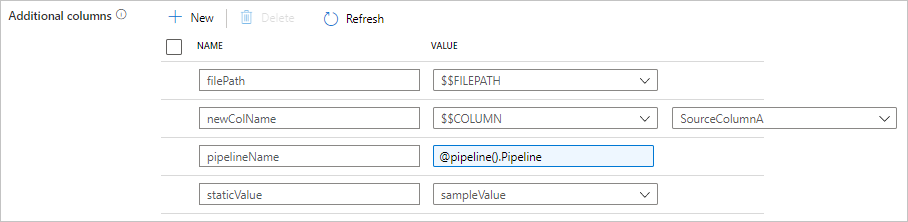
Ref - Add additional columns during copy
Hope this helps.