Windows for business | Windows Server | Storage high availability | Clustering and high availability

This browser is no longer supported.
Upgrade to Microsoft Edge to take advantage of the latest features, security updates, and technical support.
' cx='32' cy='32' r='32' /%3E%3Ctext x='50%25' y='55%25' dominant-baseline='middle' text-anchor='middle' fill='%23FFF' %3EAJ%3C/text%3E%3C/svg%3E)
Hello,
I am experiencing a strange Windows 2008R2/SQL server 2008 cluster related issue that is bothering me.
We get no response when we ping to access the cluster IP address from an external network, but it remains operational and once the cluster ping from one of the nodes, it becomes accessible again from the outside.
Why does this happen - has anyone experienced the same problem ?
Best regards
Abdelkarim
' cx='32' cy='32' r='32' /%3E%3Ctext x='50%25' y='55%25' dominant-baseline='middle' text-anchor='middle' fill='%23FFF' %3EA%3C/text%3E%3C/svg%3E)
Hi,
I would like to check if the issue has been fixed? If yes, please help accept answer, so that others meet a similar issue can find useful information quickly. If you have any other concerns or questions, please feel free to feedback.
Best Regards,
Danny
Hi,
I would like to check if the issue has been fixed? If yes, please help accept answer, so that others meet a similar issue can find useful information quickly. If you have any other concerns or questions, please feel free to feedback.
Best Regards,
Danny
Hi,
Is there anything relevant to this case? I mean, event ids or error messages?
For SQL server troubleshooting you can refer to this:
https://learn.microsoft.com/en-us/troubleshoot/sql/connect/resolving-connectivity-errors
Thanks for your understanding.
Best regards,
Danny
-----------------------------
If the Answer is helpful, please click "Accept Answer" and upvote it.
Note: Please follow the steps in our documentation to enable e-mail notifications if you want to receive the related email notification for this thread.
Thanks Dany for your response,
I have no trace on the cluster logs and no longer on the nodes, nothing on the cluster validate report either, all the resources are operational, just not able to ping Cluster IP from outside network. And I can't find any trace of what could generate this problem (owner node failover for example)
As explained when the problem recurs, all you have to do is restart the cluster services or ping the ip cluster from one of the nodes.
Is it a network problem due to the arp behavior ?
Thanks in advance.
Hi,
For your reference, here’s a similar case:
https://social.technet.microsoft.com/Forums/azure/en-US/8f76c7e6-5e77-4b06-8947-6bbe72874c93/not-able-to-ping-cluster-ip-from-outside-network?forum=winserverClustering
As far as I’m concerned, you might need to try disabling firewall first, also if possible, please check the event logs and IP address configurations and see if there’s any related information.
To find the logs:
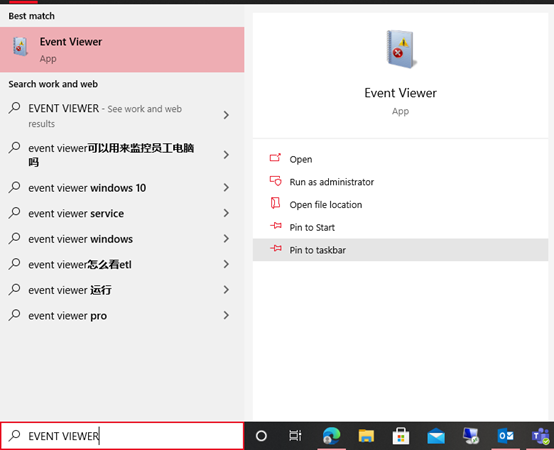
You can use /ipconfig in cmdlet and get the detailed IP configuration.
Thanks for your time.
Best regards,
Danny
-----------------------------
If the Answer is helpful, please click "Accept Answer" and upvote it.
Note: Please follow the steps in our documentation to enable e-mail notifications if you want to receive the related email notification for this thread.