I did that and change from Spanish to English delete the Spanish language and then change to Spanish and delete in English and I did the process twice after deactivating the windows 11 unicode beta and everything went well thank you very much I had already found the solution on my own but it's good that you were going to give it to me if I didn't dedicate the early morning to find it
Visual bug with ethernet driver 27.8 controller version 13.0.14.0 windows 11
I am going to explain in the most detailed way possible all the characters that contain an O are changed by this sign (?) and I think it's an error that has to do with the unicodes characters I don't know that at the level of the unicode responsible for the language of this drivers fails but it does it visually or that's what I've been able to observe in the days that I use it but anyway everything works fine and I would like to know if there is any way to solve this problem I already did the following commands the error happens both in Spanish and in English without exception I haven't tried other languages a see what's going on
in cmd and powershell with a reboot in between and it has not solved anything I do not find any error I don't know what is happening but I want a solution without having to reinstall because I already reinstalled windows cleanly with all the disks disabled and deleted all the partitions and just leave the drive on which I was going to install windows and all the system files are in Windows C: i already checked it in the disk manager please help I have all the updates of windows 11 21H2 a day and I don't want to switch to windows 11 22H2 right now and the weird thing is that this error only happens with the intels drivers with the generic drivers it doesn't even happen I deleted the drivers in safe mode and then in normal mode I reinstalled them from 0 and it didn't work either
install these drivers https://www.intel.la/content/www/xl/es/download/727998/intel-network-adapter-driver-for-microsoft-windows-11.html
and also try these as well https://www.intel.la/content/www/xl/es/download/15084/intel-ethernet-adapter-complete-driver-pack.html
DISM /Online /Cleanup-Image /StartComponentCleanup
DISM /Online /Cleanup-Image /AnalyzeComponentStore
DISM /Online /Cleanup-Image /RestoreHealth
CFS/scannow
DISM /Online /Cleanup-Image /RestoreHealth /source:D:\Sources\Install.wim:1
DISM /Online /Cleanup-Image /RestoreHealth /source:D:\Sources\install.esd
chkdsk C: /F /R /B /X
This is the error what is happening to me is BELOW
Windows for home | Windows 11 | Devices and drivers
Locked Question. This question was migrated from the Microsoft Support Community. You can vote on whether it's helpful, but you can't add comments or replies or follow the question.
3 answers
Sort by: Most helpful
-
Anonymous
2023-02-01T01:17:29+00:00 -
Anonymous
2023-02-01T02:25:21+00:00 Hi kirne hyuga´´,
Thank you for getting back to us.
I'm glad to hear that you've found the right solution through your own exploration.
Your selfless sharing will help others and will foster the continuous development of the community.
Best Regards,
Kyo - MSFT | Microsoft Community Support Specialist
-
Anonymous
2023-01-31T08:37:01+00:00 Hi kirne hyuga´´,
Welcome to Microsoft Community.
Is the problem you are experiencing only with the Intel® Ethernet Controller I211? Is this happening on other pages or apps?
If the former is the case, perhaps the driver provided by Intel has character set related problems, it is recommended to contact Intel technical department for support.
Disclaimer: Microsoft provides no assurances and/or warranties, implied or otherwise, and is not responsible for the information you receive from the third-party linked sites or any support related to technology.
The following are other scenarios for reference.
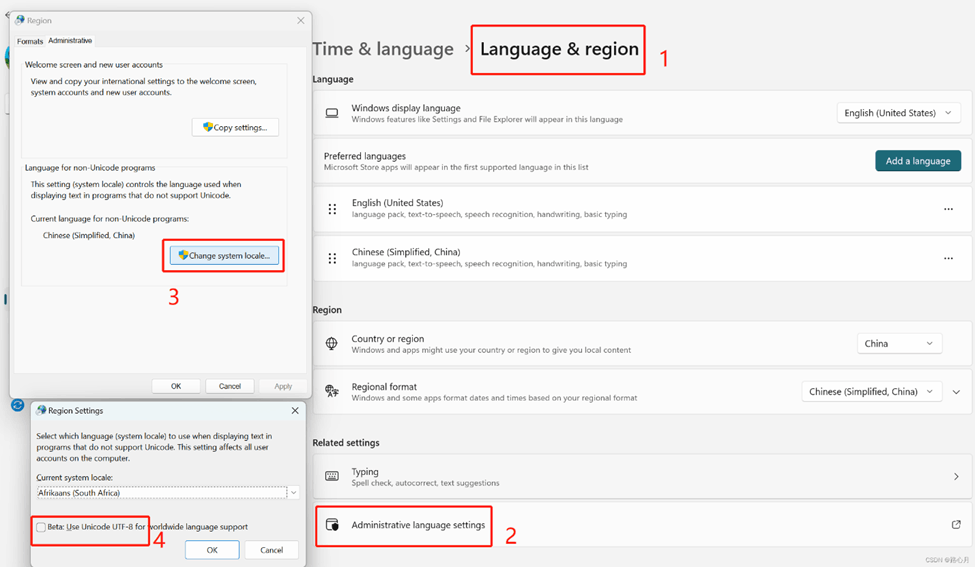
- Verify that the language and locale match, if not, modify and wait for it to take effect.
Log in to the website, select Settings and privacy, and check the Language and Region.
- Verify that the Current Language for non-Unicode programs entry matches your current language and uncheck the √ for the Beta: User Unicode UTF-8 for worldwide language support entry.
Please refer to the figure below.
- Test whether the problem recurs under the new account.
Create a local user or administrator account in Windows - Microsoft Support
If there is anything not clear, please do not hesitate to let me know.
Best Regards,
Kyo - MSFT | Microsoft Community Support Specialist
