Azure Virtual Machines
An Azure service that is used to provision Windows and Linux virtual machines.
This browser is no longer supported.
Upgrade to Microsoft Edge to take advantage of the latest features, security updates, and technical support.
' cx='32' cy='32' r='32' /%3E%3Ctext x='50%25' y='55%25' dominant-baseline='middle' text-anchor='middle' fill='%23FFF' %3ENB%3C/text%3E%3C/svg%3E)
Written a code to DeployifNotExists for Vm bootdiagnostics enable, but it is not working as expected.
Please have a look on code and support me to resolve
code:
{
"policyRule": {
"if": {
"field": "type",
"equals": "Microsoft.Compute/virtualMachine"
},
"then": {
"effect": "DeployIfNotExists",
"details": {
"type": "Microsoft.Compute/virtualMachines/diagnosticsProfile.bootDiagnostics",
"existenceCondition": {
"allOf": [
{
"field": "Microsoft.Compute/virtualMachines/diagnosticsProfile.bootDiagnostics.enabled",
"equals": "false"
}
]
},
"deployment": {
"properties": {
"mode": "incremental",
"template": {
"$schema": "http://schema.management.azure.com/schemas/2015-01-01/deploymentTemplate.json#",
"contentVersion": "1.0.0.0",
"resources": [
{
"type": "Microsoft.Compute/virtualMachines/diagnosticsProfile.bootDiagnostics",
"apiVersion": "2020-06-01",
"dependsOn": [],
"properties": {
"diagnosticsProfile": {
"bootDiagnostics": {
"enabled": true
}
}
}
}
],
"outputs": {}
}
}
}
}
}
}
}
An Azure service that is used to provision Windows and Linux virtual machines.
Answer accepted by question author
@SRIJIT-BOSE-MSFT ,
Its working fine as of now, but only for existing resources some resources shows in remediate task and others not (even they are candidate for remediate).
Thank you very much for your quick support.

@Naveen Begur nagaraj , Thank you for your question.
Can you please check out if the following script serves your purpose?
 {
  "mode": "Indexed",
  "policyRule": {
    "if": {
      "allOf": [
        {
          "field": "type",
          "equals": "Microsoft.Compute/virtualMachines"
        },
        {
          "anyOf": [
            {
              "field": "Microsoft.Compute/virtualMachines/diagnosticsProfile.bootDiagnostics.enabled",
              "exists": "false"
            },
            {
              "field": "Microsoft.Compute/virtualMachines/diagnosticsProfile.bootDiagnostics.enabled",
              "equals": "false"
            }
          ]
        }
      ]
    },
    "then": {
      "effect": "modify",
      "details": {
        "operations": [
          {
            "operation": "add",
            "field": "Microsoft.Compute/virtualMachines/diagnosticsProfile",
            "value": {}
          },
          {
            "operation": "add",
            "field": "Microsoft.Compute/virtualMachines/diagnosticsProfile.bootDiagnostics",
            "value": {}
          },
          {
            "operation": "add",
            "field": "Microsoft.Compute/virtualMachines/diagnosticsProfile.bootDiagnostics.enabled",
            "value": true
          }
        ],
        "roleDefinitionIds": [
          "/providers/Microsoft.Authorization/roleDefinitions/b24988ac-6180-42a0-ab88-20f7382dd24c"
        ]
      }
    }
  },
  "parameters": {}
}
This makes use of Modify effect instead of DeployIfNotExists.
DeployIfNotExists runs about 15 minutes after a Resource Provider has handled a create or update subscription or resource request and has returned a success status code. A template deployment occurs if there are no related resources or if the resources defined by ExistenceCondition don't evaluate to true. The duration of the deployment depends on the complexity of resources included in the template.
During an evaluation cycle, policy definitions with a DeployIfNotExists effect that match resources are marked as non-compliant, but no action is taken on that resource. Existing non-compliant resources can be remediated with a remediation task.
----------
Modify is used to add, update, or remove properties or tags on a subscription or resource during creation or update. A common example is updating tags on resources such as costCenter. Existing non-compliant resources can be remediated with a remediation task. A single Modify rule can have any number of operations.
Hope this helps!
Please "Accept as Answer" if it helped, so that it can help others in the community looking for help on similar topics.
Hello @SRIJIT-BOSE-MSFT ,
Thank you very much for the answer.
Your script just enables the bootdiagnostics at the time of creation, but it is not checking for already available VM as a compliant or non-compliant.
What may be the issue.
Thanks in advance,
Regards,
Naveen BN
@Naveen Begur nagaraj , Thank you for your response.
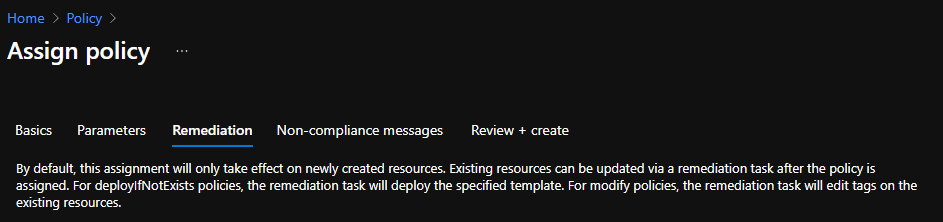
In this case, the Modify policy adds a property instead of a tag.
Resources that are non-compliant to a deployIfNotExists or modify policy can be put into a compliant state through Remediation. Remediation is accomplished by instructing Azure Policy to run the deployIfNotExists effect or the modify operations of the assigned policy on your existing resources and subscriptions, whether that assignment is to a management group, a subscription, a resource group, or an individual resource.. [Reference]
You can get on-demand compliance evaluation scan following any of the procedures shared here.