Microsoft 365 and Office | SharePoint | For business | Windows
A group of Microsoft Products and technologies used for sharing and managing content, knowledge, and applications.

This browser is no longer supported.
Upgrade to Microsoft Edge to take advantage of the latest features, security updates, and technical support.
' cx='32' cy='32' r='32' /%3E%3Ctext x='50%25' y='55%25' dominant-baseline='middle' text-anchor='middle' fill='%23FFF' %3EA%3C/text%3E%3C/svg%3E)
Requirement is to upload document to a Sharepoint site using A WPF Desktop Application. I registred my app in Azure, used the Client ID, Thumbprint, Tenant Id in my code to procure Access Token. My Code was able to get the access token but as soon as it runs Context.ExecuteQuery() it fails with:
The remote server returned an error:(401) Unauthorized" even after getting access Token
string SiteUrl = "https://<Tenant>.sharepoint.com/teams/<sitename>/";
                string clientId = "XXXXXXXXXXXXXXXXXXXXXXXXXX";
                string certThumprint = "XXXXXXXXXXXXXXXXXXXXXXXXXXXXXXXXXXX";
                var scopes = new string[] { "https://<tenant>.sharepoint.com/.default" };
                string tenantId = "XXXXXXXXXXXXXXXXXXXXXXXXXXXXXXXXXXX";
                var accessToken = await GetApplicationAuthenticatedClient(clientId, certThumprint, scopes, tenantId);

                using (ClientContext CContext = GetClientContextWithAccessToken(SiteUrl, accessToken))
        		{


        			FileCreationInformation newFile = new FileCreationInformation();
        			byte[] FileContent = System.IO.File.ReadAllBytes(FileName);
        			newFile.ContentStream = new MemoryStream(FileContent);
        			newFile.Url = Path.GetFileName(FileName);

                    Web web = CContext.Web;

                    List DocumentLibrary = web.Lists.GetByTitle(DocLibrary);
                    CContext.Load(DocumentLibrary);
                    CContext.ExecuteQuery();
                    Folder Clientfolder =null;
        			if (ClientSubFolder == "")
        			{
        				Clientfolder = DocumentLibrary.RootFolder;
        			}
        			else
        			{
        				Clientfolder = DocumentLibrary.RootFolder.Folders.Add(ClientSubFolder);
        				Clientfolder.Update();
        			}
                    Microsoft.SharePoint.Client.File uploadFile = Clientfolder.Files.Add(newFile);
        			CContext.Load(uploadFile);
        			CContext.ExecuteQuery();
        			Console.ForegroundColor = ConsoleColor.Green;
        			Console.WriteLine("The File has been uploaded" + Environment.NewLine + "FileUrl -->" + SiteUrl + "/" + DocLibrary + "/" + ClientSubFolder + "/" + Path.GetFileName(FileName));
        		}
        		#endregion
        	}
        	catch (Exception exp)
        	{
        		Console.ForegroundColor = ConsoleColor.Red;
        		Console.WriteLine(exp.Message + Environment.NewLine + exp.StackTrace);
                MessageBox.Show(exp.Message + " (Ref: 401)");
            }
        	finally
        	{
        		Console.ReadLine();
        	}
        }

        internal static async Task<string> GetApplicationAuthenticatedClient(string clientId, string certThumprint, string[] scopes, string tenantId)
        {
            X509Certificate2 certificate = GetAppOnlyCertificate(certThumprint);
            IConfidentialClientApplication clientApp = ConfidentialClientApplicationBuilder
                                            .Create(clientId)
                                            .WithCertificate(certificate)
                                            .WithTenantId(tenantId)
                                            .Build();

            AuthenticationResult authResult = await clientApp.AcquireTokenForClient(scopes).ExecuteAsync();
            string accessToken = authResult.AccessToken;
            return accessToken;
        }

        public static ClientContext GetClientContextWithAccessToken(string targetUrl, string accessToken)
        {
            ClientContext clientContext = new ClientContext(targetUrl);
            clientContext.ExecutingWebRequest +=
                delegate (object oSender, WebRequestEventArgs webRequestEventArgs)
                {
                    webRequestEventArgs.WebRequestExecutor.RequestHeaders["Authorization"] =
                        "Bearer " + accessToken;
                };
            return clientContext;
        }

        private static X509Certificate2 GetAppOnlyCertificate(string thumbPrint)
        {
            X509Certificate2 appOnlyCertificate = null;
            X509Store certStore = new X509Store(StoreName.My, StoreLocation.CurrentUser);
            certStore.Open(OpenFlags.ReadOnly);
            X509Certificate2Collection certCollection = certStore.Certificates.Find(X509FindType.FindByThumbprint, thumbPrint, false);
            if (certCollection.Count > 0)
            {
                appOnlyCertificate = certCollection[0];
            }
            certStore.Close();
            return appOnlyCertificate;

        }
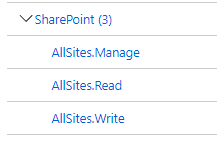
While I have following API permissions in App Registrations:
A group of Microsoft Products and technologies used for sharing and managing content, knowledge, and applications.
' cx='32' cy='32' r='32' /%3E%3Ctext x='50%25' y='55%25' dominant-baseline='middle' text-anchor='middle' fill='%23FFF' %3EMM%3C/text%3E%3C/svg%3E)
Hi @Apoorv ,
The way you used to get access token is for Microsoft Graph API. It would not work for SharePoint CSOM API.
To get the access token for SharePoint CSOM API, you could use the AuthenticationManager.GetAzureADAppOnlyAuthenticatedContext Method in the SharePointPnPCoreOnline library package: https://www.nuget.org/packages/SharePointPnPCoreOnline
Read this article for more details: https://learn.microsoft.com/en-us/sharepoint/dev/solution-guidance/security-apponly-azuread#using-this-principal-in-your-application-using-the-sharepoint-pnp-sites-core-library
If an Answer is helpful, please click "Accept Answer" and upvote it.
Note: Please follow the steps in our documentation to enable e-mail notifications if you want to receive the related email notification for this thread.
If the response is helpful, please click "Accept Answer" and upvote it.
Hi @Apoorv ,
Is there anything update? If my answer helps you, please click "Accept Answer" and upvote it:)
' cx='32' cy='32' r='32' /%3E%3Ctext x='50%25' y='55%25' dominant-baseline='middle' text-anchor='middle' fill='%23FFF' %3ELP%3C/text%3E%3C/svg%3E)
App Only is not modern authentication why would this be the only way to do it?
Secondly if you look at the permissions, they are not Graph, they are Sharepoint. So they should work with CSOM. otherwise what would they possibly work with?
' cx='32' cy='32' r='32' /%3E%3Ctext x='50%25' y='55%25' dominant-baseline='middle' text-anchor='middle' fill='%23FFF' %3ESB%3C/text%3E%3C/svg%3E)
I have a similar issue where I am getting access token from the graphAPI and passing it to the Sharepoint CSOM it throws 401 error.
@Apoorv - have you found any solution to this?