Developer technologies | Windows Presentation Foundation
A part of the .NET Framework that provides a unified programming model for building line-of-business desktop applications on Windows.
This browser is no longer supported.
Upgrade to Microsoft Edge to take advantage of the latest features, security updates, and technical support.
' cx='32' cy='32' r='32' /%3E%3Ctext x='50%25' y='55%25' dominant-baseline='middle' text-anchor='middle' fill='%23FFF' %3EEG%3C/text%3E%3C/svg%3E)
Hello everyone, I have a little bug in my WPF application, that is bugging me. I am changing the font size of my text in my richtextbox, the weird thing is, that sometimes it works, and sometimes it doesn't,
It's very weird, and I was thinking that someone, would have an idea why?
This is the part of the code that controls that
private void NoteContent_SelectionChanged(object sender, RoutedEventArgs e) {
        var selectionFontWeight = NoteContent.Selection.GetPropertyValue(TextElement.FontWeightProperty);
        boldBton.IsChecked = (selectionFontWeight != DependencyProperty.UnsetValue)
            && selectionFontWeight.Equals(FontWeights.Bold);

        var selectionFontStyle = NoteContent.Selection.GetPropertyValue(TextElement.FontStyleProperty);
        italicBton.IsChecked = (selectionFontStyle != DependencyProperty.UnsetValue)
            && selectionFontStyle.Equals(FontStyles.Italic);

        var selectionFontDecoration = NoteContent.Selection.GetPropertyValue(Inline.TextDecorationsProperty);
        UndelineBton.IsChecked = (selectionFontDecoration != DependencyProperty.UnsetValue)
            && selectionFontDecoration.Equals(TextDecorations.Underline);

        FontsComboBox.SelectedItem = NoteContent.Selection.GetPropertyValue(FontFamilyProperty);
        SizeConboBox.Text = (NoteContent.Selection.GetPropertyValue(FontSizeProperty)).ToString();
    }

    private void FontsComboBox_SelectionChanged(object sender, SelectionChangedEventArgs e) {
        if (FontsComboBox.SelectedItem != null) {
            NoteContent.Selection.ApplyPropertyValue(FontFamilyProperty, FontsComboBox.SelectedItem);
        }
    }

    private void SizeConboBox_SelectionChanged(object sender, SelectionChangedEventArgs e) {
        NoteContent.Selection.ApplyPropertyValue(FontSizeProperty, SizeConboBox.Text);
    }
Another thing to mention is that if I change my font family to "Arial", it will work fine but the rest no, or sometimes I have to change it twice in order to see the effect


Please try below code to change your FontSize:
Xaml code is:
 <RichTextBox Name="rtf" Width="200" Height="200" SelectionChanged="rtf_SelectionChanged" >
            <FlowDocument>
                <Paragraph>
                    <Run>Paragraph 1</Run>
                </Paragraph>
                <Paragraph>
                    <Run>Paragraph 2</Run>
                </Paragraph>
                <Paragraph>
                    <Run>Paragraph 3</Run>
                </Paragraph>
            </FlowDocument>
        </RichTextBox>
        <WrapPanel VerticalAlignment="Center" Width="100">
            <ComboBox x:Name="FontSizeCombo" Height="23" Width="40" Margin="5,2,5,2" IsEditable="True" SelectionChanged="OnFontSizeComboSelectionChanged">
            </ComboBox>
        </WrapPanel>
C# code is:
public partial class MainWindow : Window
    {
        public MainWindow()
        {
            InitializeComponent();
            Initialize();
        }
        private void Initialize()
        {
            FontSizeCombo.Items.Add("10");
            FontSizeCombo.Items.Add("12");
            FontSizeCombo.Items.Add("14");
            FontSizeCombo.Items.Add("18");
            FontSizeCombo.Items.Add("24");
            FontSizeCombo.Items.Add("36");
        }

        private void OnFontSizeComboSelectionChanged(object sender, SelectionChangedEventArgs e)
        {
            if (FontSizeCombo.SelectedItem == null) return;

            if (FontSizeCombo.SelectedItem.ToString() == "{DependencyProperty.UnsetValue}")
            {
                FontSizeCombo.SelectedItem = null;
                return;
            }

            var pointSize = FontSizeCombo.SelectedItem.ToString();
            var pixelSize = Convert.ToDouble(pointSize) * (96 / 72);
            var textRange = new TextRange(rtf.Selection.Start, rtf.Selection.End);
            textRange.ApplyPropertyValue(TextElement.FontSizeProperty, pixelSize);
        }

        private void rtf_SelectionChanged(object sender, RoutedEventArgs e)
        {
            var textRange = new TextRange(rtf.Selection.Start, rtf.Selection.End);
            var fontSize = textRange.GetPropertyValue(TextElement.FontSizeProperty);
            FontSizeCombo.Text = fontSize.ToString();
        }
    }
The result picture is:
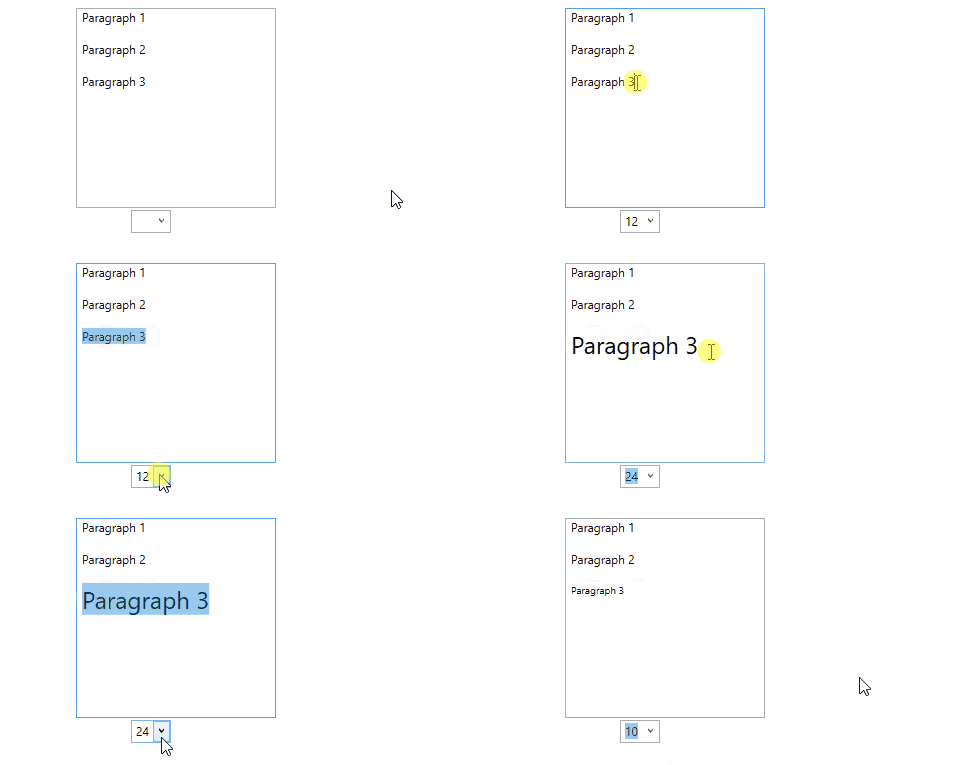
If the response is helpful, please click "Accept Answer" and upvote it.
Note: Please follow the steps in our documentation to enable e-mail notifications if you want to receive the related email notification for this thread.
' cx='32' cy='32' r='32' /%3E%3Ctext x='50%25' y='55%25' dominant-baseline='middle' text-anchor='middle' fill='%23FFF' %3EHV%3C/text%3E%3C/svg%3E)
This works great!
I was wondering how to do the same thing with Fonts.
I have list of Fonts in combobox and what to change selected text in richtextbox with selected font in combobox?