HI Team,
We have a power shell script. It will check if the user is available in the ACL list of ADL. To get the ACL list, we are connecting to the Azure Datalake storage using Connect-AzAccount and authenticating with SPN. To get the group member details, we authenticate the Connect-MgGraph using the same SPN credentials.
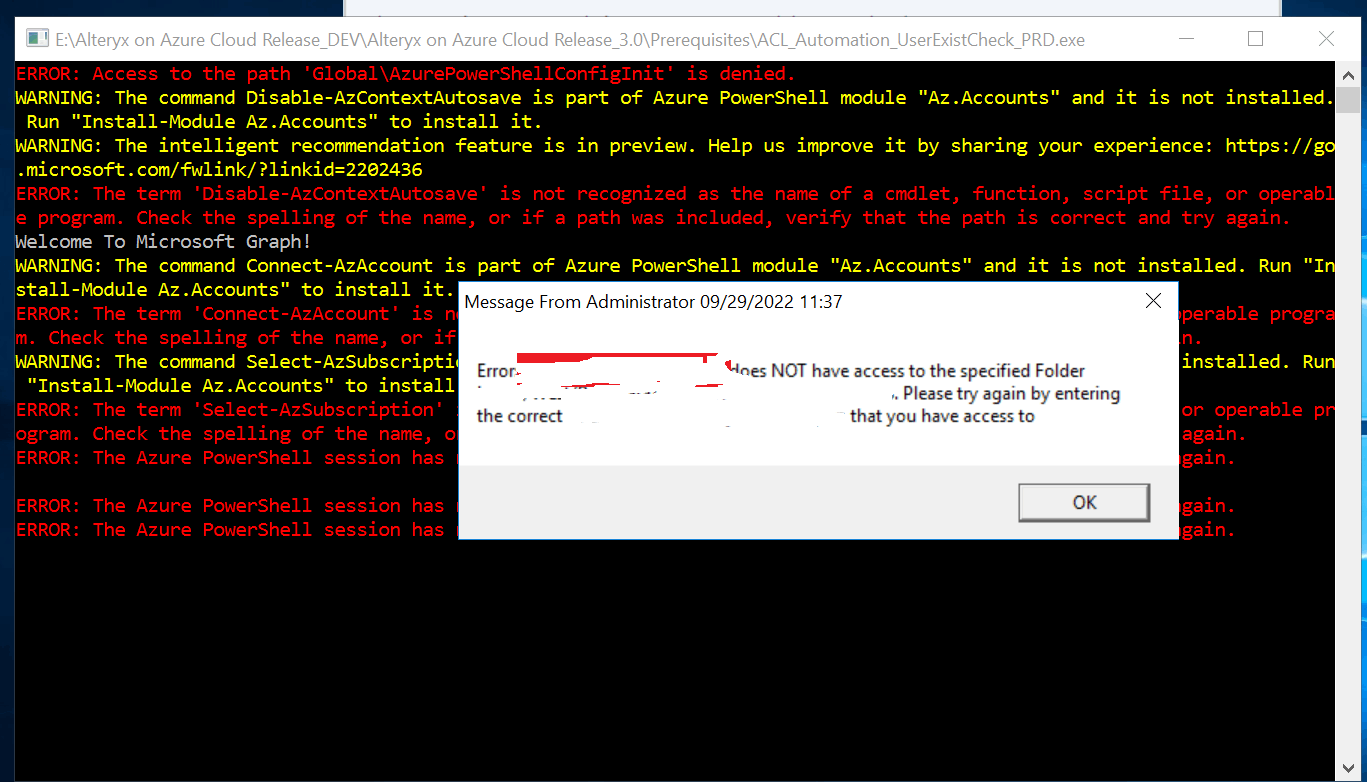
Now, this solution was working fine when a single user is running the script at a time in the VM. But, it fails for any of the users when multiple users were running the same powershell script at the same time in the same VM.
I herewith attached the script and the screenshot of the error for the reference.
[CmdletBinding()]
Param( [Parameter(Mandatory = $true)][String] $FolderPath )
import-module Az.accounts
import-module Az.Storage
$DomainID=[System.Security.Principal.WindowsIdentity]::GetCurrent().Name
$global:mailExist = $false
$SQL = @{ 'Database' = 'SQL_DB'
'ServerInstance' = 'AzureSQLServer.database.windows.net'
'Username' = 'User'
'Password' = 'Password'
}
$User = Invoke-Sqlcmd -Query "select * from table where DomainID='$($DomainID)'" @SQL
if($User.MailID -eq $null)
{
 $CurrentDate = Get-Date -Format "MM/dd/yyyy HH:mm"

$MessageTitle = "Message From Administrator $CurrentDate"

 $MessageBody = "User is invalid, please complete Custom Domain ID and MSP ID tracking Form"

 Add-Type -AssemblyName System.Windows.Forms     [System.Windows.Forms.MessageBox]::Show($MessageBody ,$MessageTitle)

$mailExist = $false

exit 1
}
$azureAplicationId ="ApplicationID"
$azureTenantId= "TenantID"
$pbispnsecret= "Secret"
$body = @{Grant_Type = "client_credentials"
Scope = "https://graph.microsoft.com/.default"
Client_Id = $azureAplicationId
Client_Secret = $pbispnsecret
}
Disable-AzContextAutosave -Scope Process
$connection = Invoke-RestMethod `
-Uri [https://login.microsoftonline.com/$azureTenantId/oauth2/v2.0/token](https://login.microsoftonline.com/$azureTenantId/oauth2/v2.0/token) `

-Method POST `

-Body $body
$token= $connection.access_token
Connect-MgGraph -AccessToken $token
$azurePassword = ConvertTo-SecureString
$pbispnsecret -AsPlainText -Force
$psCred = New-Object System.Management.Automation.PSCredential($azureAplicationId , $azurePassword) Connect-AzAccount -Credential $psCred -TenantId $azureTenantId -ServicePrincipal
Select-AzSubscription -SubscriptionId "subscription"
$account= Get-AzStorageAccount -ResourceGroupName RG57893425743 -Name storage22112
$ctx = $account.Context
Write-Host $ctx
$aclGroup = (Get-AzDataLakeGen2Item -Context $ctx -FileSystem "container1" -Path $FolderPath).ACL | where AccessControlType -eq 'Group'
$aclUser = (Get-AzDataLakeGen2Item -Context $ctx -FileSystem "container1" -Path $FolderPath).ACL | where AccessControlType -eq 'User'
$GroupIds=$aclGroup.EntityId | Sort-Object | Get-Unique
$Users=$aclUser.EntityId | Sort-Object | Get-Unique
ForEach ($User_ID in $Users)
{
if ($mailExist -eq $true) 	{

	break

}

     	$mem =Get-MgUser -UserId "$User\_ID"

if ($mem.Mail -eq $User.MailID)
{
	Write-Output "Member : $($mem.Mail)"

	Write-Output "Individual User"

	Write-Output "Display Name : $($mem.DisplayName)"

	$mailExist = $true
}
}
ForEach ($GroupId in $GroupIds)
{
if ($mailExist -eq $true)
{
	break

}

$GroupMembers = Get-MgGroupMember -GroupId "$GroupId"

ForEach ($GroupMember in $GroupMembers)
{
	if ($mailExist -eq $true)

	{

		break

	}

      		$mem =Get-MgUser -UserId $GroupMember.Id

	if ($mem.Mail -eq $User.MSPID)

	{

		Write-Output "Group-Member : $($mem.Mail)"

		Write-Output "Group : $($GroupId)"

		Write-Output "Display Name : $($mem.DisplayName)"

		$mailExist = $true

	}

}
}
if ($mailExist -eq $true)
{
#$mailExist | Out-File hello.txt

$CurrentDate = Get-Date -Format "MM/dd/yyyy HH:mm"

$UserID = "$($User.MailID)"

$MessageTitle = "Message From Administrator $CurrentDate"

$MessageBody = "$UserID have access to the specified Folder $FolderPath" 	[System.Windows.Forms.MessageBox]::Show($MessageBody ,$MessageTitle)

return $true

exit 0
}
else {
#$mailExist | Out-File hello.txt

$CurrentDate = Get-Date -Format "MM/dd/yyyy HH:mm"

$UserID = "$($User.MailID)"

$MessageTitle = "Message From Administrator $CurrentDate"

$MessageBody = "$UserID doesn't have access to the specified Folder $FolderPath" 	[System.Windows.Forms.MessageBox]::Show($MessageBody ,$MessageTitle)

exit 1
}
Thanks,
Pravin Kumar R
' cx='32' cy='32' r='32' /%3E%3Ctext x='50%25' y='55%25' dominant-baseline='middle' text-anchor='middle' fill='%23FFF' %3EA%3C/text%3E%3C/svg%3E)

' cx='32' cy='32' r='32' /%3E%3Ctext x='50%25' y='55%25' dominant-baseline='middle' text-anchor='middle' fill='%23FFF' %3EP%3C/text%3E%3C/svg%3E)