
Are you misinterpreting the displayed users? It shows 5 distinct accounts. It doesn't appear to agree with what you said.
This browser is no longer supported.
Upgrade to Microsoft Edge to take advantage of the latest features, security updates, and technical support.
' cx='32' cy='32' r='32' /%3E%3Ctext x='50%25' y='55%25' dominant-baseline='middle' text-anchor='middle' fill='%23FFF' %3EA%3C/text%3E%3C/svg%3E)
With the help of the Admin command, I discovered that what I thought was my Administrator Account is the WDAGUtilityAccount with my username associated with it. Additionally, my default account is my //administrator account. From what little research I have done, I know I need skilled support.
I have known for a long time I have had two main accounts. My preferred account was a local account, but I frequently had to switch to a Microsoft account to access services other than email. Somewhere along the way, this resulted in an error which probably induced other errors over time. As of this writing, everything is working as expected, but I believe that what I see is not good news. How can I fix it?
Administrator. How can I fix this?
Locked Question. This question was migrated from the Microsoft Support Community. You can vote on whether it's helpful, but you can't add comments or replies or follow the question.
Are you misinterpreting the displayed users? It shows 5 distinct accounts. It doesn't appear to agree with what you said.
' cx='32' cy='32' r='32' /%3E%3Ctext x='50%25' y='55%25' dominant-baseline='middle' text-anchor='middle' fill='%23FFF' %3ESD%3C/text%3E%3C/svg%3E)
Hi Ken,
I am Sumit here to assist you with this question.
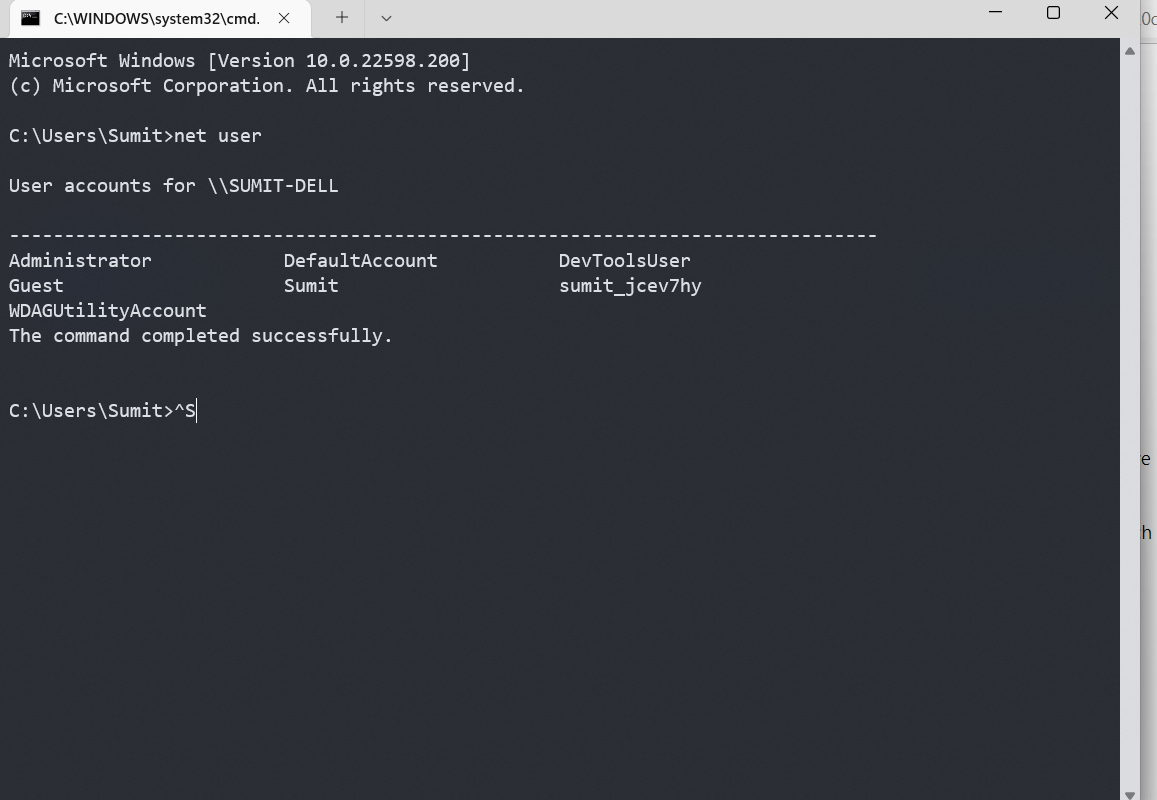
Everything is perfect on your computer. The cause of the confusion is, it isn't a table, it is a list that shows every account on the computer.
Adminstrator is the built-in Admin account.
KenB is the one you are using.
Default is one made by Windows called a temporary account if you are unable to sign in to your account.
WDAGutilityAccount is used by a feature called Windows Sandbox.
Guest is the Guest account.
Mine has additional one called DevTools, which is likely due to I am running an Insider Build.
Hope that makes sense and helps.
Hi Ken,
I am Sumit here to assist you with this question.Everything is perfect on your computer. The cause of the confusion is, it isn't a table, it is a list that shows every account on the computer.
Adminstrator is the built-in Admin account.
KenB is the one you are using.
Default is one made by Windows called a temporary account if you are unable to sign in to your account.
WDAGutilityAccount is used by a feature called Windows Sandbox.
Guest is the Guest account.Mine has additional one called DevTools, which is likely due to I am running an Insider Build.
Hope that makes sense and helps.
Thank you for the informative reply. I am not that knowledgeable to know what I should have expected. to see. What should I see and are there any special precautions I should take when I disable the built-in Admin account?
Hi,
It is already disabled by default. No action is required from your end.
With the help of the Admin command, I discovered that what I thought was my Administrator Account is the WDAGUtilityAccount with my username associated with it. Additionally, my default account is my //administrator account. From what little research I have done, I know I need skilled support.
I have known for a long time I have had two main accounts. My preferred account was a local account, but I frequently had to switch to a Microsoft account to access services other than email. Somewhere along the way, this resulted in an error which probably induced other errors over time. As of this writing, everything is working as expected, but I believe that what I see is not good news. How can I fix it?
Administrator. How can I fix this?
You shouldnt display your computers data like this, ken. Find a way to cover up your data and then take a screen shot