Share via

SD Driver missing

Anonymous
2022-04-17T14:16:30+00:00

Hi,

(to my knowledge) my SD driver is missing since the update to Windows 11.

It is an build in SD card reader and I have two partitions on my laptop, Ubuntu and Wndows 11. The hardware is working just fine, as I can perfectly access it under my Ubuntu partition.

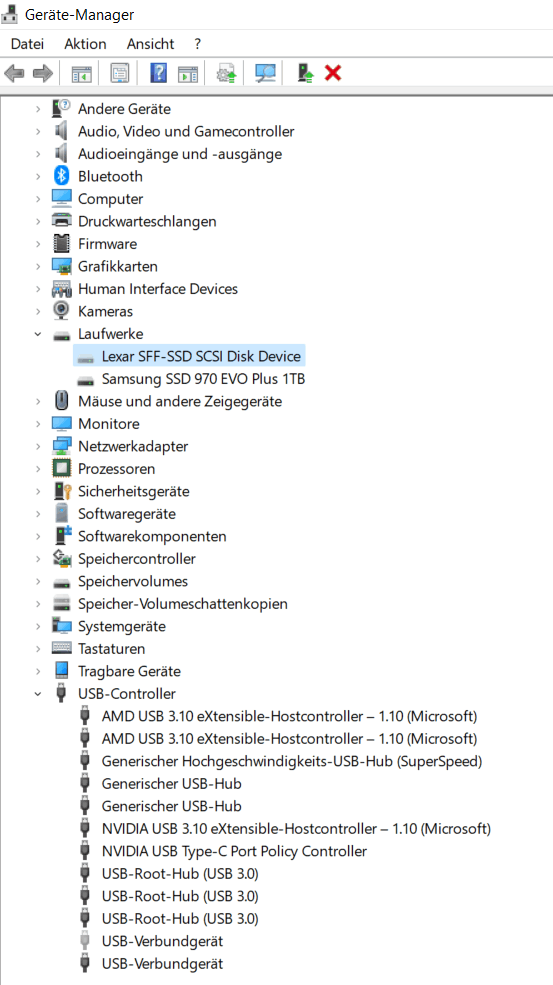
I cannot find the driver in the device manager, even when I display hidden item.

(I attached screen shots. It is in German, but should be understandable if you know "Geräte-Manager" = "device manager", "Laufwerk = Disk drives", "USB-controller = Universal Serial Bus controller", "Generisch = generic" and "USB-Verbundgerät" = "USB connect device")

All sources I could find tell me to check if it is a hardware problem (it is not, works under Ubuntu to this day, worked unter Win 10 before) and to look for it in the device manager to reinstall it (it is not in the device manager, to my knowledge).

My laptop is an XMG Core 15 with an AMD Ryzen 7 4800H processor, an NVIdia GeForce RTX 2060 Refresh (6 GB GDDR6) graphic card, two 16GB DDR4-3200 Corsair Vengeance RAM and 1TB M.2 Samsung 970 EVO Plus hard disk.

My Windows version is Windows 11 Home (Version 21H2 Build 22000.556).

I hope that is all the information you could possibly need. If you need anything else, let my know...
Best wishes and thank you in advance!

Windows for home | Windows 11 | Devices and drivers

Locked Question. This question was migrated from the Microsoft Support Community. You can vote on whether it's helpful, but you can't add comments or replies or follow the question.

0 comments No comments

Answer accepted by question author

  1. Anonymous
    2022-04-17T14:48:47+00:00

    Hello FMHM,

    I am Jaspreet Singh.

    Please try downloading and installing this driver : https://download.schenker-tech.de/package/xmg_c...

    Disclaimer: this is a non Microsoft website. The page appears to be providing accurate and safe information. Watch out for ads on the site that may advertise products frequently classified as a PUP (potentially unwanted products). Thoroughly research any product advertised on the site before you decide to download and install it

    3 people found this answer helpful.
    0 comments No comments

3 additional answers

Sort by: Most helpful
  1. Deleted

    This answer has been deleted due to a violation of our Code of Conduct. The answer was manually reported or identified through automated detection before action was taken. Please refer to our Code of Conduct for more information.


    Comments have been turned off. Learn more

  2. Anonymous
    2022-04-17T15:53:04+00:00

    Hi,

    this worked, thank you :)

    Best wishes!

    0 comments No comments
  3. Anonymous
    2022-04-17T14:21:35+00:00

    Have you tried downloading drivers from the SSD manufacturer's website?

    0 comments No comments
