
Microsoft (R) Windows Debugger Version 10.0.22000.194 AMD64
Copyright (c) Microsoft Corporation. All rights reserved.
Loading Dump File [C:\Windows\Minidump\050922-20734-01.dmp]
Mini Kernel Dump File: Only registers and stack trace are available
Symbol search path is: srv*
Executable search path is:
Windows 10 Kernel Version 19041 MP (16 procs) Free x64
Product: WinNt, suite: TerminalServer SingleUserTS
Edition build lab: 19041.1.amd64fre.vb_release.191206-1406
Machine Name:
Kernel base = 0xfffff80573000000 PsLoadedModuleList = 0xfffff80573c2a230
Debug session time: Mon May 9 19:10:29.205 2022 (UTC - 5:00)
System Uptime: 3 days 1:42:36.839
Loading Kernel Symbols
...............................................................
................................................................
................................................................
.....................................................
Loading User Symbols
Loading unloaded module list
..................................................
For analysis of this file, run !analyze -v
6: kd> !analyze -v
*******************************************************************************
* *
* Bugcheck Analysis *
* *
*******************************************************************************
KERNEL_SECURITY_CHECK_FAILURE (139)
A kernel component has corrupted a critical data structure. The corruption
could potentially allow a malicious user to gain control of this machine.
Arguments:
Arg1: 0000000000000003, A LIST_ENTRY has been corrupted (i.e. double remove).
Arg2: ffffc58695e87a50, Address of the trap frame for the exception that caused the bugcheck
Arg3: ffffc58695e879a8, Address of the exception record for the exception that caused the bugcheck
Arg4: 0000000000000000, Reserved
Debugging Details:
KEY_VALUES_STRING: 1
Key : Analysis.CPU.mSec
Value: 5156
Key : Analysis.DebugAnalysisManager
Value: Create
Key : Analysis.Elapsed.mSec
Value: 6536
Key : Analysis.Init.CPU.mSec
Value: 1280
Key : Analysis.Init.Elapsed.mSec
Value: 9030
Key : Analysis.Memory.CommitPeak.Mb
Value: 86
Key : FailFast.Name
Value: CORRUPT_LIST_ENTRY
Key : FailFast.Type
Value: 3
Key : WER.OS.Branch
Value: vb_release
Key : WER.OS.Timestamp
Value: 2019-12-06T14:06:00Z
Key : WER.OS.Version
Value: 10.0.19041.1
BUGCHECK_CODE: 139
BUGCHECK_P1: 3
BUGCHECK_P2: ffffc58695e87a50
BUGCHECK_P3: ffffc58695e879a8
BUGCHECK_P4: 0
TRAP_FRAME: ffffc58695e87a50 -- (.trap 0xffffc58695e87a50)
NOTE: The trap frame does not contain all registers.
Some register values may be zeroed or incorrect.
rax=ffffca03f0373fb2 rbx=0000000000000000 rcx=0000000000000003
rdx=0000000000000000 rsi=0000000000000000 rdi=0000000000000000
rip=fffff80573280b48 rsp=ffffc58695e87be0 rbp=ffffca03f0373faa
r8=0000000000000000 r9=0000000000000000 r10=0000000000000000
r11=0000000000000000 r12=0000000000000000 r13=0000000000000000
r14=0000000000000000 r15=0000000000000000
iopl=0 nv up ei ng nz na pe cy
nt!KiProcessThreadWaitList+0x88:
fffff805`73280b48 cd29 int 29h
Resetting default scope
EXCEPTION_RECORD: ffffc58695e879a8 -- (.exr 0xffffc58695e879a8)
ExceptionAddress: fffff80573280b48 (nt!KiProcessThreadWaitList+0x0000000000000088)
ExceptionCode: c0000409 (Security check failure or stack buffer overrun)
ExceptionFlags: 00000001
NumberParameters: 1
Parameter[0]: 0000000000000003
Subcode: 0x3 FAST_FAIL_CORRUPT_LIST_ENTRY
BLACKBOXBSD: 1 (!blackboxbsd)
BLACKBOXNTFS: 1 (!blackboxntfs)
BLACKBOXPNP: 1 (!blackboxpnp)
BLACKBOXWINLOGON: 1
CUSTOMER_CRASH_COUNT: 1
PROCESS_NAME: fm.exe
ERROR_CODE: (NTSTATUS) 0xc0000409 - The system detected an overrun of a stack-based buffer in this application. This overrun could potentially allow a malicious user to gain control of this application.
EXCEPTION_CODE_STR: c0000409
EXCEPTION_PARAMETER1: 0000000000000003
DPC_STACK_BASE: FFFFC58695E87FB0
EXCEPTION_STR: 0xc0000409
STACK_TEXT:
ffffc58695e87728 fffff80573409869 : 0000000000000139 0000000000000003 ffffc58695e87a50 ffffc58695e879a8 : nt!KeBugCheckEx
ffffc58695e87730 fffff80573409c90 : fffff8056e4d6180 fffff8057328852f 0000000000000000 ffffca04026bc040 : nt!KiBugCheckDispatch+0x69
ffffc58695e87870 fffff80573408023 : ffffc58695e87be8 0000000000000006 0000000000000000 0000000000000000 : nt!KiFastFailDispatch+0xd0
ffffc58695e87a50 fffff80573280b48 : ffffca04033721c0 0000000000000000 ffffca04026bc1b0 0000000000000000 : nt!KiRaiseSecurityCheckFailure+0x323
ffffc58695e87be0 fffff805732818ad : ffffca03ef393860 000000000000000f ffffde0099595180 ffffde0000000002 : nt!KiProcessThreadWaitList+0x88
ffffc58695e87c30 fffff80573299add : ffffde0099595180 ec83485500000000 0000000000000008 00000000009a7558 : nt!KiProcessExpiredTimerList+0x31d
ffffc58695e87d20 fffff805733fe8e5 : 66000001fab8ea8b ffffde0099595180 ffffca03ec906380 000000009317a550 : nt!KiRetireDpcList+0x5dd
ffffc58695e87fb0 fffff805733fe6d0 : fffff805733f3990 fffff80573325fda 000000000000001e 0000000000000110 : nt!KxRetireDpcList+0x5
ffffc586a189fa80 fffff805733fdf85 : 000000009317a550 fffff805733f9931 00000000931a2aa0 0000000000000001 : nt!KiDispatchInterruptContinue
ffffc586a189fab0 fffff805733f9931 : 00000000931a2aa0 0000000000000001 0000000000000151 ffffc586a189fb40 : nt!KiDpcInterruptBypass+0x25
ffffc586a189fac0 0000000000000000 : 0000000000000000 0000000000000000 0000000000000000 0000000000000000 : nt!KiInterruptDispatchNoLockNoEtw+0xb1
SYMBOL_NAME: nt!KiProcessExpiredTimerList+31d
MODULE_NAME: nt
IMAGE_NAME: ntkrnlmp.exe
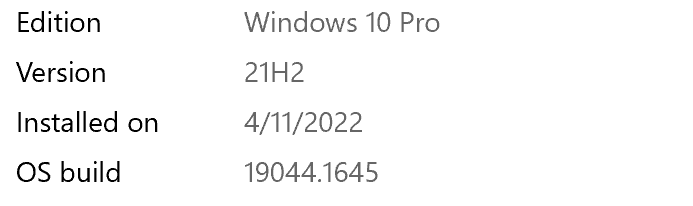
IMAGE_VERSION: 10.0.19041.1645
STACK_COMMAND: .thread ; .cxr ; kb
BUCKET_ID_FUNC_OFFSET: 31d
FAILURE_BUCKET_ID: 0x139_3_CORRUPT_LIST_ENTRY_KTIMER_LIST_CORRUPTION_nt!KiProcessExpiredTimerList
OS_VERSION: 10.0.19041.1
BUILDLAB_STR: vb_release
OSPLATFORM_TYPE: x64
OSNAME: Windows 10
FAILURE_ID_HASH: {9db7945b-255d-24a1-9f2c-82344e883ab8}
Followup: MachineOwner
' cx='32' cy='32' r='32' /%3E%3Ctext x='50%25' y='55%25' dominant-baseline='middle' text-anchor='middle' fill='%23FFF' %3EA%3C/text%3E%3C/svg%3E)

