Share via

new window start aware

SaGaR BaHuGuNA 1 Reputation point
2020-07-07T07:16:49.24+00:00

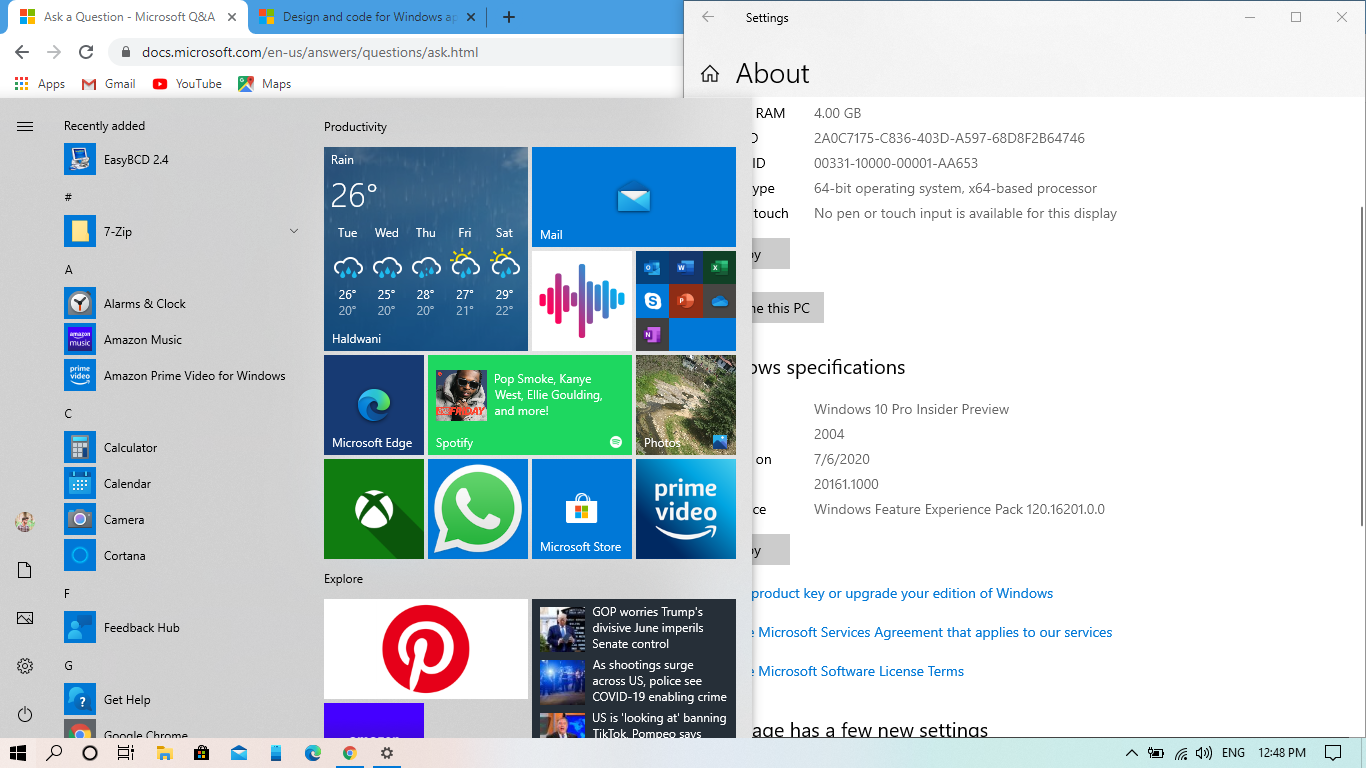
guys why i didnt get the windows aware after updating to latest build in my pc 11456-screenshot-2.png

Windows for business | Windows Client for IT Pros | User experience | Other
0 comments No comments

2 answers

Sort by: Most helpful
  1. Joy Qiao 5,812 Reputation points Moderator
    2020-07-08T02:36:47.027+00:00

    Hi,

    I noticed you have upgraded your system to Windows 10 version 20161 and the start menu should be changed to partially transparent background however which not works on your system. Please create a new thread on Windows insider forum to check if they have any resources or thoughts about this issue, as they are more familiar with your system version.
    If my reply is useful for you, please accept it as answer.

    Bests,

    Was this answer helpful?

    0 comments No comments

  2. Leon Laude 86,201 Reputation points
    2020-07-07T09:24:36.27+00:00

    Hi,

    It seems the new "Theme-aware" tiles in the Start menu has only been rolled out to Windows 10 Insider Preview Builds.
    https://blogs.windows.com/windowsexperience/2020/07/01/announcing-windows-10-insider-preview-build-20161

    You can register for free to the Windows Insider Program and there you can obtain the preview versions of Windows 10:
    https://insider.windows.com/en-gb/

    Best regards,
    Leon

    Was this answer helpful?

    0 comments No comments

Your answer

Answers can be marked as 'Accepted' by the question author and 'Recommended' by moderators, which helps users know the answer solved the author's problem.