Microsoft 365 and Office | SharePoint | For business | Windows
A group of Microsoft Products and technologies used for sharing and managing content, knowledge, and applications.

This browser is no longer supported.
Upgrade to Microsoft Edge to take advantage of the latest features, security updates, and technical support.

Hi Experts,
I wanted to get a clarification on a permission level.
We have two groups called Internal and External.
What should be best approach to implement this in SharePoint Online using Custom Permissions ?
Thanks,
Murali .

For internal users, we could grant default permission level “Contribute” at library level to view, add, update, and delete all documents:

However for external users, there is no easy way to restrict them only delete their own documents if they have appropriate permissions at library level.
We need to create a custom permission level that remove the delete items permission on the basis of the "Contribute" permission level:
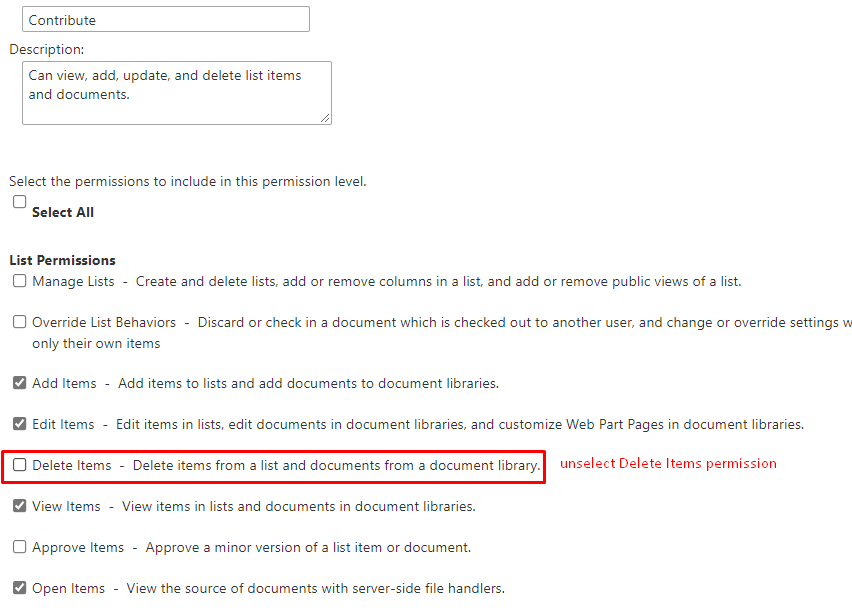
Then use above custom permission level to set unique permissions for documents that do not belong to them. This will enable users in the external group to read and edit all documents, delete their own documents, cannot delete other documents.
More information:
How to Set Unique Permissions in SharePoint
In addition, if you have multiple files in your library, this is not suitable for you, because you need to set unique permissions for multiple files one by one. This is not a convenient process, and there is no good way to customize permissions to fulfill your requirement .
Note: Microsoft is providing this information as a convenience to you. The sites are not controlled by Microsoft. Microsoft cannot make any representations regarding the quality, safety, or suitability of any software or information found there. Please make sure that you completely understand the risk before retrieving any suggestions from the above link.
If an Answer is helpful, please click "Accept Answer" and upvote it.
Note: Please follow the steps in our documentation to enable e-mail notifications if you want to receive the related email notification for this thread.
Thanks for your answer. Let me a quick test and come back to you.
If you feel an answer works for you, please kindly accept it as answer.
It will be beneficial to other community members reading this thread.
Thank you for your understanding.