Developer technologies | C#
An object-oriented and type-safe programming language that has its roots in the C family of languages and includes support for component-oriented programming.
This browser is no longer supported.
Upgrade to Microsoft Edge to take advantage of the latest features, security updates, and technical support.
' cx='32' cy='32' r='32' /%3E%3Ctext x='50%25' y='55%25' dominant-baseline='middle' text-anchor='middle' fill='%23FFF' %3EJZ%3C/text%3E%3C/svg%3E)
Hello:
I want to use WebView2 to get the response body when I visit one specific web site, like "https://www.bing.com".
I created one C# Windows Form App, and have the following code now:
using Microsoft.Web.WebView2.Core;
using Microsoft.Web.WebView2.WinForms;
using System;
using System.Diagnostics;
using System.Drawing;
using System.Windows.Forms;

namespace GetResponse
{
    public partial class Form1 : Form
    {
        private readonly WebView2 WebView21 = new();
        private static readonly Button GetResponse = new();

        public Form1()
        {
            InitializeComponent();
            FormBorderStyle = FormBorderStyle.FixedDialog;
            StartPosition = FormStartPosition.CenterScreen;
            SuspendLayout();
            MaximizeBox = true;
            MinimizeBox = true;
            BackColor = Color.White;
            ForeColor = Color.Black;
            Size = new Size(1800, 800);
            Text = "GetContentAsync";
            FormBorderStyle = FormBorderStyle.FixedDialog;
            StartPosition = FormStartPosition.CenterScreen;
            SuspendLayout();
            WebView21.CreationProperties = null;
            WebView21.Location = new Point(50, 100);
            WebView21.Name = "WebView21";
            WebView21.Size = new Size(1700, 700);
            WebView21.TabIndex = 0;
            WebView21.ZoomFactor = 1D;
            WebView21.Visible = true;
            Controls.Add(WebView21);
            GetResponse.Name = "Response";
            GetResponse.Font = new Font("Arial", 10);
            GetResponse.Location = new Point(850, 30);
            GetResponse.Size = new Size(100, 40);
            GetResponse.Text = "Hide";
            GetResponse.Click += new EventHandler(Response_Click);
            GetResponse.Visible = true;
            Controls.Add(GetResponse);
            ResumeLayout();
        }

        private async void Response_Click(object sender, EventArgs e)
        {
            try
            {
            }
            catch (TimeoutException ex)
            {
                Debug.Print("[Response_Click] EX:" + ex.Message);
            }
        }

        private void WebView21_NavigationCompleted(object sender, Microsoft.Web.WebView2.Core.CoreWebView2NavigationCompletedEventArgs e)
        {
           Debug.Print("NavigationCompleted");
        }

        private void WebView21_CoreWebView2InitializationCompleted(object sender, CoreWebView2InitializationCompletedEventArgs e)
        {
        }

        private void WebView21_WebResourceResponseReceived(object sender, CoreWebView2WebResourceResponseReceivedEventArgs e)
        {
            Debug.Print("WebResourceResponseReceived");
            Debug.Print("How to get response body? How to use CoreWebView2WebResourceResponseView.GetContentAsync()?");
        }
        private void Form1_Load(object sender, EventArgs e)
        {
            WebView21.Source = new Uri("https://www.bing.com/", UriKind.Absolute);
            WebView21.CoreWebView2InitializationCompleted +=
                new EventHandler<CoreWebView2InitializationCompletedEventArgs>(WebView21_CoreWebView2InitializationCompleted);
        }
    }
}
But I can't find any code example for using CoreWebView2WebResourceResponseView.GetContentAsync.
In my program, I want to search Bing for some words, like "WebView2", and after I click on the button GetResponse, I want to show
the HTTP response body. Those Http request is something like "https://www.bing.com/search?q=webvew2"
By the way, I am using Visual Studio 2019 Version 16.10.1, the version of WebView2 run time is: 1.0.864.35
My OS is: Windows 10 Version 21H1 (OS Build 19043.1055)
Please advise!
' cx='32' cy='32' r='32' /%3E%3Ctext x='50%25' y='55%25' dominant-baseline='middle' text-anchor='middle' fill='%23FFF' %3ETY%3C/text%3E%3C/svg%3E)
Try using GetContentAsync like this:
    private readonly WebView2 WebView21 = new();
    private static readonly Button GetResponse = new();

    public Form1()
    {
        InitializeComponent();
        FormBorderStyle = FormBorderStyle.FixedDialog;
        StartPosition = FormStartPosition.CenterScreen;
        SuspendLayout();
        MaximizeBox = true;
        MinimizeBox = true;
        BackColor = Color.White;
        ForeColor = Color.Black;
        Size = new Size(1800, 800);
        Text = "GetContentAsync";
        FormBorderStyle = FormBorderStyle.FixedDialog;
        StartPosition = FormStartPosition.CenterScreen;
        SuspendLayout();
        WebView21.CreationProperties = null;
        WebView21.Location = new Point(50, 100);
        WebView21.Name = "WebView21";
        WebView21.Size = new Size(1700, 700);
        WebView21.TabIndex = 0;
        WebView21.ZoomFactor = 1D;
        WebView21.Visible = true;
        Controls.Add(WebView21);
        GetResponse.Name = "Response";
        GetResponse.Font = new Font("Arial", 10);
        GetResponse.Location = new Point(850, 30);
        GetResponse.Size = new Size(100, 40);
        GetResponse.Text = "Hide";
        GetResponse.Click += new EventHandler(Response_Click);
        GetResponse.Visible = true;
        Controls.Add(GetResponse);
        ResumeLayout();
    }

    private async void Response_Click(object sender, EventArgs e)
    {
        try
        {
            //WebView21.CoreWebView2.WebResourceResponseReceived += WebView21_WebResourceResponseReceived;
        }
        catch (TimeoutException ex)
        {
            Debug.Print("[Response_Click] EX:" + ex.Message);
        }
    }

    private void WebView21_NavigationCompleted(object sender, Microsoft.Web.WebView2.Core.CoreWebView2NavigationCompletedEventArgs e)
    {
        Debug.Print("NavigationCompleted");
    }
    private void Form1_Load(object sender, EventArgs e)
    {
        WebView21.Source = new Uri("https://www.bing.com/", UriKind.Absolute);
        WebView21.CoreWebView2InitializationCompleted +=
            new EventHandler<CoreWebView2InitializationCompletedEventArgs>(WebView21_CoreWebView2InitializationCompleted);
    }
    private void WebView21_CoreWebView2InitializationCompleted(object sender, CoreWebView2InitializationCompletedEventArgs e)
    {
        WebView21.CoreWebView2.WebResourceResponseReceived += WebView21_WebResourceResponseReceived;
    }

    private async void WebView21_WebResourceResponseReceived(object sender, CoreWebView2WebResourceResponseReceivedEventArgs e)
    {
        Stream stream = await e.Response.GetContentAsync();
        TextReader tr = new StreamReader(stream);
        string re = tr.ReadToEnd();
    }
}
Update(6/18):
When a webpage loads, there are many resources, such as bing, where there are more than 100 resources.
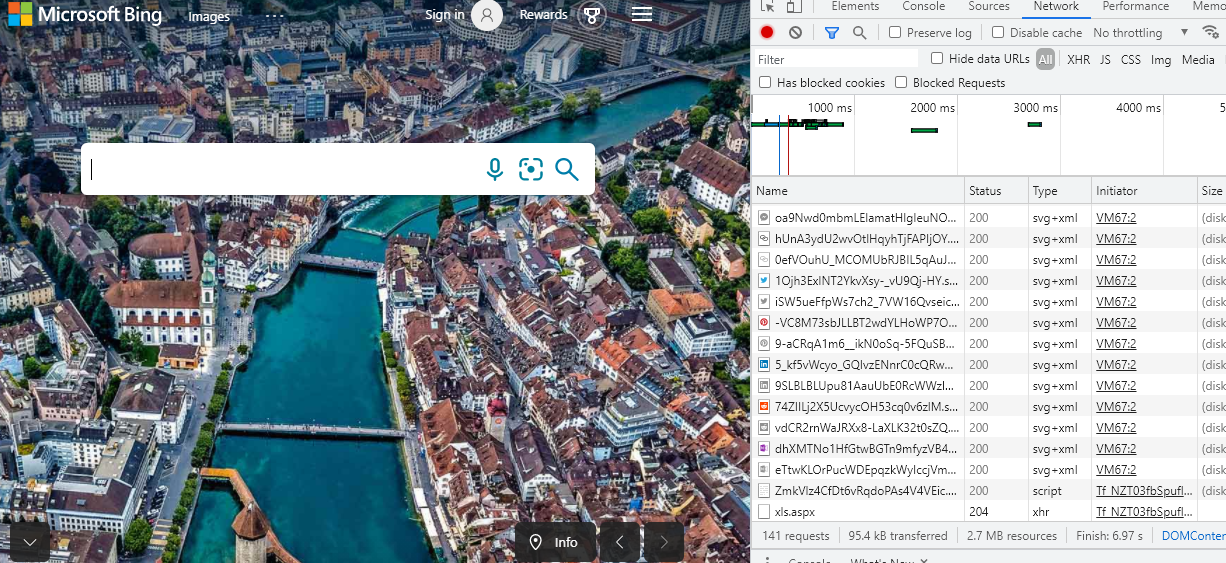
The loading of each resource will trigger the WebResourceResponseReceived event.
Some can get a response normally (status==200), while some can't (status == 204 no content).
When its status is 204, the current error will be triggered.
If you just don't want to encounter this exception, you can judge the response code as follows:
        private async void WebView21_WebResourceResponseReceived(object sender, CoreWebView2WebResourceResponseReceivedEventArgs e)
        {
            if (e.Response.StatusCode==200)
            {
                Stream stream = await e.Response.GetContentAsync();
                TextReader tr = new StreamReader(stream);
                string re = tr.ReadToEnd();
            }
        }
However, these resources include text, images and other types of resources, and it is not appropriate to convert all of them into text.
And it is not the overall response body but individual resources, so I think this method may not be suitable for your current needs.
This is why I suggested in the previous comment to use WebRequest to get the response.
If the response is helpful, please click "Accept Answer" and upvote it.
Note: Please follow the steps in our documentation to enable e-mail notifications if you want to receive the related email notification for this thread.
Hello:
Thanks for your reply, I can see the type of "re" is System.IO.Stream, but I want to convert it to string.
How I can do this?
Thanks,
Try this:
            Stream stream = await e.Response.GetContentAsync();
            TextReader tr = new StreamReader(stream);
            string re = tr.ReadToEnd();
But there is a problem. This event will be triggered continuously, causing an exception to occur when it is triggered again after reading the stream
Can we change the code to get it like this?
            Uri uri = WebView21.Source;
            var webRequest = WebRequest.Create(uri);

            using (var response = webRequest.GetResponse())
            using (var content = response.GetResponseStream())
            using (var reader = new StreamReader(content))
            {
                var strContent = reader.ReadToEnd();
            }
Hello:
I changed my code according to your advice, for Form_Load function, the code look like this:
private void Form1_Load(object sender, EventArgs e)
{
WebView21.CoreWebView2.WebResourceResponseReceived += WebView21_WebResourceResponseReceived;
WebView21.Source = new Uri("https://www.bing.com/", UriKind.Absolute);
WebView21.CoreWebView2InitializationCompleted +=
new EventHandler<CoreWebView2InitializationCompletedEventArgs>
(WebView21_CoreWebView2InitializationCompleted);
}
But when I run this, I got error:
System.NullReferenceException
HResult=0x80004003
Message=Object reference not set to an instance of an object.
Source=GetResponse
For this statement:
WebView21.CoreWebView2.WebResourceResponseReceived += WebView21_WebResourceResponseReceived;
Let me know how to fix this first,
Thanks,
My fault, I copied the wrong code, and I apologize to you.
I modified the code, and this error will not appear anymore, but as I said in the previous comment, other errors will also appear in the modified code, because the WebResourceResponseReceived event will be triggered continuously, and this event will be triggered again after reading the content When, GetContentAsync will cause this exception:

Hello:
Please show me all the correct code you have now.
I see only one picture with some code.
Thanks,
I revised the answer, please check it out.
It's basically your code, I only modified a few things.
Hello:
I modified my code as per your advice, and I did see the error shown in your picture.
How I can fix the error:
The pipe is being closed. (0x800700E8)
Thanks,
@john zyd I
I updated the answer again and added some content, please check it.
Hello:
If I got it correctly, I changed one function like this:
private async void WebView21_WebResourceResponseReceived(object sender, CoreWebView2WebResourceResponseReceivedEventArgs e)
{
if (e.Response.StatusCode == 200)
{
Stream stream = await e.Response.GetContentAsync();
TextReader tr = new StreamReader(stream);
string re = tr.ReadToEnd();
Debug.Print(re);
}
}
This way works until, I begin to add some search text, and click button to search. Then I got the same error:
An exception of type 'System.Runtime.InteropServices.COMException' occurred in System.Private.CoreLib.dll but was not handled in user code
The pipe is being closed. (0x800700E8)
The exception occurred at this statement:
Stream stream = await e.Response.GetContentAsync();
Let me know if I got it correctly.
Well, it seems that there are more reasons for this exception.
I reproduced this error but haven't found out how to solve it completely.
In addition, this method is not suitable for getting the response body. I still recommend using weclient or httpclient instead.
How to get content body from a httpclient call?