Issue Description
A critical issue is being experienced with a Windows Server 2025 Standard Edition virtual machine (VM) on VMware ESXi 7. The VM frequently freezes and becomes completely unresponsive. This behavior started occurring after the Windows updates were applied on July 10, 2025. A similar issue was faced in April 2025, which led to destroying and recreating the VM. The new VM was stable until these recent updates.
Specific Symptoms
- The VM freezes and doesn't respond to any input.
- Remote Desktop (RDP) sessions fail to connect, or if connected, they freeze and cannot be interacted with.
- Accessing the VM console via vSphere Client or vCenter Server shows the VM as unresponsive.
- The Ctrl+Alt+Del command has no effect on responsiveness within the console.
- VM console shutdown and restart commands are also unavailable; only Power Off and Reset VM actions are possible.
- When the freeze happens, the VM's CPU usage, as reported by the hypervisor, shows a sudden, consistent spike of around 21% out of the 64 vCPUs allocated.
- Crucially, the server tends to freeze when the VM is idle or left unused. If the VM is continuously used through RDP after a reset, it functions normally for a period. This strongly suggests a background task or process kicking in during idle time might be causing the freeze, possibly at a kernel level.
- The issue seems to affect only this VM; other VMs on the same ESXi host function normally.
Environment Details
- Operating System: Windows Server 2025 Standard Edition
- Edition: Windows Server 2022 Standard Version: 21H2 Installed on: 12-05-2023 OS build: 20348.3932
- Virtualization Platform: VMware ESXi 7.0 Update 3 (Build 16324942)
- Host Manufacturer: Dell Inc.
- Host Model: PowerEdge R540
- Host CPU: 32 CPUs x Intel(R) Xeon(R) Gold 5218 CPU @ 2.30GHz
- Host Memory: 256 GB
- Host Resource Consumption (Normal): CPU Free: 67.6 GHz (8% used), Memory Free: 48.91 GB (81% used), Storage Free: 6.01 TB (37% used).
- Host BIOS Version: 2.9.3 (Release Date: September 23, 2020)
- ESXi State: Normal (not connected to any vCenter Server)
- VM Configuration:
- vCPUs: 2 Sockets, 12 Cores per Socket (Total 24 vCPUs - Previously 64 vCPUs When issue occurred, Now reconfigured to 24vCPUs). IOMMU Enabled.
- RAM: 64 GB
- Hard disk 1 (OS): 150 GB, Dependent, Thin provisioned: No, Controller: SCSI controller 0:0 (LSI Logic SAS)
- Hard disk 2 (Data): 90 GB, Dependent, Thin provisioned: Yes, Controller: SCSI controller 0:1 (LSI Logic SAS)
- Filesystem: Both disks NTFS formatted. (Note: Not using ReFS filesystem).
- Network adapter 1: Connected to "VM Network", Pass-through (Direct-path I/O) No.
- Network adapter 2: Connected to "VM12", Pass-through (Direct-path I/O) No.
- Video Card: Total video memory 16 MB, Number of displays 1, 3D Graphics Disabled.
- SCSI Adapter: SCSI controller 0 (LSI Logic SAS)
- VMware Tools: Installed: Yes, Version: VMware Tools 11.1.0 build 16036546, Running: Yes.
- VM Resource Consumption (Normal): Consumed host CPU: 3.1 GHz, Consumed host memory: 50.95 GB, Active guest memory: 3.2 GB, Provisioned Storage: 240 GB, Used Storage: 191.06 GB.
- Guest Disk Space: C:: 149.23 GB (66.61 GB Free - 45%), D:: 89.98 GB (81.05 GB Free - 90%).
- Primary Use Case: Software Development using WSL Ubuntu.
Troubleshooting Steps Taken and Workarounds
- Checked ESXi Host Performance: esxtop was used to monitor host-level performance. No significant CPU saturation or high ready times were observed across the host overall, with host CPU usage at 8% and memory at 81%. Other VMs perform as expected.
- The issue started immediately after the installation of Windows updates KB5062553 and KB5056579 on July 10, 2025, and KB5054979 on July 11, 2025.
- Action: These updates were uninstalled.
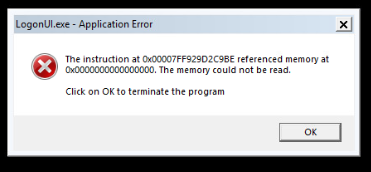
- Issue: During uninstalling the updates by Trust Installer after reboot and restarting the VM, a LogonUI.exe – Application error was encountered. !
- Automatic Windows updates have been paused for 5 weeks to prevent further automatic installations.
- Checked for ReFS Issues: All volumes within the VM are formatted with NTFS, not ReFS. This avoids the known issues with ReFS volumes freezing on Windows Server 2025. Learn Microsoft
- Examined Guest OS Disk Space: Ample free space is confirmed on both the OS (45% free) and Data (90% free) drives within the VM.
- Reviewed VM Hardware Version and VMware Tools Status: The VM is using the latest compatible hardware version for ESXi 7.
- VMware Tools 11.1.0 build 16036546 are installed and running.
- BIOS Compatibility: Dell PowerEdge R540 BIOS version 2.9.3 is installed. Dell lists support for Windows Server 2025 starting with BIOS version 2.22.1, according to Dell support documentation. This older BIOS version could potentially be a factor, although Dell does list ESXi 7.0 as supported on this hardware, according to Dell support documentation.
Workarounds Identified So Far
- Reset VM: Resetting the VM via the VMware console restores responsiveness, but only for approximately 30 minutes, after which the CPU usage spikes and it freezes again.
- Suspend/Resume VM with Network Adapter Disablement: Suspending the VM, waiting ~5 minutes, then disabling the VM's Network Adapter via vCenter/vSphere Client's VM Edit Settings, and then resuming the VM makes it responsive again for a limited period. This allows for a graceful shutdown or restart within the guest OS. This specific interaction with the network adapter strongly suggests a potential issue related to network drivers (VMXNET3), services, or communication protocols after the recent updates.
Next Steps Planned / Questions for the Forum
- Process activity logging using Windows Performance Monitor will be configured and analyzed to pinpoint specific processes (potentially system or background tasks, possibly related to WSL Ubuntu or network components) consuming CPU or other resources just before a freeze occurs, particularly during idle periods. Setting up logging right before the freeze is recommended for diagnosis.
- Given that disabling the network adapter allows regaining control, this strongly points towards a network-related issue. Is there a known issue with the VMXNET3 network adapter driver on Windows Server 2025 after recent updates on ESXi 7 (Build 16324942)? There have been past reports of VMXNET3 performance issues with Windows Server 2025/Windows 11 24H2, according to the Microsoft Community Hub. Should network offloading features (e.g., LSO, RSC, RSS) be disabled within the VMXNET3 adapter properties as a test? Disabling offloading features has been suggested as a workaround for VMXNET3 issues
- Are the specific updates KB5062553, KB5056579, or KB5054979 (or components within them) known to cause system freezes, network stack instability, or LogonUI.exe errors upon uninstallation of updates on Windows Server 2025? Details and known issues for these updates may be available on the Microsoft release health dashboard.


- Considering the temporary recovery with suspend/resume/network adapter disablement and reset, what might be theunderlying kernel, driver (likely network driver), or service state that is temporarily resolved by these actions but then recurs after a short period, especially when idle?
Any assistance or guidance from the community, especially regarding debugging freezing behavior related to recent updates, idle states, network adapter interaction, or WSL integration on Windows Server 2025, would be greatly appreciated. Thank you.

' cx='32' cy='32' r='32' /%3E%3Ctext x='50%25' y='55%25' dominant-baseline='middle' text-anchor='middle' fill='%23FFF' %3EA%3C/text%3E%3C/svg%3E)
' cx='32' cy='32' r='32' /%3E%3Ctext x='50%25' y='55%25' dominant-baseline='middle' text-anchor='middle' fill='%23FFF' %3EMD%3C/text%3E%3C/svg%3E)