Microsoft Security | Intune | Configuration Manager | Other
Other Configuration Manager-related features and issues

This browser is no longer supported.
Upgrade to Microsoft Edge to take advantage of the latest features, security updates, and technical support.
' cx='32' cy='32' r='32' /%3E%3Ctext x='50%25' y='55%25' dominant-baseline='middle' text-anchor='middle' fill='%23FFF' %3ES%3C/text%3E%3C/svg%3E)
and the solution was
"Update 3: Problem solved! The "AlertVariableChangeTargetService" in SQL Service Broker wasn't running. It probably happened during the SCCM upgrade we did recently or the SQL server upgrade we did before the SCCM Upgrade. You can check these Services in SQL Server Management Studio, then: Databases > CM_XY1 (SCCM Database) > Service Broker > Services"
but how to do that? If i check this service on our database it says "closed"

Hi @Saxe , welcome to Microsoft Q&A! Does the SQL Service cannot start on your side? And is there have any error message? Could you please give us more details?
Hi Carrin,
thanks for replying.
have you checked the link? I have an error message in SCCM (Endpoint Protection Manager failed to generate alerts for type:"31". Verify that the site database is configured correctly. Error code returned is:"0x87d20002".) and this brought me to the technet article which says check for service "AlertVariableChangeTargetService" in SCCMDatabase\Service Broker\Services and i just want to know if it says closed is it linke service is stopped or just waiting for running like a manual service?
Regards Sascha

I can't say whether Carrin read the link or not, but if he did, he may not have made much sense out of it. Just like me, Carrin specialises in SQL Server, but you are asking a question about SCCM., which we know little about. I would recommend that you edit the tag for your question.
Hi Carrin and Erland,
thanks for your answers, my thoughts were that these services are specially for SCCM but there are may other services which should work the same way under Service Broker in SQL.
For example, you have service on every windows device, if you open services.msc you dont need to know what "computer browser" stands for if you just want to stop, start or restart this service. You can do the same commands for every other service [mostly :)]
Regards Sascha
A "service" in Windows has no relation to a "service" in SQL Server Service Broker.
Service Broker is asynchronous messaging system and it can be distributed over many servers. A service is a kind of an endpoint for a conversation of message. A conversation is between two services. All services has a queue associated with them.
You don't start services, you start (well "enablee") the queues. Although normally queues are running, but they can be disabled if there are five consecutive rollbacks on the queue. Usually that is due to a so-called poison message that you need take out of the queue to get things working.

Hi, @Saxe
Thank you for posting in Microsoft Q&A forum.
I see the queue is corresponding to the services under Service Broker, you may try to enable the queue "AlertVariableChangeTargetQueue".
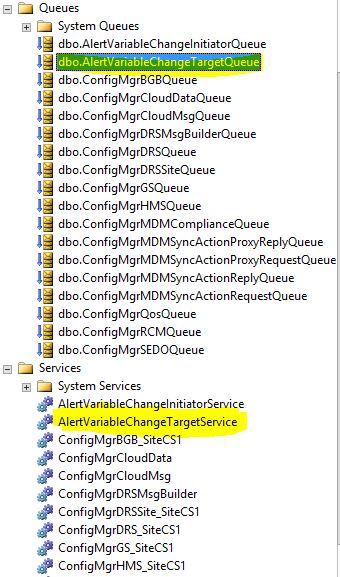
If the response is helpful, please click "Accept Answer" and upvote it.
Note: Please follow the steps in our documentation to enable e-mail notifications if you want to receive the related email notification for this thread.
Queue is already enabled, so i am waiting for some SCCM experienced user who can answer that question
' cx='32' cy='32' r='32' /%3E%3Ctext x='50%25' y='55%25' dominant-baseline='middle' text-anchor='middle' fill='%23FFF' %3EB%3C/text%3E%3C/svg%3E)
The service "AlertVatiableChangeTargetService" have mapped contracts "AlertVariableChangeContract"
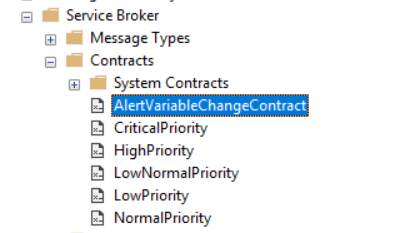 ]
]
If this Contracts not existing, it is possible to create by this sql query:
CREATE CONTRACT AlertVariableChangeContract
( AlertVariableChangeMessage SENT BY INITIATOR,
AlertVariableChangeAckMessage SENT BY TARGET )