Azure Data Factory
An Azure service for ingesting, preparing, and transforming data at scale.
This browser is no longer supported.
Upgrade to Microsoft Edge to take advantage of the latest features, security updates, and technical support.
' cx='32' cy='32' r='32' /%3E%3Ctext x='50%25' y='55%25' dominant-baseline='middle' text-anchor='middle' fill='%23FFF' %3EDH%3C/text%3E%3C/svg%3E)
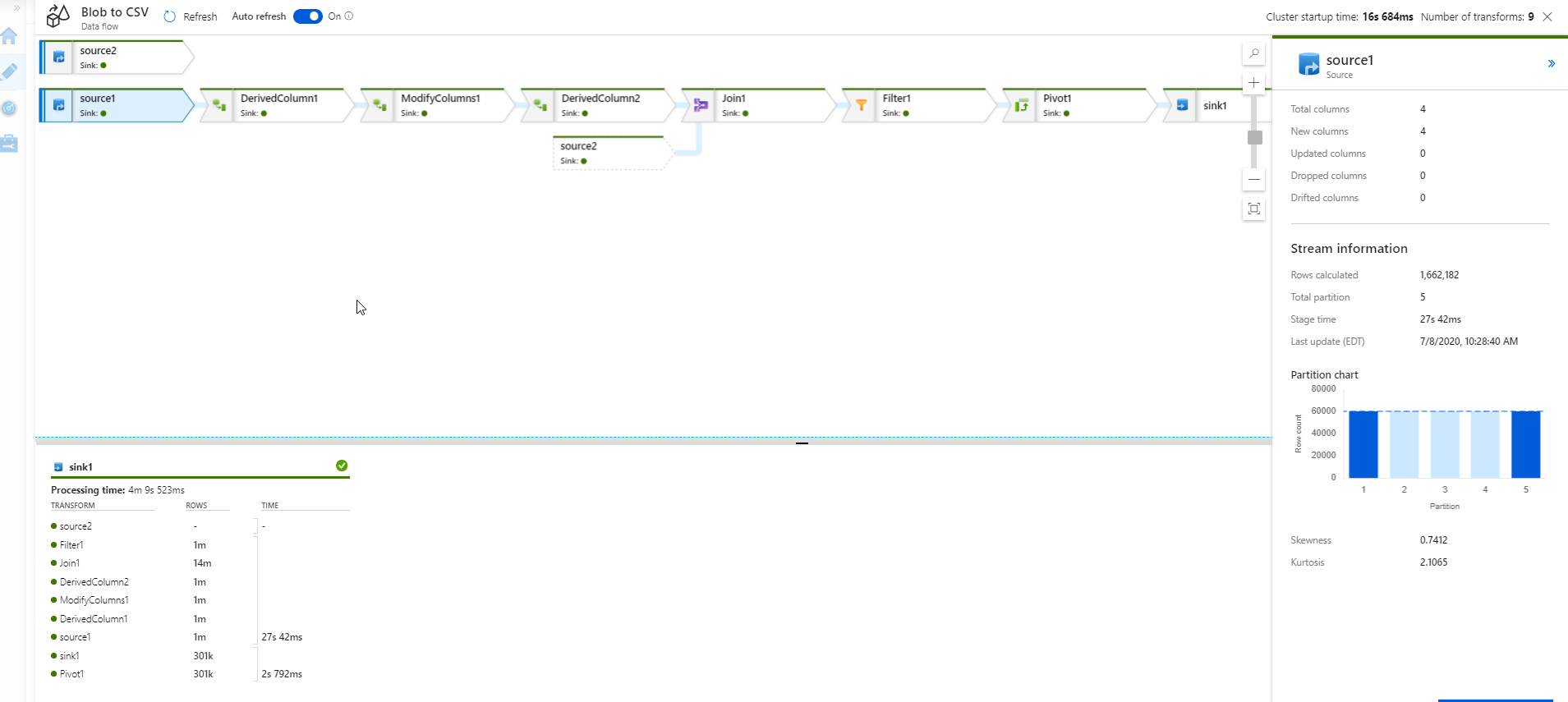
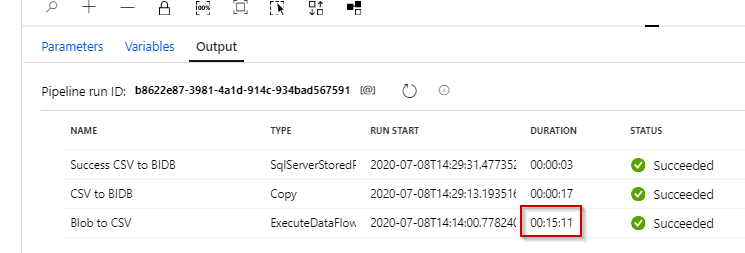
I can't figure out where the bottleneck is in my Mapping Data Flow. The duration says it took around 15 minutes to run, but if I look at the details, it only seems that actual sink processing time is 4 minutes. I don't understand where the remaining 11 minutes is spent. I suspect I am being charged for these 11 mystery minutes.
Perhaps I am interpreting the 'data flow' details visual incorrectly?
' cx='32' cy='32' r='32' /%3E%3Ctext x='50%25' y='55%25' dominant-baseline='middle' text-anchor='middle' fill='%23FFF' %3EA%3C/text%3E%3C/svg%3E)
They're actively answering Flow questions in dedicated Power automate forums here.
https://powerusers.microsoft.com/t5/Microsoft-Power-Automate/ct-p/MPACommunity
--please don't forget to Accept as answer if the reply is helpful--
Regards, Dave Patrick ....
Microsoft Certified Professional
Microsoft MVP [Windows Server] Datacenter Management
Disclaimer: This posting is provided "AS IS" with no warranties or guarantees, and confers no rights.
Thanks for the reply, but that forum is not dealing with Data Factory 'Data Flows', but with Power Automate (which used to be called Microsoft Flow)...confusing naming!

Click on the Sink in your data flow in the monitoring UI. The right-hand panel will show the total processing time at the bottom.
Now, look at the "Stage time" in that same fly-in panel. The difference between those 2 durations is the amount of time it took Databricks to write your data to your destination linked service and perform any post-execution clean-up.
And, yes, before you ask ... we can make this better and clearer and we are working on it! :)
QQ: Are you performing any post-execution scripts or sink to single file in your sink configuration?
' cx='32' cy='32' r='32' /%3E%3Ctext x='50%25' y='55%25' dominant-baseline='middle' text-anchor='middle' fill='%23FFF' %3EKM%3C/text%3E%3C/svg%3E)
Hi @Derek Horrall ,
Following up to see if the above information from Mark Kromer was helpful to analyse the duration of your data flow run? If you are still experiencing the issue, could you please share the details requested by Mark for further assistance - "QQ: Are you performing any post-execution scripts or sink to single file in your sink configuration?"
Please let us know.
----------
Thank you
Hi @Derek Horrall ,
Just checking to see if you are still looking for assistance on this query. If so, please let us know.
Thanks Mark for the response, I am sinking to a single file in a separate path, but that stage runs in about a minute (so it says).
I still don't get where all the time is being spent. I feel like I am missing something fundamental here.
Again, if I look at the duration time, it is around 14/15 minutes. If I look at the details on the 'fly-ins' all of the 'times' say 1 minute or less.
Perhaps a related question, I noticed that as the pipeline is running the values on the 'stages' change on the fly-ins. Could this be changing as each partition is processed? Could the total duration iam seeing be the sum of the times of each partition?
Bottom line is, I would like to get the duration down from the 14/15 mintues I am seeing, but I don't know where the bottleneck is and even if this is something I can control.
' cx='32' cy='32' r='32' /%3E%3Ctext x='50%25' y='55%25' dominant-baseline='middle' text-anchor='middle' fill='%23FFF' %3ESP%3C/text%3E%3C/svg%3E)
I am having same problem, unable to add up the data flow stage time for individual stages to the data flow activity duration shown under pipeline activity run. Apart from that, data flow execution time is inconsistent, can take 10 minutes or 20 minutes, irrespective of the volume of data being processed. I am running a 4 record fuzzy match against 5000 reference records in the data flow. Cluster startup time being few seconds.