High Availabilty - Unable to connect to SQL Instance

Daniel McAuley-Burnett 96 Reputation points
2021-06-18T14:01:35.407+00:00

Hi

I'm hoping somebody can assist with this as I'm currently slipping into a pit of dispair. I actually had HA up and running, but then had to tear everything down due to an outside issue and start again and now (of course) I cannot get HA to work. As per most other people stuck on this, I get the 'the database specified in the database connection string is not available' error after entering my connection string.

My env consists of 1 Gateway, 2 brokers and 2 hosts sitting on seperate VMs running Server 2019. I have a SQL Server 2019 instance running on another VM. I have both SQL Server Native Client 10 & 11 installed across the board (both fail). I have a Security Group configured with both my CB's present and said group has DBCREATOR/SYSADMIN privilages on the SQL instance (CB's were rebooted after being added to said group). DNS/Round Robin is configured for both CBs.

TCP Port 1433 is configured via protocols for the sql instance in SQL Config manager and I've added inbound/outbound rules for TCP Port 1433 and UDP port 1434 on the SQL Server/CB's.

In term of the connection string, I've tried both with and without the port present in the string (conflicting advice on this being required) and I have tried creating the DB first/with without login credentials in the string, but no joy;

DRIVER=SQL Server Native Client 11.0;SERVER=SQL Server\Instance;1433;Trusted_Connection=Yes;APP=Remote Desktop Services Connection Broker;DATABASE=DatabaseName

As I said, I got this working the first time so I have no idea where I'm going wrong now, the internet seems to be full of people with the same issue though.

Any help would be greatly appreciated.

Thank you

Daniel

Windows for business | Windows Client for IT Pros | User experience | Remote desktop services and terminal services
Windows for business | Windows Server | User experience | Other
0 comments No comments
{count} votes

Answer accepted by question author
  1. Daniel McAuley-Burnett 96 Reputation points
    2021-06-21T12:28:24.167+00:00

    Hi.

    Thanks for the reply, that was a typo on my part, the comma was correctly configured in the actual string I was trying.

    I've actually just solved this, I noticed that whilst testing via UDL, I could connect via the named instance (that's all I tested previously), but not port 1433. which pointed (as I suspected) to issues with the TCP config in SQL Configuration Manager.

    I noticed a funny Dynamic Port number configured under 'IPAll' which I removed and hey presto. No clue how it got in there as was blank before.

    FYI I know that the port is not required in the connection string when specifying the Named Instance (and vice versa), but it is still actually permitted to have both and will succeed, one is just redundant.

    Thanks everyone.

    Daniel

    0 comments No comments

3 additional answers

Sort by: Most helpful
  1. Carl Fan 6,891 Reputation points
    2021-06-21T08:02:44.69+00:00

    Hi,
    Have you met any error message prompted up? Check event log if any event log recorded some information.

    Have you gave two RD CB servers db_owner permissions on the database so they both can write to it? Did you try to recreate the security group to check?

    RD Connection Broker HA – SQL Permissions

    https://social.technet.microsoft.com/wiki/contents/articles/10393.windows-server-2012-rds-rd-connection-broker-ha-sql-permissions.aspx

    Also here is a detailed guidance for you to deploy RDS HA.

    Installing SQL for RDS 2012 – RD HA Mode

    https://ryanmangansitblog.com/2013/03/30/configure-sql-for-rds-2012/

    Deploying RD Connection Broker High Availability in Windows Server 2012

    https://ryanmangansitblog.com/2013/03/30/deploying-rd-connection-broker-high-availability-in-windows-server-2012/
    Hope this helps and please help to accept as Answer if the response is useful.
    Best Regards,
    Carl

    0 comments No comments

  2. Daniel McAuley-Burnett 96 Reputation points
    2021-06-21T10:27:20.247+00:00

    Hi, Carl.

    Thanks for replying.

    Absolutely zero errors presented in the Event logs of either the broker I'm trying to connect from or the SQL server I'm trying to connect to. so it's like it's not even getting through. Also worth noting that the connection string works fine when testing via a UDL file and manually configuring an ODBC connection to the SQL instance from the Broker also works fine.

    I have indeed tried recreating the security group and re-adding the brokers (and rebooting) with no luck.

    In terms of giving the security group db_owner permissions, I can't do that if I'm trying to create the DB via the deployment (dedicated server option) as it obviously doesn't exist at that stage. I have tried creating an empty DB manaully first and going via the 'Shared DB' option (giving the security group owner permissions and adding login credentials to the connection string), but I get the same error.

    FYI I used Nedim's guide to deploy this and as I said, it worked fine the first time. The ONLY difference here is that I built a new VM for the SQL server, so I suspect the issue is config there.

    https://nedimmehic.org/category/remote-desktop-services-2016/

    I have also scoured Ryan's blog (that you linked above), but no joy. It's tricky as most of these guides relate to 2012/2016 servers and there are subtle differences in config with 2019.

    One thing that would be great to clarify is relating to the TCP settings in Configuration Manager on the SQL server as there are so many guides online that offer slightly different config guidance.

    Under SQL Native Client 11.0 Configuration (32 & 64-bit) I have set the default port as 1433:

    107574-image.png

    Under Protocols for 'SQL INSTANCE' I have disabled 'Listen All' and set port 1433 under all IP options:

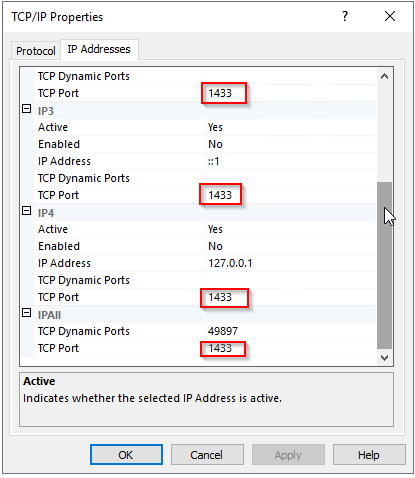
    107623-image.png

    107556-image.png

    Does this look correct? And would you expect me to have to specify port 1433 in the connection string? FYI I've set up firewall exclusions for both TCP Port 1433 and UDP port 1434 on both the SQL Server and Brokers.

    Thank you

    Daniel

    0 comments No comments

  3. Olaf Helper 47,586 Reputation points
    2021-06-21T11:25:12.94+00:00

    DRIVER=SQL Server Native Client 11.0;SERVER=SQL Server\Instance;1433;Trusted_Connection=Yes

    So you have a named instance of SQL Server installed and by the screenshot the instance name is OFFICERDS
    Your connection string is wrong, use either instance name or port, not both. And the IP port must be added with comma separated to server name, you used semikoloon = new parameter, but there is non for IP port.
    This both should work:

    DRIVER=SQL Server Native Client 11.0;SERVER=MachinName\OFFICERDS;Trusted_Connection=Yes ...
    DRIVER=SQL Server Native Client 11.0;SERVER=MachinName, 1433;Trusted_Connection=Yes ...
    

    https://www.connectionstrings.com/microsoft-odbc-driver-17-for-sql-server/


Your answer

Answers can be marked as 'Accepted' by the question author and 'Recommended' by moderators, which helps users know the answer solved the author's problem.

