' cx='32' cy='32' r='32' /%3E%3Ctext x='50%25' y='55%25' dominant-baseline='middle' text-anchor='middle' fill='%23FFF' %3EB1%3C/text%3E%3C/svg%3E)

' cx='32' cy='32' r='32' /%3E%3Ctext x='50%25' y='55%25' dominant-baseline='middle' text-anchor='middle' fill='%23FFF' %3EA%3C/text%3E%3C/svg%3E)
Hello anonymous user,
Thank you for posting here.
Q: Anyone seen any side affects of putting a 25 GB or larger file on Sysvol?
A: Based on the description, you want to put 25 GB or larger file on Sysvol on each DC and the large file is a tool instead of GPO file.
Because the file is not GPO file, we do not recommend that you put this large file in the SYSVOL path on the domain controller, so as not to affect the replication of SYSVOL and the application of GPO.
Here are my suggestions for you reference.
Suggestion 1
If you do not have so many Domain Controllers in your AD forest, you can put this large file into another path instead of SYSVOL path on every Domain Controller manually.
Suggestion 2
Or you can put this large file on each Domain Controller via GPO.
Create a GPO and link it to Default Domain Controller Policy.
Edit the GPO, navigate to Computer Configuration\Preferences\Folders\New folder.
For example:
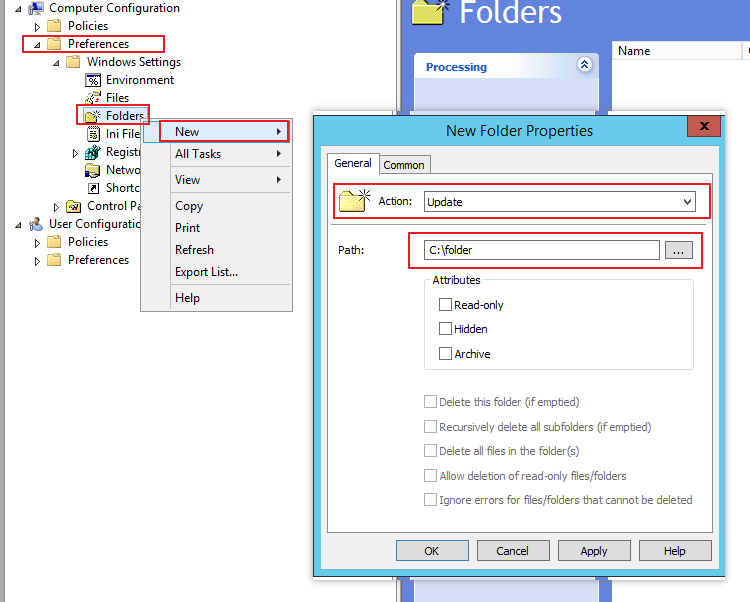
Run gpupdate /force on each DC to make this GPO take effect.
It will create a new folder C:\folder on each DC.
Then put the large tool file on one folder and share this folder.
Copy the large tool file from shared path to local path on each DC via GPO.
Create another GPO and link it to Default Domain Controller Policy.
Edit the GPO, navigate to Computer Configuration\Preferences\Files\New files.
For example:
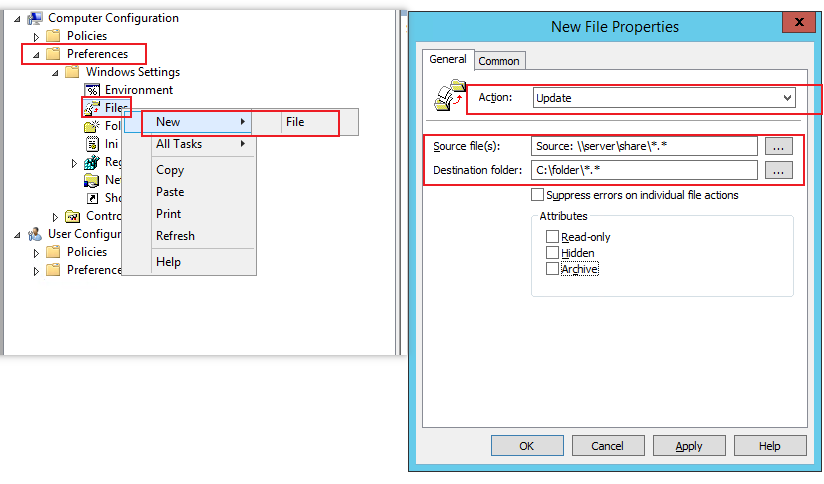
Run gpupdate /force on each DC to make this GPO take effect.
It will Copy the large tool file from shared path to local path on each DC.
Hope the information above is helpful.
Should you have any question or concern, please feel free to let us know.
Best Regards,
Daisy Zhou
============================================
If the Answer is helpful, please click "Accept Answer" and upvote it.