Developer technologies | C#
An object-oriented and type-safe programming language that has its roots in the C family of languages and includes support for component-oriented programming.
This browser is no longer supported.
Upgrade to Microsoft Edge to take advantage of the latest features, security updates, and technical support.
' cx='32' cy='32' r='32' /%3E%3Ctext x='50%25' y='55%25' dominant-baseline='middle' text-anchor='middle' fill='%23FFF' %3ESJ%3C/text%3E%3C/svg%3E)
So this is a new one for me. I have a WinForm with two PictureBox instances. Their default value for Visible is true.
When the auto-generated "this.Controls.Add(this.___PictureBox);" gets invoked, Visible gets set to false.
If I try to set it back to true, [External Code] sets it back to false.
If I add a VisibleChange event handler to set Visible back to true, it leads to a stack overflow with only external code being executed.
Looking through PictureBox's documentation, I can't see anything that would force the PictureBox to not be visible. No exceptions are thrown, and given that Visible is a property, there is no error code returned.
Does anybody happen to know what I am missing?
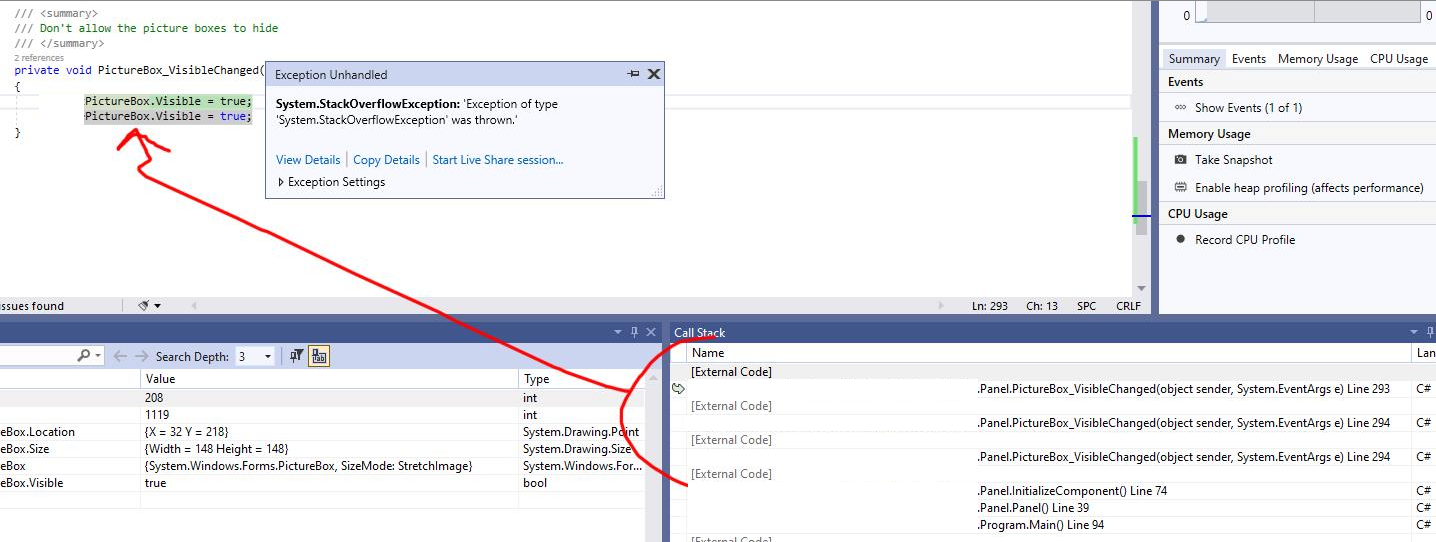
I tried replacing the PictureBox with a Panel and using BackgroundImage, and the behavior was the same. So something in this.Controls.Add is causing the visibility of components to be force hidden.
And to be clear - this undesired behavior occurs when the form is showing. So this is not some issue where Visible will always be false when the parent Form isn't showing.
With hours of life wasted - it appears that the problem is this:
The Form I was instantiating was not initially displayed. It waited for a Windows event from an external process to then display. Because of this, no Form was ever visible at instantiation.
If instead of creating the Form at start-up and defer displaying it, I create the Form and display it off-screen at instantiation, everything magically works despite no other logic changes.
This feels like a bug in the .NET Framework somewhere. Best guess is a simple Control.Visible value getting cached somewhere that does not get updated when Control.Visible does, or something similar in Control.Load/Control.Show/etc. Or at a minimum, documentation missing from the MSDN.
I know if I provide Microsoft with a reproducible test case for this, they will say "you need enterprise level support to get us to look into this". And I know if I get my company to open a ticket about this, they will charge us thousands to come back with the response of "Have you seen this thread? This is how someone else worked around it" instead of actually fixing the underlying issue.
So hopefully I saved someone hours of their life should they encounter this.

Unsubscribe from the event e.g.
public Form1()
{
    InitializeComponent();
    pictureBox1.VisibleChanged += PictureBox1OnVisibleChanged;
}
private void button1_Click(object sender, EventArgs e)
{
    pictureBox1.Visible = false;
}
private void PictureBox1OnVisibleChanged(object? sender, EventArgs e)
{
    pictureBox1.VisibleChanged -= PictureBox1OnVisibleChanged;
    pictureBox1.Visible = true;
    pictureBox1.VisibleChanged += PictureBox1OnVisibleChanged;
}
Thank you for taking the time to reply, Karen. But this turned out to be a much more complicated issue.
When a Control's parent is not Visible, setting a child component's Visible property will understandably fail as the parent Control has precedence.
Should an application not show any Form on start-up, there appears to be a scenario in which showing a Form later will not propagate the parent's new Visible flag to child components.
This causes attempts to set child Control's Visible flag to true to fail, as the Control believes the parent Control's Visible flag is set to false when it is actually set to true.
The workaround for this is to display the Form at start-up off-screen as opposed to initializing its Visible state to false. You can hide the parent Control shortly after, but there is a bug somewhere in the initiation code path.