Microsoft 365 Insider | Loop | Windows
A collaborative workspace app in Microsoft 365 designed to help teams co-create, stay organized, and work together in real time across apps and devices.

This browser is no longer supported.
Upgrade to Microsoft Edge to take advantage of the latest features, security updates, and technical support.
' cx='32' cy='32' r='32' /%3E%3Ctext x='50%25' y='55%25' dominant-baseline='middle' text-anchor='middle' fill='%23FFF' %3EA%3C/text%3E%3C/svg%3E)
The Loop access via Microsoft 365 subscriptions page mentions how after the Public Preview period ends, "the only capabilities that may be lost after the grace period are creating new workspaces, adding members to workspaces, and removing members from workspaces." However, it makes no mention of pages within workspaces.
Does this mean new pages can still be created? Can the content in existing pages be modified?
And what about the app for Loop, will it still be accessible or will it have to be accessed through the Microsoft 365 web app or another means?
A collaborative workspace app in Microsoft 365 designed to help teams co-create, stay organized, and work together in real time across apps and devices.
Locked Question. This question was migrated from the Microsoft Support Community. You can vote on whether it's helpful, but you can't add comments or replies or follow the question.
Hello Arquel,
Yes, I have provided feedback a few times. Once I even noticed the bug I reported was fixed, so that was much appreciated.
I was discussing Loop no longer being available with one of my coworkers, wherein I went back to the Loop access via Microsoft 365 subscriptions page. I saw this page has been updated to say those with an A3 subscription will maintain access. This is the subscription my company provides us with, so I will not lose access after all!
Thank you for your all your help.
Hello Ryan,
Thank you for your response.
Yes, it also the same for sub-pages. For the location of it, I presume that it will remain where it was originally created and can not be moved. For this, I highly suggest keeping in touch with possible updates in the near future. Even if it will end the preview state, we always suggest to send a feedback on this as our engineering team are continuously working on improving it's functionality.
In the bottom right corner, select Help> Give feedback.
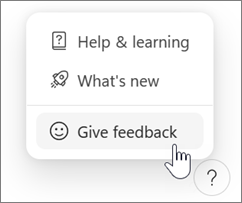
On Android or iOS, tap your profile picture at the top left to find Help and feedback.
I hope this information helps!
Regards,
Arquel C.
Microsoft Moderator
Hi Arquel,
This does make things more clear about what can and cannot be done, thank you!
I currently have a few pages that have sub-pages. I presume the changes you mentioned about pages in your initial reply will be the same for sub-pages, correct? Also, will editing capabilities for pages include the ability to move the location of where they are stored? For example, move a sub-page under another page or directly under the workspace so it then becomes a main page itself?
Hello Ryan,
Thank you for posting here in Microsoft Community.
Loop is a new app that allows you to create and collaborate on pages and workspaces with your team. Loop is currently in Public Preview, which means that you can use it for free until it becomes generally available. After the Public Preview period ends, you will need a Microsoft 365 subscription that includes Loop to continue using it.
You mentioned that you are confused about the capabilities that may be lost after the grace period. Let me clarify that for you. The grace period is a time window after the Public Preview ends, during which you can still access your existing workspaces and pages, but you cannot create new ones or modify the membership of your workspaces. This means that you can still view and edit the content of your existing pages, but you cannot create new pages or delete existing ones. You can also still access the Loop app on your devices,
If you want to keep using Loop without any limitations, you will need to purchase a Microsoft 365 subscription that includes Loop before the grace period ends.
I hope this answers your questions. If you have any further questions or issues, please let me know and I will be glad to help you.
Regards,
Arquel C.
Microsoft Moderator