Microsoft Security | Microsoft Entra | Microsoft Entra External ID
Managing external identities to enable secure access for partners, customers, and other non-employees

This browser is no longer supported.
Upgrade to Microsoft Edge to take advantage of the latest features, security updates, and technical support.
' cx='32' cy='32' r='32' /%3E%3Ctext x='50%25' y='55%25' dominant-baseline='middle' text-anchor='middle' fill='%23FFF' %3ES%3C/text%3E%3C/svg%3E)
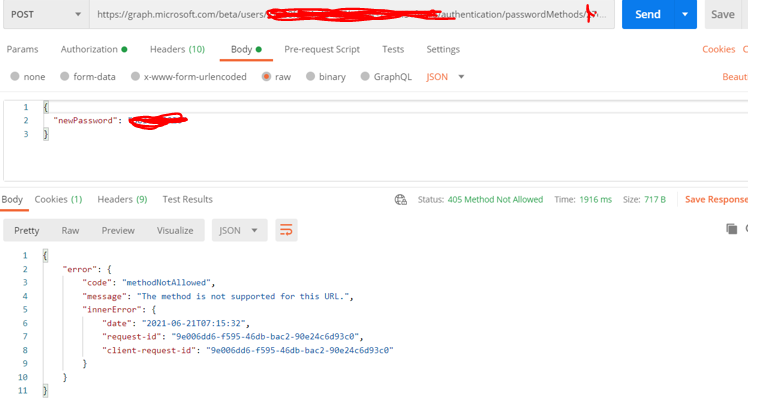 POST /users/{id | userPrincipalName}/authentication/passwordMethods/{id}/resetPassword
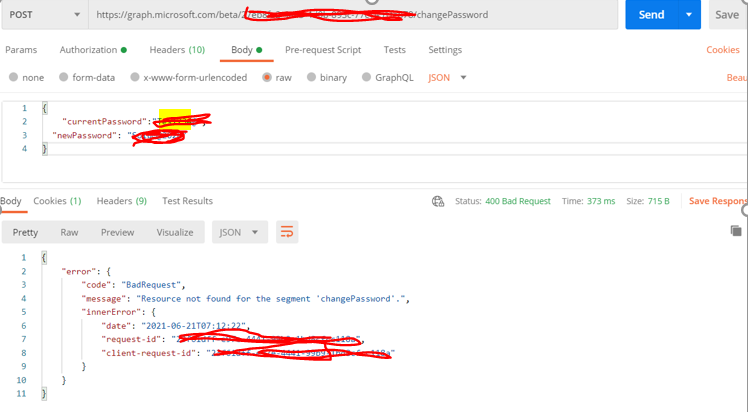
POST https://graph.microsoft.com/beta/me/changePassword
POST https://graph.microsoft.com/v1.0/me/changePassword
tried above apis. but all the apis are giving below error

Hi @SRI · Thank you for reaching out.
In the changePassword call, you need to update the call to either /beta/users/object_id_or_upn_of_user or /beta/me. Reason why you are getting error resource not found is, because you are passing /beta/object_id_of_the_user.
Directory.AccessAsUser.All - Required for changePasswordUserAuthenticationMethod.ReadWrite.All - Required for resetPasswordPlease "Accept the answer" if the information helped you. This will help us and others in the community as well.
Hi @AmanpreetSingh-MSFT
Thank you for your response.
UserAuthenticationMethod.ReadWrite.All - Required for resetPassword -- this permissions is provided.
can you give an example or correct api for reset password?
Hi @SRI · Below call works.
Call: POST https://graph.microsoft.com/beta/users/{id | userPrincipalName}/authentication/passwordMethods/{id}/resetPassword
Body:
{
"newPassword": "newPasswordvalue",
}
If this doesn't work, try creating new member user and assign with Global Admin rights in your B2C tenant. Don't use guest or signed-up user for this purpose.

I wrote a Blog article a few weeks ago at (https://www.msxfaq.de/cloud/graph/graph_password.htm) But it is german. So Sorry for that. Maybe Google/Bing Translation might help.
The Code is langauge independend. I got it working for my testlab user "******@msxfaq.net" with the following two powershell lines.
You have to collect the accesstoken first, of course.
$passwordmethods = Invoke-RestMethod -Method GET
-Headers @{"Authorization" = "Bearer $($accesstoken)"} -ContentType "application/json"
-URI "https://graph.microsoft.com/beta/users/clouduser1%40msxfaq.net/authentication/passwordMethods"
Invoke-RestMethod -Method POST
-Headers @{"Authorization" = "Bearer $($accesstoken)"} -ContentType "application/json"
-URI "https://graph.microsoft.com/beta/users/clouduser1%40msxfaq.net/authentication/passwordMethods/$($passwordmethods.value.id)/resetPassword" `
-body "{""newPassword"": ""superSecretPasswordHere!""}"
The only issue i have not solved yet: the user has to change it's password at the first logon and i have not found a way to disabled that.
It works with the old GraphAPI at graph.windows.net
' cx='32' cy='32' r='32' /%3E%3Ctext x='50%25' y='55%25' dominant-baseline='middle' text-anchor='middle' fill='%23FFF' %3EG%3C/text%3E%3C/svg%3E)
how to change password for the logged in user using Change Password call?.
Directory.AccessAsUser.All - Required for changePassword - this permission is provided
Calling Change password for Microsoft Graph Api using
Users[User Object Id].ChangePassword(current pswd, new pswd)
the System throws Exception - Access to change password operation is denied.
am i missing something here?
' cx='32' cy='32' r='32' /%3E%3Ctext x='50%25' y='55%25' dominant-baseline='middle' text-anchor='middle' fill='%23FFF' %3EK%3C/text%3E%3C/svg%3E)
Hi
I have an Azure AD B2C App registration and I want to be able to change passwords for users under that App with the Graph Api.
But I keep getting an exception that the 'Access to change password operation is denied' - I have tried to give the App different roles in the AD (Password and Helpdesk Admin) - but nothing seems to help.
I can not find this permission 'Directory.AccessAsUser.All' - under Graph API and Delegated Permissions I only have "openid" and "offline_access" and I can not find it under Delegated Permissions.
Any clue and help will be much appreciated. :)
Thanks in advance.
@Kim • B2C apps do not support all Graph operations as of now. These permissions will be visible only when the application is registered using one of the below-highlighted options:
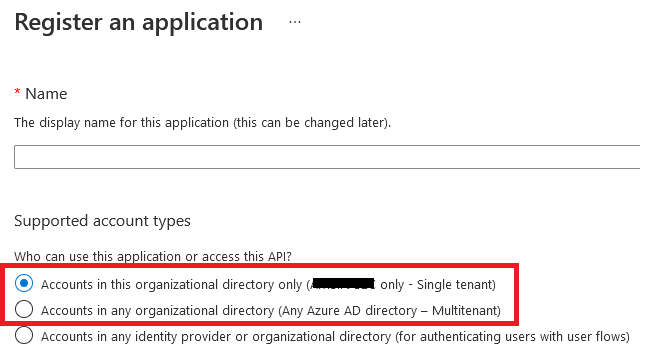
Thanks. I have supported account types "All users" - is that why? Also, when will the graph operations be available for changing passwords?
' cx='32' cy='32' r='32' /%3E%3Ctext x='50%25' y='55%25' dominant-baseline='middle' text-anchor='middle' fill='%23FFF' %3EI2%3C/text%3E%3C/svg%3E)
@Kim I got it to work by assigning the role 'Password administrator' to my Azure AD B2C app registration and giving the following API permissions: Directory.ReadWrite.All and User.ReadWrite.All (both type: application).
I am updating the password using Graph as follows:
                   User user = new User
                    {
                        PasswordProfile = new PasswordProfile
                        {
                            ForceChangePasswordNextSignIn = false,
                            Password = "myNewPassword"
                        }
                    };

                    await graphServiceClient.Users[userId].Request().UpdateAsync(user);
' cx='32' cy='32' r='32' /%3E%3Ctext x='50%25' y='55%25' dominant-baseline='middle' text-anchor='middle' fill='%23FFF' %3EJB%3C/text%3E%3C/svg%3E)
Thank you very much!
Worked for me
' cx='32' cy='32' r='32' /%3E%3Ctext x='50%25' y='55%25' dominant-baseline='middle' text-anchor='middle' fill='%23FFF' %3ESJ%3C/text%3E%3C/svg%3E)
Worked for me as well. This information is really buried, so appreciate the help.