

Powershell - I get difference in output returned

Erwin van den Born 51 Reputation points
2021-06-24T06:17:01.923+00:00

Hi all,

I have been struggling with a Powershell script for expired passwords in my domain. I run the following script as a domain admin :

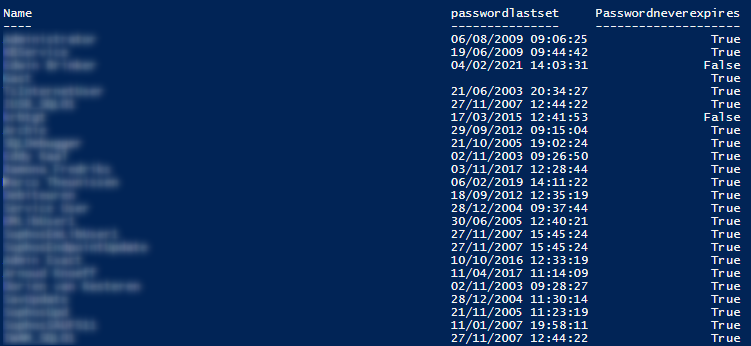
get-aduser -filter * -properties passwordlastset, passwordneverexpires |ft Name, passwordlastset, Passwordneverexpires  

On my own laptop I get a proper resonse with all the users and the information. 108845-2021-06-24-08h08-55.png

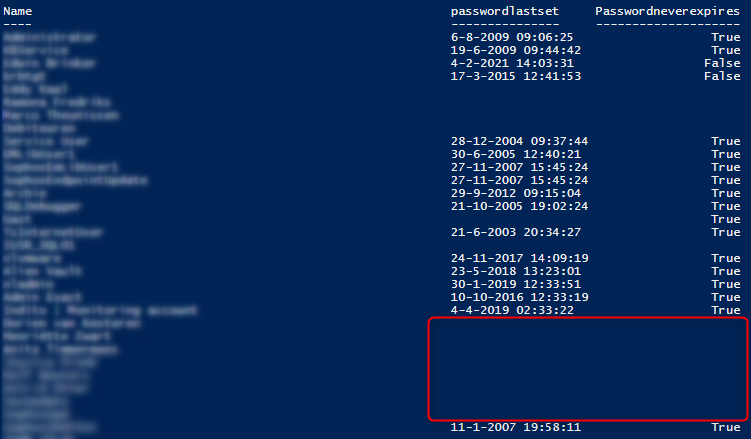
When I run the same script on a Domain Controller, I get different (incomplete) information: 108883-dc.png

Any idea?

Thanks in advance!

Windows for business | Windows Client for IT Pros | Directory services | Active Directory
Windows for business | Windows Server | User experience | PowerShell
0 comments No comments
{count} votes

4 answers

Sort by: Most helpful
  1. Anonymous
    2021-06-25T07:48:25.123+00:00

    Hi,

    Welcome to share here!
    Did you login with the same user?
    Please try to run the PowerShell with administrator and run the script again.
    Did you get the same result on all the DCs?

    Then check the passwordlastset attribute of the users with blank on DCs.
    If possible, please share a screenshot here!

    Best Regards,

    0 comments No comments

  2. Erwin van den Born 51 Reputation points
    2021-06-25T08:24:10.01+00:00

    Hi, thanks for your reply.

    I did not login as the same user as I run Powershell as a different user. The result on both DC's is the same. Running the script on a DC as administratror (so run as admin instead of run as different user with domain admin credentials) does work.

    As I want to run this script scheduled on a daily basis, I need to run this under a Service Account that we use for these kind of scheduled tasks.


  3. Parvez Gadhia 1 Reputation point
    2021-06-26T09:03:23.307+00:00

    Just give a try using the same command with selecting different DC if you have more than one dc in your environment.

    get-aduser -filter * -Server DC01.domain.local -properties passwordlastset, passwordneverexpires |ft Name, passwordlastset, Passwordneverexpires

    get-aduser -filter * -Server DC02.domain.local -properties passwordlastset, passwordneverexpires |ft Name, passwordlastset, Passwordneverexpires


  4. Anonymous
    2021-06-29T06:16:57.327+00:00

    Hi,

    From my side i will try to:
    1, Disable the UAC temporarily
    2, When configure the schedule task, select the option:
    Run with the highest privileges
    Best Regards,


Your answer

Answers can be marked as 'Accepted' by the question author and 'Recommended' by moderators, which helps users know the answer solved the author's problem.