Community Center | Not monitored
Tag not monitored by Microsoft.

This browser is no longer supported.
Upgrade to Microsoft Edge to take advantage of the latest features, security updates, and technical support.
' cx='32' cy='32' r='32' /%3E%3Ctext x='50%25' y='55%25' dominant-baseline='middle' text-anchor='middle' fill='%23FFF' %3EEC%3C/text%3E%3C/svg%3E)
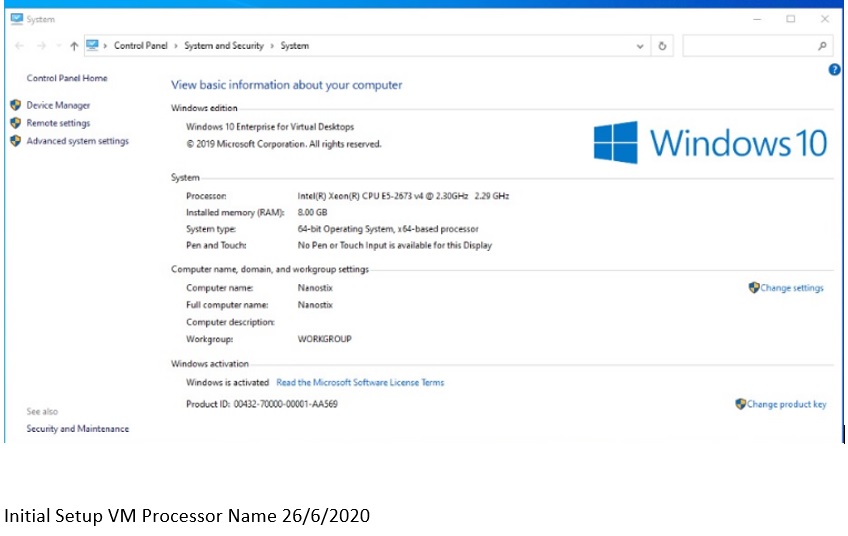
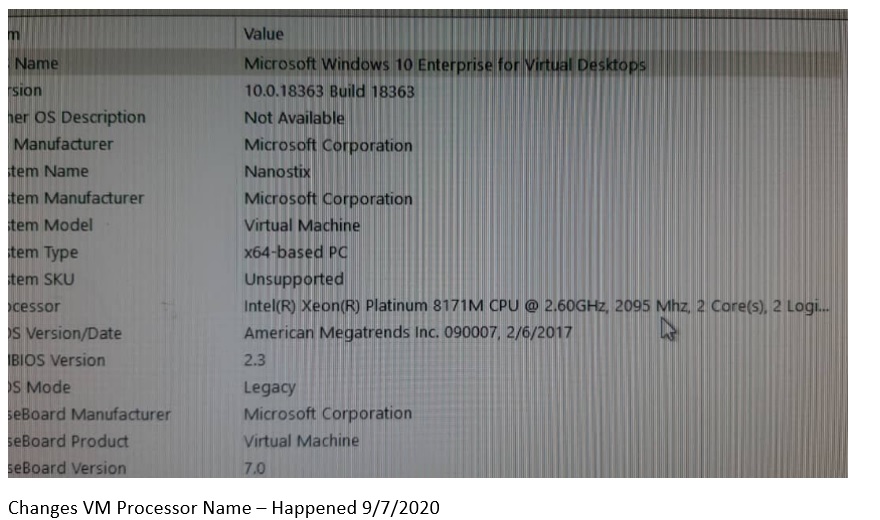
Please help me to check why the VM Processor Names Changes?
I didn't perform any VM size changes or scale the VM.
Hope to hear from you soon.
Thanks.
' cx='32' cy='32' r='32' /%3E%3Ctext x='50%25' y='55%25' dominant-baseline='middle' text-anchor='middle' fill='%23FFF' %3EA%3C/text%3E%3C/svg%3E)
Windows 10 Virtualization is not currently supported here on QnA. They're actively answering question in dedicated forums here.
https://social.technet.microsoft.com/Forums/en-US/home?forum=win10itprovirt
--please don't forget to Accept as answer if the reply is helpful--
Regards, Dave Patrick ....
Microsoft Certified Professional
Microsoft MVP [Windows Server] Datacenter Management
Disclaimer: This posting is provided "AS IS" with no warranties or guarantees, and confers no rights.

Hi,
Is this a virtual machine running on Azure (Azure VM)?
If this is the case, Microsoft periodically updates its platform to improve the reliability, performance, and security of the host infrastructure for virtual machines. So in your case it could be that Microsoft has changed hardware of some Hypervisors in their data centers, which could be one reason to why you are seeing a different processor.
Best regards,
Leon
Noted. But can I stop this from happening? Because I have install one of the software licence which validate again processor name. If the processor name changes, the licence key not valid anymore. So I cannot access to the software. Is there any method that I can configure to stop this processor name changes? Please advise. Thanks.
I’m afraid you can’t, Microsoft changes their underlying hardware every now and then to make sure the hardware is up-to-date and running the latest possible hardware.
You might want to contact your software’s vendor and check with them how to deal with this.
Noted. From your experience previously. How frequent Microsoft changes this hardware yearly?
I don’t have any information on this, but Microsoft are running Intel and AMD processors in their hardware so basically when Intel/AMD releases new CPU generations/models.
Some information here:
https://azure.microsoft.com/en-in/blog/find-out-when-your-virtual-machine-hardware-is-degraded-with-scheduled-events
(Please don't forget to accept helpful replies as answer)