How to bypass initial user authentication requirement for Office 365 accounts

Anonymous
2021-04-13T11:57:01+00:00

Hi,

I am struggling a lot with freaking Microsoft authentication requirements. A company has 100+ new users, which we migrated to Office 365/Microsoft 365 Business Premium subscription.

Now when we setup user's new Exchange online mail into installable OUTLOOK 365, it annoys me with:

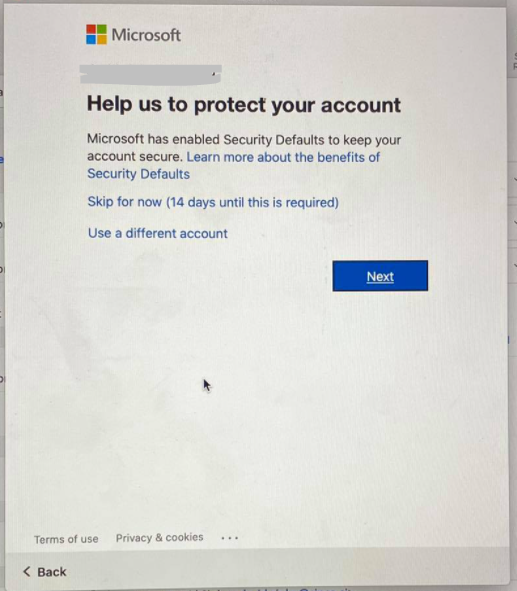
"Help us protect your account" and if I click:

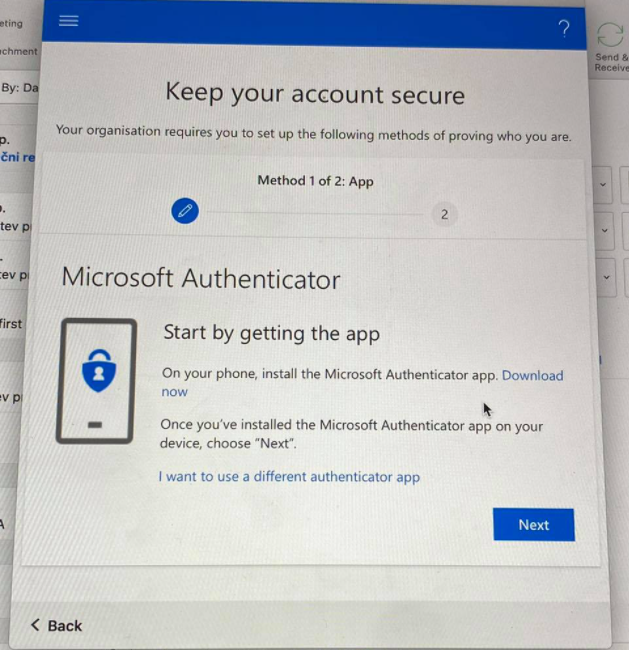
  • NEXT --> 2nd step "Keep account secure" --> Microsoft Authenticator
  • SKIP (14 days until this is required) --> 2nd step is the same "Keep account secure" --> Microsoft Authenticator

I have DISABLED in Azure AD admin under USERS --> MULTI-FACTOR AUTH STATUS --> DISABLED

????

How can we disable this annoying step?

We just want to manage users centraly, no 2FA, we do not want to involve users into security related issues, we manage all from admin perspective.

Please, help, we're stuck for few days now.
Whatever I click, I get to the same 2nd step (cannot SKIP!):
Outlook | Windows | Classic Outlook for Windows | For home

Locked Question. This question was migrated from the Microsoft Support Community. You can vote on whether it's helpful, but you can't add comments or replies or follow the question.

0 comments No comments
{count} votes
Answer accepted by question author
  1. Anonymous
    2021-04-13T14:38:49+00:00

    Hi Andrej Pirman,

    Thank you for choosing Microsoft community.

    Regarding your concern, try to disable Security defaults to see it works for your scenario. See Disabling security defaults

    Multi-factor authentication is an important method to keep accounts in secure. See What is: Multifactor Authentication (microsoft.com).

    Hope it helps!

    Thanks & Stay safe,

    Qian

    4 people found this answer helpful.
    0 comments No comments

2 additional answers

Sort by: Most helpful
  1. Anonymous
    2021-04-13T21:56:08+00:00

    Thank you, Qian! That was exactly what I was looking for. Could not found that tiny little link Manage Security defaults under  Azure Active Directory > Properties. I was looking under Security instead.

    And yes, MFA is important, but in case of AD - if you ask me - adds additional security complications to end-user, 99% of users will not engage with it properly, so it calls for tech help in 99% of cases, which is not what AD was meant for. If we'd like user-self-managed security, we'd buy other product.

    7 people found this answer helpful.
    0 comments No comments
  2. Anonymous
    2021-04-17T12:49:13+00:00

    Thank you for your feedback sir!

    You might find the following articles helpful. Just for your reference:

    Thanks & Stay safe,

    Qian

    0 comments No comments