Microsoft 365 and Office | SharePoint | For business | Windows
A group of Microsoft Products and technologies used for sharing and managing content, knowledge, and applications.

This browser is no longer supported.
Upgrade to Microsoft Edge to take advantage of the latest features, security updates, and technical support.
' cx='32' cy='32' r='32' /%3E%3Ctext x='50%25' y='55%25' dominant-baseline='middle' text-anchor='middle' fill='%23FFF' %3ES%3C/text%3E%3C/svg%3E)
Hi,
We're trying to resolve an exception occurring when we attempt to delete a term from the term store.
Connection to graph client:
var cert = new System.Security.Cryptography.X509Certificates.X509Certificate2(@"cert.pfx", "{password}");
IConfidentialClientApplication clientApp = ConfidentialClientApplicationBuilder
                .Create(appId)
                .WithTenantId(tenantId)
                .WithCertificate(cert)
                .Build();

            var authProvider = new ClientCredentialProvider(clientApp);
     graphClient = new  MicrosoftGraphBeta.Microsoft.Graph.GraphServiceClient(authProvider);
This is the code being used to attempt to delete a single term using the SharePoint API via the PnP Framework package:
string siteUrl = "https://xxxx.sharepoint.com";
using (var clientContext = new PnP.Framework.AuthenticationManager(
    appId,
    @"cert.pfx",
    "{password}",
    "xxxx.onmicrosoft.com")
    .GetContext("https://xxxx.sharepoint.com")) {
TaxonomySession taxonomySession =  TaxonomySession.GetTaxonomySession(clientContext);
TermGroup termGroup = termStore.Groups.GetByName("ADGroups");
    TermSet termSet = termGroup.TermSets.GetByName("TopLevel");
Term term = termSet.Terms.GetByName("GroupOne");
term.DeleteObject();
    termStore.CommitAll();
clientContext.ExecuteQuery();
}
Packages (note we have tried older versions of these packages too):
The above code fails with the following error:
Microsoft.SharePoint.Client.ServerUnauthorizedAccessException: 'The current user has insufficient permissions to perform this operation.'
Other attempts using previous versions of the packages has resulted in:
Microsoft.SharePoint.Client.ServerUnauthorizedAccessException: 'Access denied. You do not have permission to perform this action or access this resource.'
These errors continue to occur when the following PowerShell command has been run to enable legacy authentication and waiting 24 hours:
Set-SPOTenant -LegacyAuthProtocolsEnabled $True
The Azure App has been granted admin approval on the following permissions for the Graph API under both application and delegated contexts:
The Azure App has been granted admin approval on the following permissions for SharePoint under the delegated context:
The Azure App has been granted admin approval on the following permissions for SharePoint under the application context:
Looking for assistance in how to resolve the error. Looks like there is a permission missing somewhere.
Thanks.
' cx='32' cy='32' r='32' /%3E%3Ctext x='50%25' y='55%25' dominant-baseline='middle' text-anchor='middle' fill='%23FFF' %3EMM%3C/text%3E%3C/svg%3E)
Hi @ShaneMarsden ,
Per my test, I got the same result as yours on my end. And I find the solution in this article: https://learn.microsoft.com/en-us/sharepoint/dev/solution-guidance/elevated-privileges-in-sharepoint-add-ins
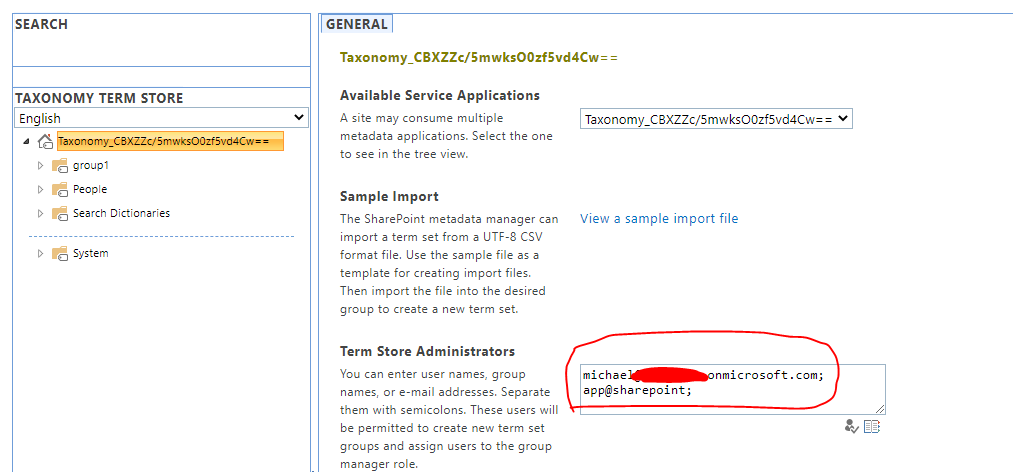
To allow to use app-only access for writing to Taxonomy Term Store, you'll need to explicitly add app@Srini M identity as a Term Store Administrator in the Taxonomy Term Store administrative user interface. This grants the app-only identity needed permissions for write operations. You do not need to perform this step for read operations.
So you need to add app@sharepoint identity as a Term Store Administrator, like the below.
Note: you need to add it in classic term store: https://xxxx-admin.sharepoint.com/_layouts/15/termstoremanager.aspx
If an Answer is helpful, please click "Accept Answer" and upvote it.
Note: Please follow the steps in our documentation to enable e-mail notifications if you want to receive the related email notification for this thread.
' cx='32' cy='32' r='32' /%3E%3Ctext x='50%25' y='55%25' dominant-baseline='middle' text-anchor='middle' fill='%23FFF' %3EJR%3C/text%3E%3C/svg%3E)
When I try and add the app@sharepoint to the term store administrators I get an error. Is there an updated answer for the new term store management page?