Microsoft 365 and Office | Install, redeem, activate | For business | Windows
Processes in Microsoft 365 for setting up Office apps, redeeming product keys, and activating licenses.

This browser is no longer supported.
Upgrade to Microsoft Edge to take advantage of the latest features, security updates, and technical support.
' cx='32' cy='32' r='32' /%3E%3Ctext x='50%25' y='55%25' dominant-baseline='middle' text-anchor='middle' fill='%23FFF' %3ELX%3C/text%3E%3C/svg%3E)
My word ex figuration is :
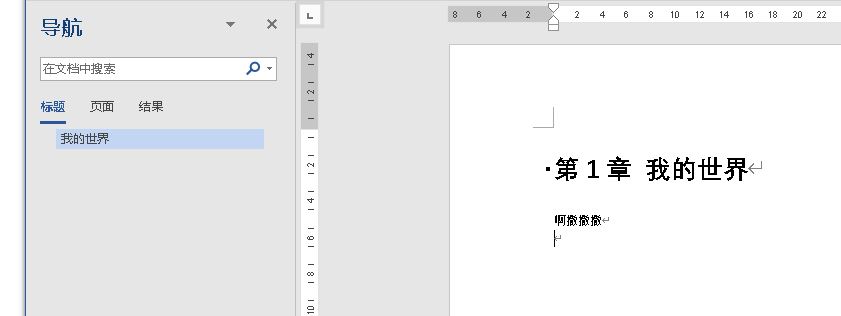
in the window of "导航", word can not show the "第1章“ which is the content of a MacroButton.
Why? And How can I show the content of MacroButton in Navigation window?
Thanks

Hi @lz x ,
I can reproduce this problem in my Word 365, in my opinion this by design behavior for MacroButton field.
I suggest you can try to change it to custom number format, you can go to Home- Paragraph- Define New Number Format...:
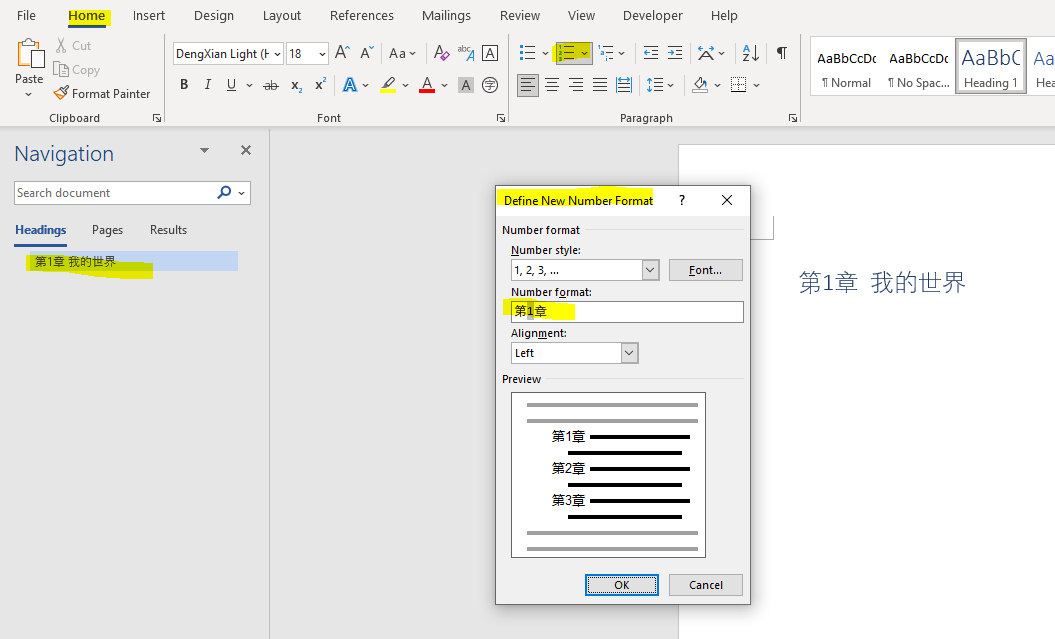
Try this method and see if the information was helpful. Please let us know if you would like further assistance.
If the response is helpful, please click "Accept Answer" and upvote it.
Note: Please follow the steps in our documentation to enable e-mail notifications if you want to receive the related email notification for this thread.
Hi @lz x ,
Just checking in to see if the information was helpful. Please let us know if you would like further assistance.
If the response is helpful, please click "Accept Answer" and upvote it.
Note: Please follow the steps in our documentation to enable e-mail notifications if you want to receive the related email notification for this thread.