Azure Synapse Analytics
An Azure analytics service that brings together data integration, enterprise data warehousing, and big data analytics. Previously known as Azure SQL Data Warehouse.
This browser is no longer supported.
Upgrade to Microsoft Edge to take advantage of the latest features, security updates, and technical support.
' cx='32' cy='32' r='32' /%3E%3Ctext x='50%25' y='55%25' dominant-baseline='middle' text-anchor='middle' fill='%23FFF' %3EJV%3C/text%3E%3C/svg%3E)
I have a Conditional Split transform feeding three branches, one of which has multiple streams to write to multiple different tables, like so:
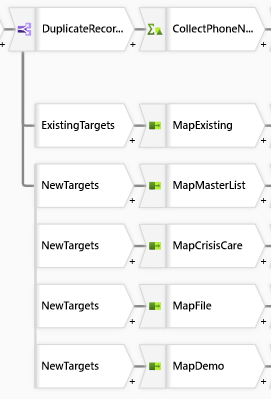
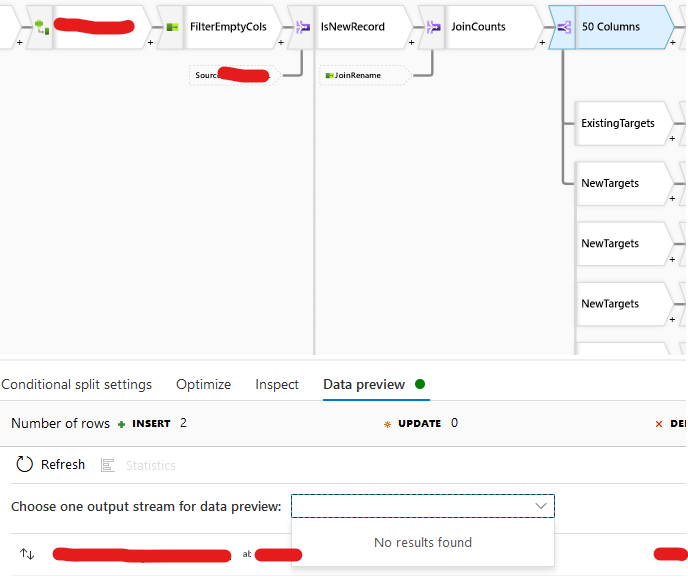
But when I run Data preview in Debug mode, it won't show me any preview except the top-most case, and doesn't switch if I click another case and rerun the preview task - same result only. Any suggestions?
An Azure analytics service that brings together data integration, enterprise data warehousing, and big data analytics. Previously known as Azure SQL Data Warehouse.
An Azure service for ingesting, preparing, and transforming data at scale.
For posterity: this seems to be an intermittent issue. I'm not sure what causes the drop-down to fail to load, but I can currently see the 3 different output streams and their previews. Interestingly, the previews are not always correct for the given output stream, and I've flipped back and forth between them a few times now with differing row counts (from 2 to 21) for the same output stream.

Hi @Jeff vG ,
Following up to check is below provided answer helps. Please Accept Answer if that helps. Accepting answer will help us and community too. Thank you.
@Jeff vG ,
Just checking is provided answer helped you? Please Accept Answer. So that community will get benefit from it. Thank you
Hi @Jeff vG ,
Could you please accept below provided answer if that works for you. Accepting answer will help community. Thank you
Hi @Jeff vG ,
Thank you for posting your query in Microsoft Q&A. Yes, it looks like an intermittent issue.
If you face any such strange intermittent issue while data previewing. Please try to modify source transformation name(for example, source1 to source2 something like that) and then try data preview again. That will help to overcome.
Hope this will help.
--------------------------------
accept an answer if correct. Original posters help the community find answers faster by identifying the correct answer. Here is how. ' cx='32' cy='32' r='32' /%3E%3Ctext x='50%25' y='55%25' dominant-baseline='middle' text-anchor='middle' fill='%23FFF' %3ESA%3C/text%3E%3C/svg%3E)
Hey Maheer,
Thanks..Renaming the output stream names has helped me in getting in resolving this issue.
Hi @Syed Althaf ,
Thank you for sharing your work around.