Outlook | Windows | Classic Outlook for Windows | For business
Using classic Outlook for Windows in business environments

This browser is no longer supported.
Upgrade to Microsoft Edge to take advantage of the latest features, security updates, and technical support.
' cx='32' cy='32' r='32' /%3E%3Ctext x='50%25' y='55%25' dominant-baseline='middle' text-anchor='middle' fill='%23FFF' %3EJV%3C/text%3E%3C/svg%3E)
see attchement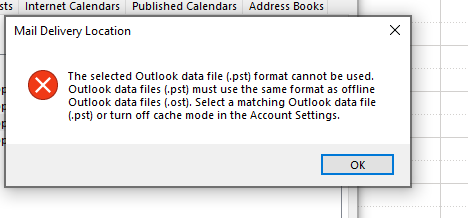
Using classic Outlook for Windows in business environments
' cx='32' cy='32' r='32' /%3E%3Ctext x='50%25' y='55%25' dominant-baseline='middle' text-anchor='middle' fill='%23FFF' %3ECM%3C/text%3E%3C/svg%3E)
Hi @Johan Verhoeven - Milestone Consulting ,
My suggestion:
As I know, similar issues might occur in an environment with several IMAP accounts and Exchange accounts in one Outlook profile, when users try to set the data file of an IMAP account as default, this error would pop up. Is this case the same as your issue?
If yes, through my research, I’m afraid that it is an expected behavior and is by design.
As a workaround, it is suggested that you could add your accounts in a new profile and remember to disable the Exchange mode when firstly configuring the Exchange account. For specific steps, please refer to:
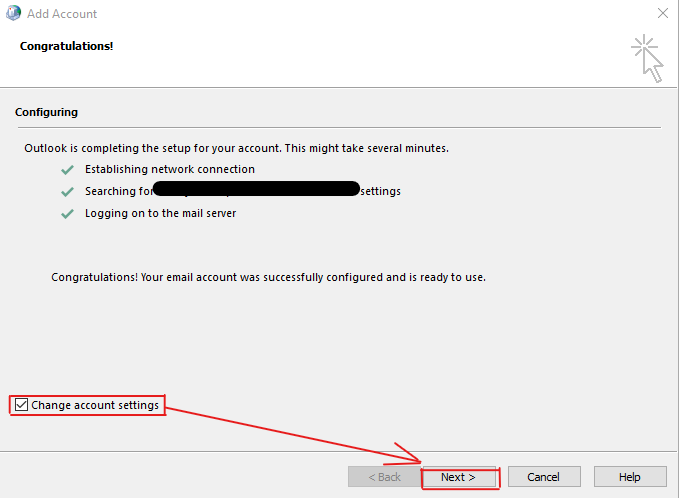
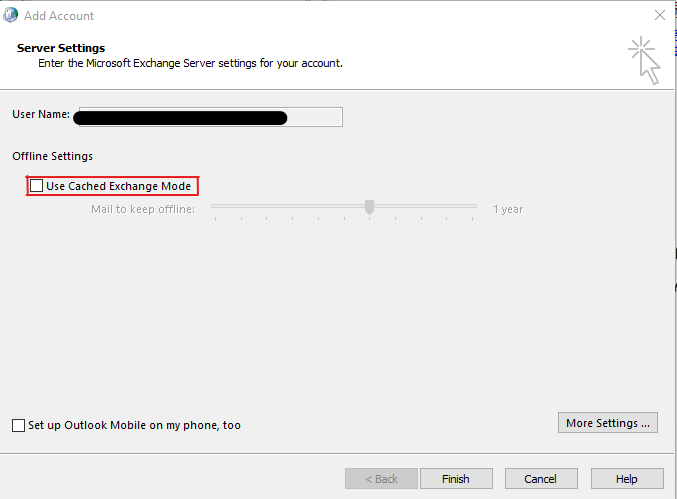
By the way, considering the interference between different accounts in one profile, it is suggested that you could configure different accounts in different profiles if possible.
Hope the above can help you!
If the response is helpful, please click "Accept Answer" and upvote it.
Note: Please follow the steps in our documentation to enable e-mail notifications if you want to receive the related email notification for this thread.
Hi @Johan Verhoeven - Milestone Consulting ,
Just checking in to see if above information was helpful. If you have any further updates on this issue, please feel free to post back. If you think my reply is helpful to you, please remember to mark it as an answer. Warm thanks.