Outlook | Windows | Classic Outlook for Windows | For business
Using classic Outlook for Windows in business environments

This browser is no longer supported.
Upgrade to Microsoft Edge to take advantage of the latest features, security updates, and technical support.
' cx='32' cy='32' r='32' /%3E%3Ctext x='50%25' y='55%25' dominant-baseline='middle' text-anchor='middle' fill='%23FFF' %3EA%3C/text%3E%3C/svg%3E)
Hi, I have a Microsoft Outlook Task table in the body of the Task that renders real ugly in Microsoft To Do:
Microsoft Outlook Task
Microsoft To Do:
How do I get my Outlook Task table to render properly in Microsoft To Do?
TIA, Peter
Using classic Outlook for Windows in business environments
Locked Question. This question was migrated from the Microsoft Support Community. You can vote on whether it's helpful, but you can't add comments or replies or follow the question.
Thank you Glenn. Unfortunately my organization has blocked Feedback Hub.
Hi Glenn,
Thanks for your message.
Microsoft 365 Apps for enterprise
Version 2102 (Build 13801.21004 Click-to-Run)
Peter
Thanks for getting back to us, Peter Duray-Bito.
So we've been able to reproduce this issue on our end and this actually a limitation of Microsoft To Do in that the notes cannot display tables. So at this point, we'd like to encourage you to provide feedback for this issue using our Send feedback to Microsoft with the Feedback Hub app guide.
Make sure to use the following category in the Feedback hub:
Currently this issue is under investigation and there's no talk of a fix for now. However if more people provide feedback for this particular issue then more attention is focused on it and with it hopefully a fix.
Respectfully,
Glenn Rue
Consumer M365 Forum Moderator
Microsoft Community
Hi Glenn,
Thanks for your message.
Microsoft 365 Apps for enterprise
Version 2102 (Build 13801.21004 Click-to-Run)
Peter
Hi Peter,
We’re glad that you reached out to the community for support on this issue of yours. We’ve already responded to your query, however, we have not heard a reply from you in the last 48 hours confirming if any of our suggestions have been helpful or not.
I personally understand that finding time to work on this matter can be a little difficult to manage. So please accept my sincerest gratitude for even entertaining this follow-up of mine.
At any rate, please post on the same thread if you need further help.
Sincerely,
Glenn
Hi, I have a Microsoft Outlook Task table in the body of the Task that renders real ugly in Microsoft To Do:
Microsoft Outlook Task
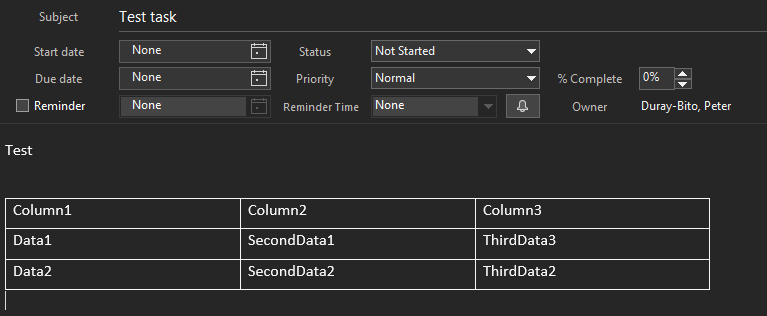
Microsoft To Do:
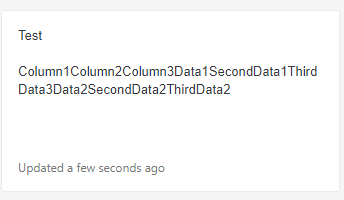
How do I get my Outlook Task table to render properly in Microsoft To Do?
TIA, Peter
Hi Peter Duray-Bito,
First and foremost, thanks for reaching out to our Microsoft Community Forum and please accept our sincerest hope that all is well.
So using Outlook 2016 and Welcome to To Do from my end, I can actually reproduce this issue and based on this test it appears to be a limitation on Microsoft To Do's end.
The thing is if I create a task in Microsoft To Do and paste a table on it only the text of the table and not the table itself is pasted. If I do the reverse in where the Outlook application can actually insert a table that table actually disappears when viewed from Microsoft To Do and all I get is the same thing you've described.
I need to check with our internal support team if this is a limitation of Microsoft To Do or some sort of bug. So please expect an update from me by the end of this week.
To that end, can you tell me what version of Outlook are you using? I specifically need the Product name and Version number as mentioned in the following guide: About Office: What version of Office am I using?
We look forward to your response.
Sincerely,
Glenn Rue
Consumer M365 Forum Moderator
Microsoft Community