Microsoft Security | Microsoft Graph
An API that connects multiple Microsoft services, enabling data access and automation across platforms

This browser is no longer supported.
Upgrade to Microsoft Edge to take advantage of the latest features, security updates, and technical support.
' cx='32' cy='32' r='32' /%3E%3Ctext x='50%25' y='55%25' dominant-baseline='middle' text-anchor='middle' fill='%23FFF' %3EBB%3C/text%3E%3C/svg%3E)
I've been attempting to create a new page in OneNote to display a rendered PDF page, my code is as follows
$n = [System.Guid]::NewGuid().ToString();
$content = @"
<!DOCTYPE html>
<html>
<head>
<title>$n</title>
</head>
<body>
<img data-render-src =`"name:$n`" />
</body>
</html>
"@
$fileBytes = [System.IO.File]::ReadAllBytes($FilePath);
$fileEnc = [System.Text.Encoding]::GetEncoding('ISO-8859-1').GetString($fileBytes);
$boundary = [System.Guid]::NewGuid().ToString();
$LF = "`r`n";
$bodyLines = (
    "--$boundary`r`nContent-Disposition: form-data; name=`"Presentation`"",
    "Content-Type: text/html$LF",
    $content,
    "--$boundary`r`nContent-Disposition: form-data; name=`"$n`"",
    "Content-Type: application/pdf$LF",
    $fileEnc,
    "--$boundary--$LF"
) -join $LF

$r = Invoke-RestMethod -Headers @{Authorization = "Bearer $($myAccessToken.AccessToken)"; Boundary = $boundary } `
    -Uri "https://graph.microsoft.com/v1.0/groups/$group/onenote/sections/$sectionId/pages" `
    -Method POST `
     -ContentType "multipart/form-data; boundary=`"$boundary`"" -Body $bodyLines
The code works fine some of the time. Without reason or rhyme, sometimes the page will be created with a rendered pdf like I want. Other times the page will be created with a file attachment instead. The file is correct and can be downloaded and opened fine from the one note.
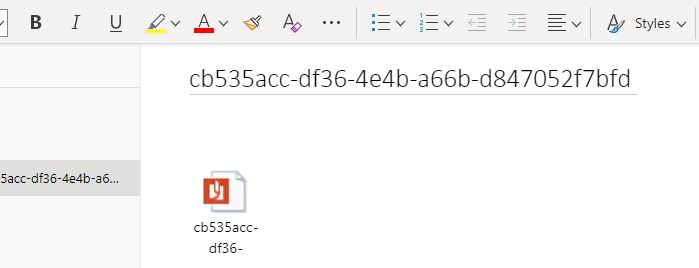
I've tried multiple different ways to approach this problem and nothing seems to produce a consistent result and there is no pattern to the errors. Any suggestions would be greatly appreciated
An API that connects multiple Microsoft services, enabling data access and automation across platforms

Hi, I did test locally without errors. Are your errors random?
Yes, it appears to be at random. Rerunning the code multiple times with the same file will produce different results. Sometimes the pdf will be rendered like I expect, other times it'll display as a file to be downloaded
I will submit this issue to Microsoft, please wait for my message :)