Azure Monitor
An Azure service that is used to collect, analyze, and act on telemetry data from Azure and on-premises environments.
This browser is no longer supported.
Upgrade to Microsoft Edge to take advantage of the latest features, security updates, and technical support.
' cx='32' cy='32' r='32' /%3E%3Ctext x='50%25' y='55%25' dominant-baseline='middle' text-anchor='middle' fill='%23FFF' %3EKA%3C/text%3E%3C/svg%3E)
I'm using the Monitor REST API in order to retrieve data from various resources, e.g. for the Storage Accounts.
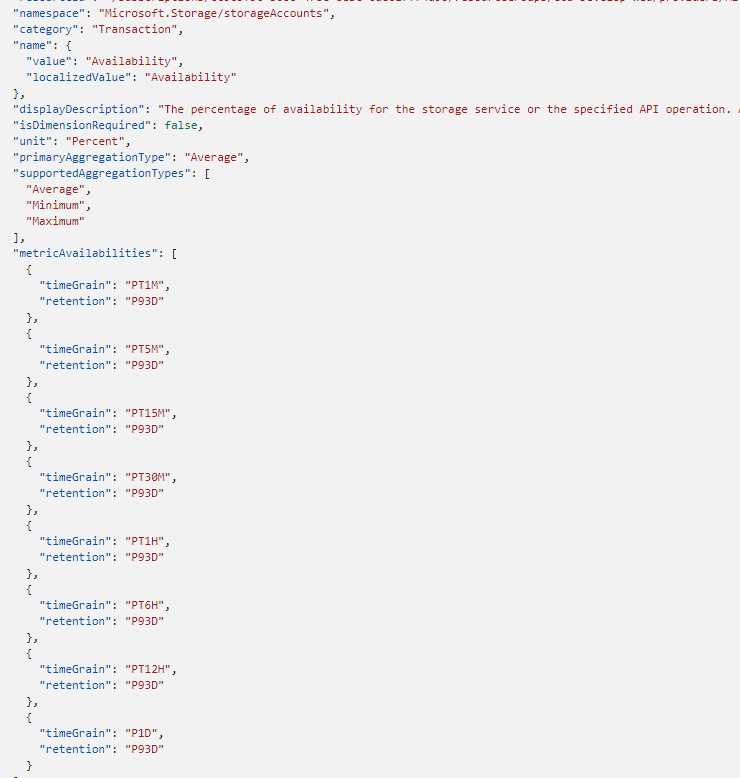
Following metrics are available as described here
Based on the metric definitions, e.g. the metric Availability supports a 1 minute interval. This would mean that aggregated data points should be available for every 1 minute. If i perform a query to retrieve the availability with Timespan 1minute, Interval 1 minute, i get a valid response with status "success" but the resturned timeseries points do not always have a valid data point next to the timestamp value. When increasing the timespan the behaviour is similar, sometimes having 1 point with data but most empty.
Increasing the Interval to 15minutes seems to improve the situation but its not reliable yet to always have a datapoint.

This behaviour seems to be happening for other metrics as well and same result can be seen when using the Azure monitor app itself to view a graph.
Several gaphs occur in the line which correspond to empty datapoints. To have a consistent result, interval should be set to 1H.

How can this behaviour be explained , is there anything that can be done in order to be able to use small granularity?

Hi,
This is probably caused by the specific metric you have chosen. As far as I can see this is availability metric for storage account. Most probably that metric is generated only once in an hour thus you have 1 hour granularity.
Please "Accept the answer" if the information helped you. This will help us and others in the community as well.
Hi,
This could indeed be a logical reason but according to the Metric Definitions, the metric i used as example ("Availability") should support 1Minute.
The information was retrieved via this query.
In the screenshot below, you can see the provided result.
For now, i'm assuming the granularity is indeed incorrect and i'm using a larger one. Is there a way to have it confirmed that the returned definitions are not always correct (related to supported granularity)
In that case I would advise you to raise a support request as either the API information is not correct, documentation is not correct or there is a problem with the metric.