Not to be able to see in "in folder" information in Outlook, whether for search results or otherwise is a significant deficiency. There are apps where the folder location of an email is readily visible at the top of each email or in a column (without having to click on the "File" ribbon/tab or make changes to the view settings for search results). Surely there are programmers at Microsoft who can enable default change to the view settings! Please enable default change for "in folder" in "show columns" settings, so that I can make this change just once, not every time I open Outlook.
Changing default display of columns in Outlook email after a search
I would like to change the default arrangement of columns that display when I do a search in email. For example, one of the columns that displays when the results of a search are shown is "categories." I don't need that but I do need "In Folder" which does not display automatically. I do know how to change the display on a one-off basis. What I don't know how to do is to make the change permanent.
Thanks!
Outlook | Windows | Classic Outlook for Windows | For education
Locked Question. This question was migrated from the Microsoft Support Community. You can vote on whether it's helpful, but you can't add comments or replies or follow the question.
9 answers
Sort by: Most helpful
-
Anonymous
2023-05-03T19:12:26+00:00 -
Anonymous
2023-05-02T16:57:36+00:00 Dear Reid Lifset,
Good day! Thank you for posting to Microsoft Community. We are happy to help you.
Based on your description, I understand that you have a query "Changing default display of columns in Outlook email after a search". I tested this on my end by going to Views > Change View > Manage View, select Current view settings > Modify > Column, then add the "In Folder" column again. Click OK three times then restart the Outlook client, you should be able to see the sticky In Folder column when you do another search in Outlook.
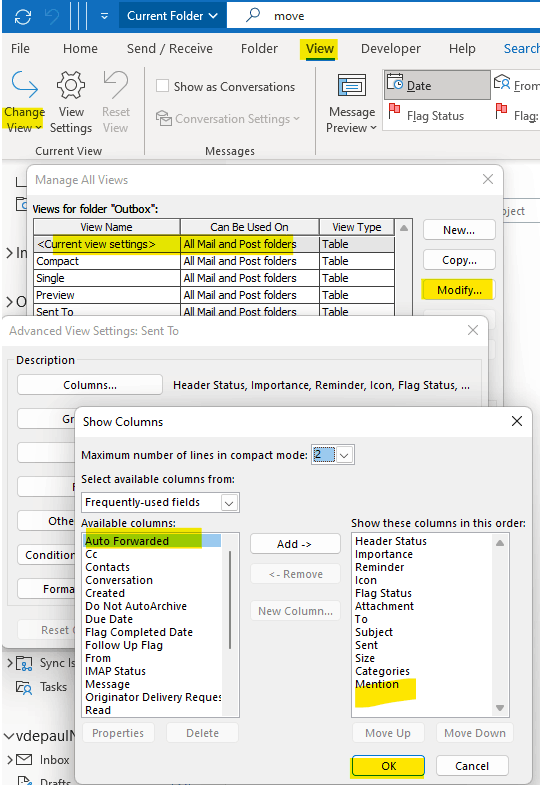
However, it seems that there the change to display of columns in Outlook email after a search as default doesn't keep this setting after closing Outlook.
We apologize if we are not able to meet your requirements; however, thank you for bringing this to our attention, we will surely raise your concerns to our Product Team and hopefully this can be considered in the future updates.
Moreover, I would like to invite community members and MVPs in the forum to share their knowledge or any third-party workaround and insight on this topic.
In the meantime, you may create an entry as a feature suggestion in the Feedback Portal at Outlook · Community (microsoft.com), Other users may vote it and make it more visible to the service team so that it may be considered for future upgrades.
For other concerns, please do not hesitate to add you post in the Microsoft Community Team.
Thank you for your cooperation and understanding.
Sincerely,
De Paul | Microsoft Community Moderator
-
Anonymous
2023-05-12T18:09:56+00:00 Not to be able to see in "in folder" information in Outlook, whether for search results or otherwise is a significant deficiency. There are apps where the folder location of an email is readily visible at the top of each email or in a column (without having to click on the "File" ribbon/tab or make changes to the view settings for search results). Surely there are programmers at Microsoft who can enable default change to the view settings! Please enable default change for "in folder" in "show columns" settings, so that I can make this change just once, not every time I open Outlook.
I agree with Kang Na1.
-
Anonymous
2023-05-23T19:03:33+00:00 Dear Reid Lifset,
Good day! Thank you for posting to Microsoft Community. We are happy to help you.
Based on your description, I understand that you have a query "Changing default display of columns in Outlook email after a search". I tested this on my end by going to Views > Change View > Manage View, select Current view settings > Modify > Column, then add the "In Folder" column again. Click OK three times then restart the Outlook client, you should be able to see the sticky In Folder column when you do another search in Outlook.
However, it seems that there the change to display of columns in Outlook email after a search as default doesn't keep this setting after closing Outlook.
We apologize if we are not able to meet your requirements; however, thank you for bringing this to our attention, we will surely raise your concerns to our Product Team and hopefully this can be considered in the future updates.
Moreover, I would like to invite community members and MVPs in the forum to share their knowledge or any third-party workaround and insight on this topic.
In the meantime, you may create an entry as a feature suggestion in the Feedback Portal at Outlook · Community (microsoft.com), Other users may vote it and make it more visible to the service team so that it may be considered for future upgrades.
For other concerns, please do not hesitate to add you post in the Microsoft Community Team.
Thank you for your cooperation and understanding.
Sincerely,
De Paul | Microsoft Community Moderator
Is there a way to use Quick Steps to (re) include In Folder as a column the display of the results of search? It is very cumbersome to go through the multiple steps shown above each time the column display needs to be reset.
-
Anonymous
2023-06-13T13:38:30+00:00 Dear De Paul,
Is there a way to use Quick Steps, macros or templates to (re) include In Folder as a column the display of the results of search? It is very cumbersome to go through the multiple steps shown above each time the column display needs to be reset.
Thanks,
Reid