Hello KristenKCS,
Thank you for posting this case in Microsoft Community!
Based your description, Table Formatting Issue in Outlook - Borders Get Lost When Sent. I would like to cooperate with you working on this case. To clarify this case, please kindly provide us your Outlook version with product details by going to Outlook > File > Office Account and share that entire page screenshot with hide personal information. What version of Outlook do I have?
For my suggestion, you may try following workaround:
- Firstly, you may try to sign in Outlook Web and test if working fine or not. This will help to identify if this is related to your Outlook for Windows.
- Then you may check Format Text if using HTML when you try to send tables with borders. It is recommended that you need to applyHTML to send out emails as Plain text and Rich Text Format have some limits which may cause some tough issues. You may check this Microsoft article:
Change the message format to HTML, Rich Text Format, or plain text
 .
.
Check your Format Settings:
**A. Steps:***Outlook>File>Mail>Compose message: Compose message in this format:*HTML
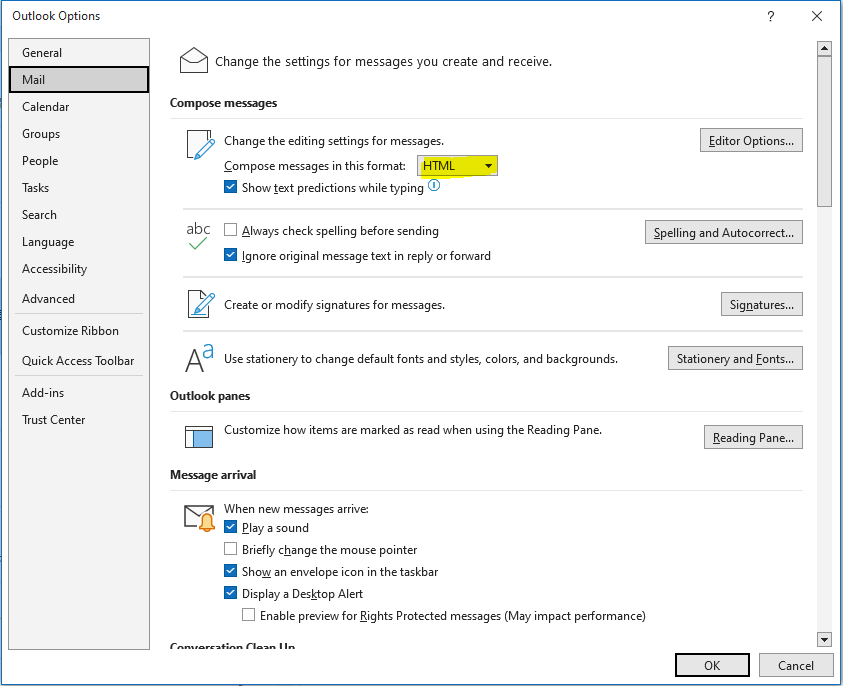 .
**B. Steps:***Outlook>File>Mail>Message format>When sending messages in Rich Text format to the internet receipents:*Convert to HTLM format
.
**B. Steps:***Outlook>File>Mail>Message format>When sending messages in Rich Text format to the internet receipents:*Convert to HTLM format
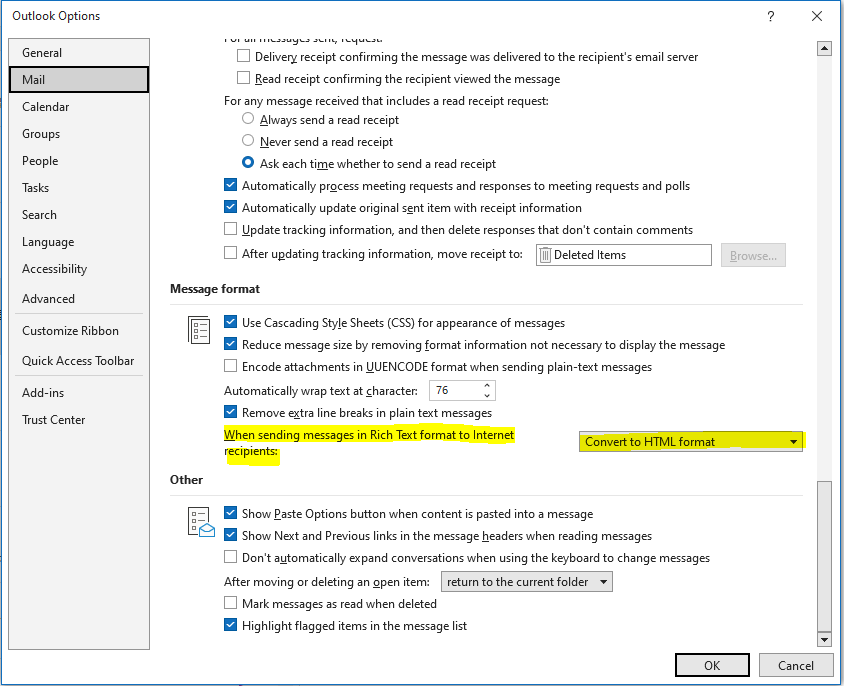 .
.
- Please also test to send tables with borders to your own mailbox using HTML format and check if display is showing working or not. You may also check the emails via Sent Items if showing there normally.
- Then you may try to re-create another Outlook profile and test it again. Create an Outlook profile - Microsoft Support
5. Next you may run SARA Tool to fix this case if possible. About the Microsoft Support and Recovery Assistant
- Outlook works best when it's up to date. We recommend Windows Update to automatically download and install recommended updates. Bug fixes, new features, and performance enhancements are released regularly. To install the latest Windows and Office updates, see Install Office updates.
- If this case still persists, finally, you may try to re-install the latest version of Office 365 application and check if working or not.
Download and install or reinstall Microsoft 365 or Office 2021 on a PC or Mac - Microsoft Support
If you need further assistance, please feel free to let me know, I will keep assisting you.
Your understanding and patience will be appreciated.
Thank you!
' cx='32' cy='32' r='32' /%3E%3Ctext x='50%25' y='55%25' dominant-baseline='middle' text-anchor='middle' fill='%23FFF' %3EA%3C/text%3E%3C/svg%3E)
