New emails to compose setting to open in a new tab?

Anonymous
2024-03-07T18:29:25+00:00

Is there a setting to choose to have a new tab open when composing a new email like the desktop version?

Outlook | Web | Outlook on the web for business | Email

Locked Question. This question was migrated from the Microsoft Support Community. You can vote on whether it's helpful, but you can't add comments or replies or follow the question.

0 comments No comments
{count} votes

5 answers

Sort by: Most helpful
  1. Anonymous
    2024-03-07T20:52:50+00:00

    Hello Jennifer,

    Good day. Thank for posting in the community.

    We've received your query, and you can expect to receive response from one of our community moderators accordingly.

    At this point, we appreciate your patience and cooperation. Thank you.

    Sincerely,

    Community moderator

    0 comments No comments
  2. Anonymous
    2024-03-08T10:01:49+00:00

    Hello Jennifer Lundy1,

    Thank you for posting in Microsoft Community! We are happy to assist.

    Based on your description, you want to open "Compose new email" in new tab. Kindly explain further if this is not the case.

    Let's work together to have this challenge addressed ASAP.

    Unfortunately there is no settings to configure to have this done automatically, however you can do it manually by following these steps:

    after you click New Email, click the arrow in the far right side as shown below. This will open the new email in a new window as shown below
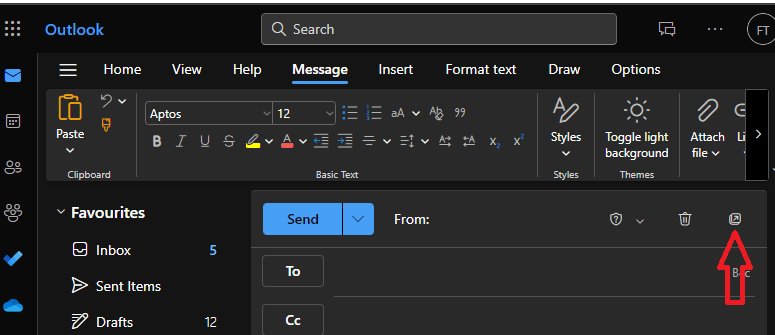
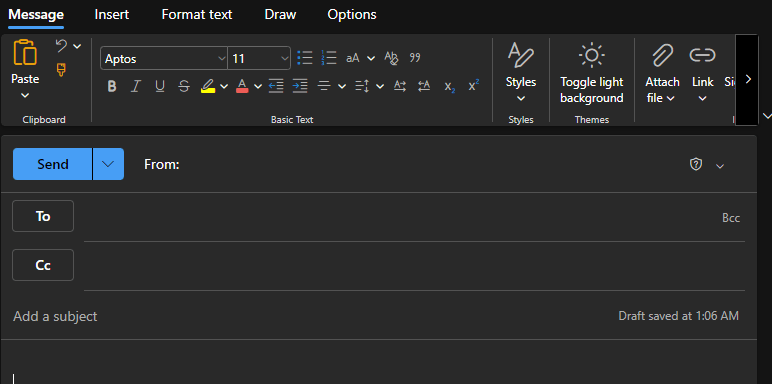
    Please feel free to let me know if you have any other concern or if I get you wrong. Glad to assist you. We sincerely appreciate your patience and cooperation. Thanks for your precious time!

    Note: Please understand that our initial reply may not always immediately resolve the issue. However, with your help and more detailed information, we can work together to find a solution.

    Best regards

    Community Moderator

    0 comments No comments
  3. Anonymous
    2024-03-08T12:26:21+00:00

    Hopefully this is something Microsoft is working on to implement. Time is precious and something little like this can really help. I really appreciate the response and echo the following comments as well.

    0 comments No comments
  4. Anonymous
    2024-03-28T02:39:05+00:00

    Dear Jennifer Lundy1,

    Good day to you and I hope you're doing well.

    We haven't heard back from you, so you want to check quickly, have you checked Eleni's reply? Feel free if you need further assistance, we will be happy to assist you further. Thank you for your time and cooperation.SincerelyAnkita Vaidya | Community Moderator

    1 person found this answer helpful.
    0 comments No comments
  5. Anonymous
    2024-03-21T17:04:15+00:00

    Dear Jennifer Lundy1,

    Good day! Hope you are doing well!

    I would like to inform you that the feature you are querying has recently been added to the new Outlook. Therefore, to have a new tab open when composing a new email like the desktop version, please kindly follow these steps and check if there is any difference.

    1. Open you outlook --> Go to Settings (The gear icon at the right top corner of your outlook)
    2. Go to Mail -->Compose and reply -->Scroll down and under Pop-out settings sections, Select Pop-out to a new window -->Save. You can refer to the screenshot below. Then, go back to your email and check if it it is working as expected.

    I hope this information will be helpful. If you have any other questions, please feel free to let me know.

    Thank you for your precious time. Have a nice day!

    Best regards

    Community Moderator

    1 person found this answer helpful.
    0 comments No comments