Developer technologies | ASP.NET | Other
A set of technologies in .NET for building web applications and web services. Miscellaneous topics that do not fit into specific categories.
This browser is no longer supported.
Upgrade to Microsoft Edge to take advantage of the latest features, security updates, and technical support.
' cx='32' cy='32' r='32' /%3E%3Ctext x='50%25' y='55%25' dominant-baseline='middle' text-anchor='middle' fill='%23FFF' %3EFS%3C/text%3E%3C/svg%3E)
    private void permisos()
    {
    string UI = ConfigurationManager.AppSettings["User Id"];
    string PS = ConfigurationManager.AppSettings["Password"];
    string DS = ConfigurationManager.AppSettings["Data Source"];

    OracleConnection m = new OracleConnection();
    m = new OracleConnection("Data Source=" + DS + "; User Id=" + UI + "; Password=" + PS + ";");
    m.Open();
        //para buscar la info en una tabla

        OracleDataAdapter conecto3 = new OracleDataAdapter("select D_NO from empresa.web_access where  TRIM(U_NO) = TRIM('" + TxtUsuario.Text + "')", m);
        DataSet access = new DataSet();
        conecto3.Fill(access);

        m.Close();
my idea is to save it in a variable Session ["AC"]
this can be ???
and the second form, how do I call this session variable and look for the information within it, to read and find the user's permissions
' cx='32' cy='32' r='32' /%3E%3Ctext x='50%25' y='55%25' dominant-baseline='middle' text-anchor='middle' fill='%23FFF' %3EAK%3C/text%3E%3C/svg%3E)
Ok, you probably should setup some global function to get that connection stuff.
and use a datatable in place of a dataset (a dataset is a collection of tables - you only have and need one)..
But, you can do this:
Session["MyAccess"] = access;
Now, on any other web page, you can do this:
Datatable access = Session["MyAccess']
At this point then, any value in that table can be had like this:
string strTest = access.Rows[0]["some column name here]"
So, once you shove the table into session[], then you can pull that table out back into a datatable anytime you want from that point on - it will persist for life time of that logged on user session.
Note that I have in some cases pulled out a row, and thus don't even have to use the rows collection, since you (we assume) ever only have one row. However, for some strange reason, a data row cannot be serialized, and if you use sql server (or I suppose oracle) based session management, then it uses serialization.
But, no worries a dataset, (or better datatable) can be serialized , and thus you should have no issues shoving (saving) that table into session.
Regards,
Albert D. Kallal (Access MVP 2003-2017)
Edmonton, Alberta Canada
For the table, I add another parameter, the user id.
when I'm putting together what you sent me, give me this
form1
---
private void permisos()
{
string UI = ConfigurationManager.AppSettings["User Id"];
string PS = ConfigurationManager.AppSettings["Password"];
string DS = ConfigurationManager.AppSettings["Data Source"];
    OracleConnection m = new OracleConnection();
    m = new OracleConnection("Data Source=" + DS + "; User Id=" + UI + "; Password=" + PS + ";");
    m.Open();
        //para buscar la info en una tabla

        OracleDataAdapter conecto3 = new OracleDataAdapter("select D_NO, U_NO from empresa.web_access where  TRIM(U_NO) = TRIM('" + TxtUsuario.Text + "')", m);
        DataSet access = new DataSet();
        conecto3.Fill(access);
        Session["MyAccess"] = access;
        m.Close();
    }
---
I get this error when I put the code, something is missing
form2

con la segunda parte me ayudas hacer una de hacer una consulta If, para buscar un dato en la tabla
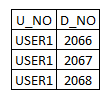
this is the table that retrieves, the permissions go from 2000 to 2100, this user has those that retrieve what is in the table
I await

Session objects must be cast to the proper type.
DataTable access = (DataTable)Session["MyAccess"];
I think you'll be interested in reading the official Session docs.
I could do it there and it keeps well, thanks for everything!
        DataTable access = new DataTable();

        //DataSet access = new DataSet(); before!!!
so I remain
    private void permisos()
    {
    string UI = ConfigurationManager.AppSettings["User Id"];
    string PS = ConfigurationManager.AppSettings["Password"];
    string DS = ConfigurationManager.AppSettings["Data Source"];

    OracleConnection m = new OracleConnection();
    m = new OracleConnection("Data Source=" + DS + "; User Id=" + UI + "; Password=" + PS + ";");
    m.Open();
        //para buscar la info en una tabla

        OracleDataAdapter conecto3 = new OracleDataAdapter("select D_NO from empresa.web_access where  TRIM(U_NO) = TRIM('" + TxtUsuario.Text + "')", m);
        DataTable access = new DataTable();
        //DataSet access = new DataSet(); antes!!!
        conecto3.Fill(access);
        Session["MyAccess"] = access;
in the other form and I go through it
DataTable access = (DataTable)Session["MyAccess"];
//esto recorre la tabla (Datatable)
for (int i = 0; i < access.Rows.Count; i++)
{
string door = access.Rows[i]["D_NO"].ToString();
            if (door == "2050")
            {
                break;

            }