Microsoft Security | Intune | Configuration Manager | Other
Other Configuration Manager-related features and issues

This browser is no longer supported.
Upgrade to Microsoft Edge to take advantage of the latest features, security updates, and technical support.
' cx='32' cy='32' r='32' /%3E%3Ctext x='50%25' y='55%25' dominant-baseline='middle' text-anchor='middle' fill='%23FFF' %3EKK%3C/text%3E%3C/svg%3E)
I need to install sccm for test env. i am proposing in-built sql. but now client is saying can we put the sccm sql instance on another application sql server as it will save the license cost.
Can you please advise the best way to go about it with few pros and cons. Thanks.
' cx='32' cy='32' r='32' /%3E%3Ctext x='50%25' y='55%25' dominant-baseline='middle' text-anchor='middle' fill='%23FFF' %3EAM%3C/text%3E%3C/svg%3E)
Hi,
Sure, it works. We can create a new instance for configuration manager on the server (that is already running multiple instances for other products) if the performance is ok. Configuration Manager doesn't care about this.
If we choose all-in-one deployment (the sql and sccm in the same server), the advantage is that we have better control of the database.
Alex
If the response is helpful, please click "Accept Answer" and upvote it.
does sql license free with sccm?
as i am using for test env with 300 machines, is there a sql version like standard which we can use or as we are using it for our organization it has to be a paid license?

Yes CM does come with it own SQL lic. and yes it is generally not recommend to share CM's SQL server with any other apps. Only SQL standard is included with CM.
So i need to install SQL before installing SCCM, how will it detect that the sql standard i am installing is licensed.
also, any drawbacks for using standard instead of enterprise?
if you use anything but standard, you will need to pay for it. unless you have more than 150 000 computers and a CAS there isn't really a big advantage of use enterprise.
Hi,
To check the license information, we can run below query in the SSMS and check SQLEdition field, as highlighted in the following screenshot. If not licensed, word "Evaluation" will appear in this field.
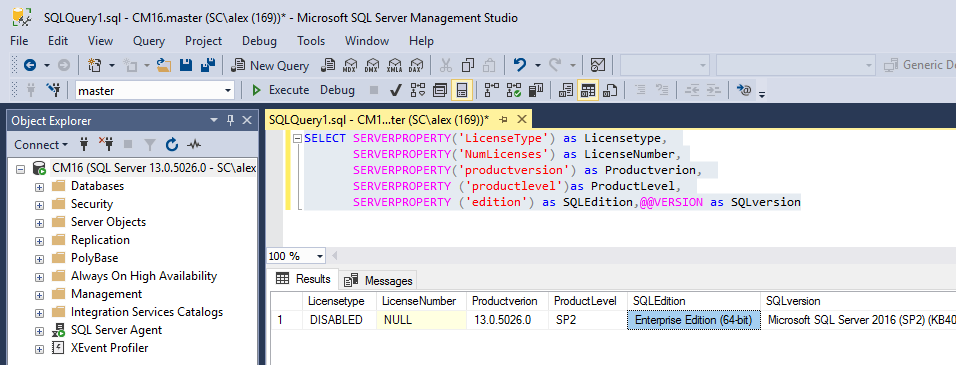
SELECT SERVERPROPERTY('LicenseType') as Licensetype,
       SERVERPROPERTY('NumLicenses') as LicenseNumber,
       SERVERPROPERTY('productversion') as Productverion,
       SERVERPROPERTY ('productlevel')as ProductLevel,
       SERVERPROPERTY ('edition') as SQLEdition,@@VERSION as SQLversion
As GarthJones said, if the sql instance is only used by SCCM, the license is included. For test environment, standard edition is enough. Enterprise edition provides additional features and should be opted for large companies. Description from MS official article, for your reference:
Enterprise: The premium offering, SQL Server Enterprise edition delivers comprehensive high-end datacenter capabilities with blazing-fast performance, unlimited virtualization1, and end-to-end business intelligence - enabling high service levels for mission-critical workloads and end-user access to data insights.
Standard: SQL Server Standard edition delivers basic data management and business intelligence database for departments and small organizations to run their applications and supports common development tools for on-premises and cloud - enabling effective database management with minimal IT resources.
Alex
If the response is helpful, please click "Accept Answer" and upvote it.
Thank you for the response, very helpful.
One last question : i have asked the procurement team to download the iso for SCCM 2002 from VLSC. once the file is downloaded, before installing i need to install SQL. so should i just download sql standard from internet and install on my primary, what to do on page where it asks for product key (as sql standard is free for sccm) ?
Your procurement team can get you the SQL lic key from VLSC too. It is the same key for all SQL instances.
i didnt understand, sorry just trying to understand how is the sql standard is free. Client told me that he doesnt want to pay so if standard is free with sccm then feel free to use. But i am not able to understand how to install sql, i have got the iso for sccm from the client via VLSC.
can i download the sql standard from internet (evaluation) and install on sccm server, wil lit automatically detect that sccm is being installed and will not expire after 180 days.
There are no tricks to installing SQL, here is a basic guide. https://www.enhansoft.com/how-to-install-sql-server-2019/. You get the lic key from the VLSC site, the SQL Lic key is the same for every SQL server the lic is a virtual license. remember that the CM SQL lic can only be use for CM.
You can't use SQL Eval, you must use the SQL from VLSC site.
once i download the sql standard from VLSC, it will be downloaded with a product key so when i install this sql and then install SCCM, the instance that the SQL will be using will be for SCCM.
So my concern is will this sql standard is free of cost as i am using for SCCM? or do i need to email MS account team to not to charge for this as its bening used for SCCM only....i am confused on this part as i need to make sure that i am not being charged for sql standard as you stated its free for SCCM use.
If you are concerned then you MUST talk to your MS licensing specialist.

You can download the SQL Server standard version from VLSC without paying anything. Microsoft won't charge you any license fee to download from VLSC. You will have to pay when you use it in your environment.
SCCM Licensing topic is always complex for me. Hope you are not using the SQL Server standard for hosting some other application DBs. If you are using this to host other application SQL DBs, then that requires an additional license.
Microsoft Learn
Approved use rights for the SQL Server capabilities with Configuration Manager include:
Site database role
Windows Server Update Services (WSUS) for software update point role
SQL Server Reporting Services (SSRS) for reporting point role
Data warehouse service point role
Database replicas for management point roles
The SQL Server license that's included with Configuration Manager supports each instance of SQL Server that you install to host a database for Configuration Manager. However, only databases for Configuration Manager in the preceding list can run on that SQL Server when you use this license. If a database for any additional Microsoft or third-party product shares the SQL Server, you must have a separate license for that SQL Server instance.
More details - https://learn.microsoft.com/en-us/mem/configmgr/core/understand/product-and-licensing-faq