How can I change the default program with which to open PDF attachments in the Outlook Desktop App?

Anonymous
2024-03-11T16:35:58+00:00

When I right click on the Downloaded File, I only get the option to open the PDF with system Viewer. I do not know how to change that.

Outlook | Windows | New Outlook for Windows | For home

Locked Question. This question was migrated from the Microsoft Support Community. You can vote on whether it's helpful, but you can't add comments or replies or follow the question.

0 comments No comments
{count} votes

4 answers

Sort by: Most helpful
  1. Anonymous
    2024-03-11T19:54:03+00:00

    Hello S Heim,

    Good day. Thank for posting in the community.

    We've received your query, and you can expect to receive response from one of our community moderators accordingly.

    At this point, we appreciate your patience and cooperation. Thank you.

    Sincerely,

    Community moderator

    0 comments No comments
  2. Anonymous
    2024-03-12T11:31:57+00:00

    Hello S Heim,

    Greetings!

    Thank you for posting on Microsoft Community!

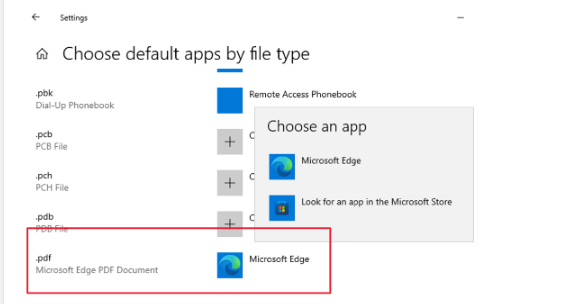
    I understand that you want to open the PDF file in New Outlook. From the screenshot you shared, you've actually downloaded the PDF attachment files on the email. Hence you could only open and view the PDF with the tool installed on your computer, if you want to change the default app to open PDF

    1. Search for "Default apps" and open it on Windows search bar.

    1. Scroll down and select "Choose default apps by file type"
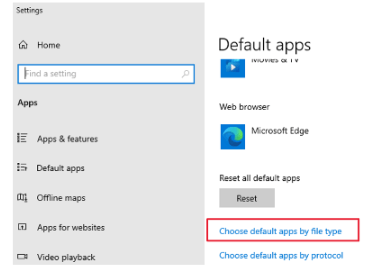
    3. Find the file type of .pdf and select the default app.
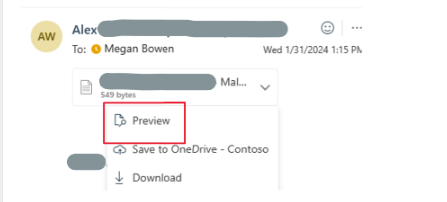
    If you want to preview the PDF file in New Outlook, you may just simply click on that attachment file and select "Preview".
    f the above mentioned information could not address your concern, feel free to reply and provide more information to us. We will continue to support you.

    Thank you for your time and cooperation. Wish you have a nice day!

    8 people found this answer helpful.
    0 comments No comments
  3. Anonymous
    2024-03-12T15:46:57+00:00

    Thanks for your reply.

    I checked my default apps and I do have Adobe Acrobat as the preferred app for .pdf files. It's only when I open the downloads from Outlook that it opens in the System viewer. See snapshot below.

    But when I open a pdf in my downloads folder for example, then it does open fully in Adobe Acrobat.

    So I'm a bit confused. Any guidance on this?

    4 people found this answer helpful.
    0 comments No comments
  4. Anonymous
    2024-05-13T02:14:10+00:00

    Hi Team, I set up the default function of Power PDF Advanced but after restart the machine, the function is gone (which means I need to set the default function every day. Please help, thanks.

    Regards

    Elsa

    2 people found this answer helpful.
    0 comments No comments