new Outlook for Windows cannot open large msg files

Anonymous
2024-05-01T11:29:07+00:00

Hello,

I have issues when I try to open msg files above the 10 mb in the new Outlook for Windows.

I received the following error message:

msg file cannot be opened. The file exceeds the maximum supported file size.

Is there a way to open message files larger than 10 mb?

Best regards,

Marco

Outlook | Web | Outlook on the web for business | Email

Locked Question. This question was migrated from the Microsoft Support Community. You can vote on whether it's helpful, but you can't add comments or replies or follow the question.

0 comments No comments
{count} votes

6 answers

Sort by: Most helpful
  1. Anonymous
    2024-05-01T12:09:15+00:00

    Hi,

    Good day!

    Thank you for posting to Microsoft Community. We are glad to assist.

    We are looking into your situation, and we will update the thread accordingly.

    Appreciate your patience and understanding and thank you for your time and cooperation.

    Sincerely,

    Microsoft Community Moderator.

    0 comments No comments
  2. Anonymous
    2024-05-01T15:04:50+00:00

    HI Marco Di Gregorio1,

    Good day!

    Thank you for posting to the Microsoft Community. We are glad to assist.

    Based on your post regarding with "new Outlook for Windows cannot open large msg files".

    Kindly provide your Outlook version by sharing a screenshot like the one below What version of Outlook do I have? - Microsoft Support:

    Image In the new Outlook for Windows, you may encounter limitations when dealing with large MSG files, especially those exceeding 10 MB in size.
    to can avoid that you can try :

    • Cloud Storage: Instead of attaching large files directly to emails, upload them to cloud storage services like OneDrive, Google Drive, or Dropbox. Share the file links in your emails instead.
    • File Compression: Compress large files into ZIP or RAR archives before attaching them to emails. This can reduce file size and make them easier to handle.
    • FTP or File Sharing Services: For exceptionally large files, consider using FTP servers or dedicated file-sharing services to transfer them securely.

    for more info : Send large files with Outlook

    We are looking forward to your response! Thanks for your precious time. Have a nice day!

    1 person found this answer helpful.
    0 comments No comments
  3. Anonymous
    2024-05-02T07:06:55+00:00

    Hello Eleni,

    I'm testing the new Outlook (olk). We have an archive system that stores exported message files. The archived mgs files cannot be modified and must be kept for a minimum of 10 years.

    When a user tries to open these message files above 10 MB, they will receive an error message about the maximum supported file size.

    Too bad the new Outlook has a message size limitation.

    Best regards,

    Marco

    0 comments No comments
  4. Anonymous
    2024-05-02T12:26:01+00:00

    Dear Marco Di Gregorio1,
    Good day! 
    Thank you for posting to the Microsoft Community. We are happy to assist you.

    After thorough research and consultations, it has been concluded that the feature you are inquiring about is not yet available in the new Outlook. However, thank you so much
    for bringing this to our attention, your suggestion is constructive and I believe it could make the use of Outlook even better. We will surely raise your concerns with our Product Development Team and hopefully, this can be included in future updates. Please note new Outlook is still in active development.
    started to be rolled out. To check for upcoming features you can check Microsoft 365 Roadmap | Microsoft 365.
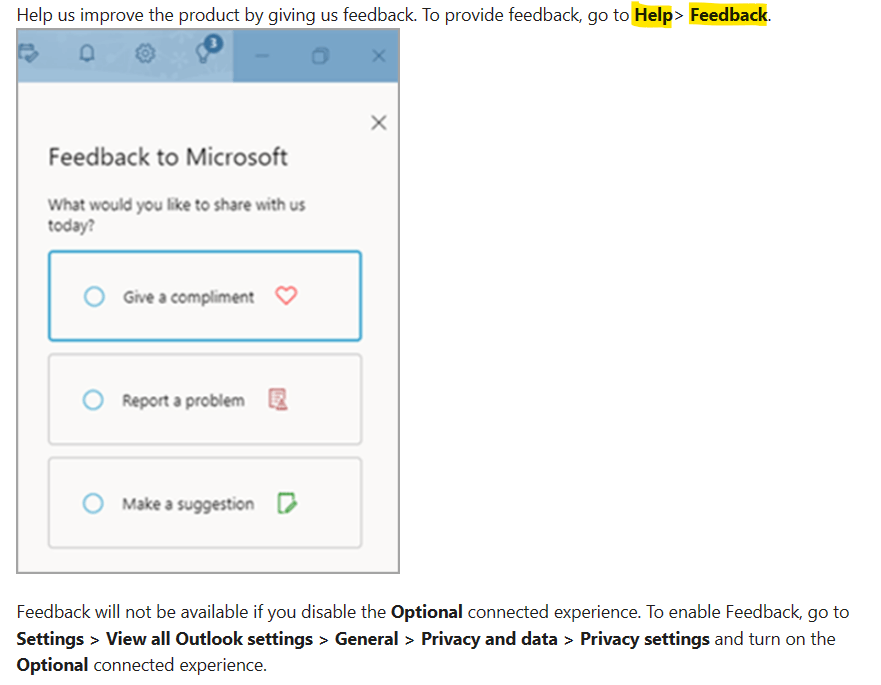
    In the meantime, we sincerely recommend you post your concern as an idea to our Outlook in-app feedback site Contact support and provide feedback within the new Outlook for Windows - Microsoft Support
    Image

    Our Product Development Team is committed to enhancing the customer experience by continually examining suggestions to include in the design and development of future
    product upgrades based on your suggestions. Hopefully, your suggestion will help many users in the future.

    Thank you for your time and understanding. For other questions, feel free to add your post to the Microsoft Community team.
    Stay safe and healthy. Have a good day!
    Sincerely,

    0 comments No comments
  5. Anonymous
    2024-05-13T21:27:55+00:00

    Dear Marco Di Gregorio1,
    Good day! 
    Thank you for posting to the Microsoft Community. We are happy to assist you.

    After thorough research and consultations, it has been concluded that the feature you are inquiring about is not yet available in the new Outlook. However, thank you so much
    for bringing this to our attention, your suggestion is constructive and I believe it could make the use of Outlook even better. We will surely raise your concerns with our Product Development Team and hopefully, this can be included in future updates. Please note new Outlook is still in active development.
    started to be rolled out. To check for upcoming features you can check Microsoft 365 Roadmap | Microsoft 365.
    In the meantime, we sincerely recommend you post your concern as an idea to our Outlook in-app feedback site Contact support and provide feedback within the new Outlook for Windows - Microsoft Support

    Image

    Our Product Development Team is committed to enhancing the customer experience by continually examining suggestions to include in the design and development of future
    product upgrades based on your suggestions. Hopefully, your suggestion will help many users in the future.

    Thank you for your time and understanding. For other questions, feel free to add your post to the Microsoft Community team.
    Stay safe and healthy. Have a good day!
    Sincerely,

    Are you seriously going to make the max 10 MB??? That's so disappointing .......

    1 person found this answer helpful.
    0 comments No comments