HI Alexander van der Hulst,
Good day! Thank you for Replying to the Microsoft Community. We are glad to assist
Based on your description in reply you "need to make an exception based on certain words in the subject line".
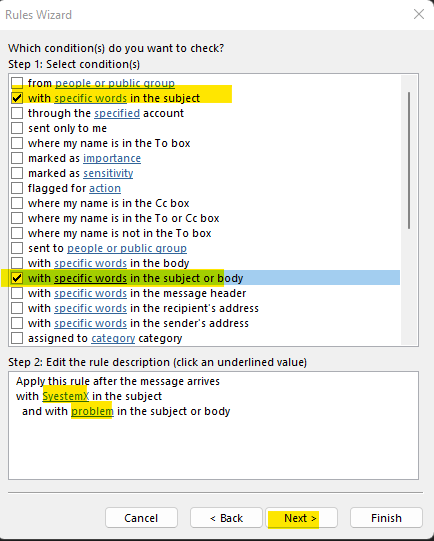
-Select with a specific words in the subject--> then down edit the rule description (click an underlined value) enter "word you need "-->Add-->Ok
-Select with specific words in the subject or body--> then down edit the rule description (click an underlined value) enter problem-->Add-->Ok
-click Next
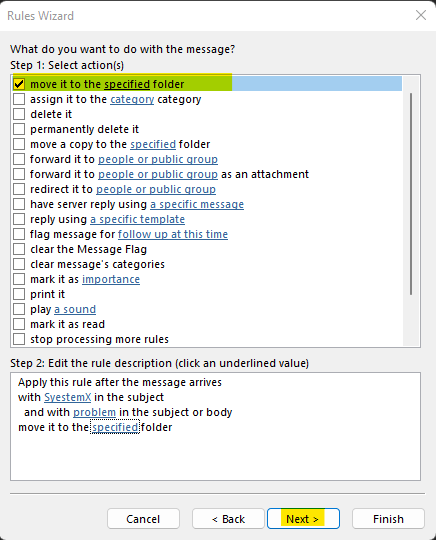
-Select move it to the specified folder-->then down edit the rule description (click an underlined value) choose your folder-->Ok
-Next
-Enter the name of your rules--> Finish
After thorough research and test I have concluded that it is currently not possible for us to match your requirements. Basically, we use OR to set one condition with multiple
values and set multiple exceptions. If we need multiple conditions in a rule, by design, we use "AND". If we need to match one condition or another, we must use separate rules
for each condition to avoid rule conflicts. We apologize if we are not able to meet your requirements; however, thank you for bringing this to our attention, we will hopefully this
can be included in the future updates.
In the meantime, please provide feedback on this feature request by creating a new post in the Feedback Portal in Microsoft is committed to enhancing the customer experience by continually examining suggestions to include in the design and development of future product upgrades based on your suggestions.
Customers’ feedbacks are always valuable for us. Your time and understanding will be greatly appreciated.
Thanks for your precious time. Have a nice day!
Sincerely,
' cx='32' cy='32' r='32' /%3E%3Ctext x='50%25' y='55%25' dominant-baseline='middle' text-anchor='middle' fill='%23FFF' %3EA%3C/text%3E%3C/svg%3E)
